
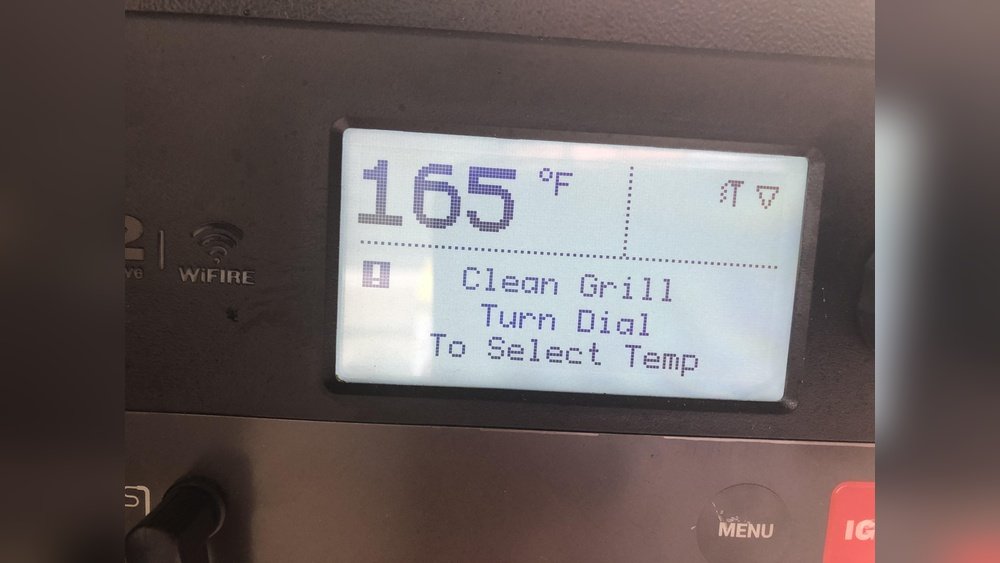
Every Traeger grill owner knows the joy of a perfectly smoked brisket or a plate of sizzling ribs. But keeping your Traeger in top shape means more than just great recipes—it means regular cleaning. What many people miss is that after a deep clean, your Traeger often needs a proper reset. This is the step where most beginners make mistakes, leading to ignition problems, temperature swings, or even error codes. Resetting your grill is not just hitting a button; it’s about getting everything back in sync for safe, smooth cooking.
In this detailed guide, you’ll discover exactly how to reset your Traeger after cleaning. Whether you own a Pro, Ironwood, Timberline, or Tailgater, you’ll find step-by-step instructions, expert tips, and clear explanations. You’ll also learn how to avoid the most common mistakes, troubleshoot issues, and understand why this process matters for the life of your grill.
By the end, you’ll feel confident—not just about cleaning, but about getting your Traeger ready to fire up your next meal.
Why Resetting After Cleaning Is Essential
You might think a deep clean is enough to keep your Traeger working well. While cleaning removes grease, ash, and food particles, it can also affect how your grill starts up and runs. Here’s why resetting matters:
- Safety: Cleaning can move or disconnect parts. A reset checks that all sensors and systems are working.
- Performance: Ash or leftover moisture can block the firepot. Resetting ensures pellets feed correctly and the fire ignites evenly.
- Error Prevention: Some models store error codes or settings that need clearing after a deep clean.
- Long Life: Regular resets help your grill last longer by preventing build-up issues and misfires.
Many users overlook the reset, leading to uneven heating or frustrating “grill won’t start” moments. Resetting is your insurance policy for smooth grilling.
Understanding Your Traeger Model
Before you reset, it’s important to know your Traeger model. Different generations—Pro Series, Ironwood, Timberline, Tailgater, and older models—have unique control boards and reset methods. Most modern Traegers use a digital controller or a WiFIRE-enabled panel. Older units may use a basic dial.
Here’s a quick comparison of common Traeger series:
| Model Series | Controller Type | Reset Complexity | WiFi Connectivity |
|---|---|---|---|
| Pro Series | Digital Pro/D2 | Moderate | Some Models |
| Ironwood | WiFIRE | Easy | Yes |
| Timberline | WiFIRE | Easy | Yes |
| Tailgater/Older | Basic Dial | Manual Steps | No |
Tip: Check your manual or the serial number sticker (usually inside the hopper lid or the back panel) to confirm your exact model.
What To Do Before Resetting
Resetting is not the first step after cleaning. You need to make sure the grill is dry, reassembled, and ready. Here’s what to do:
1. Inspect For Moisture
After cleaning, leave the lid open for 30–60 minutes. This lets all parts air dry. Pay attention to the firepot, drip tray, and grease bucket.
2. Check The Firepot
Make sure there is no leftover ash, water, or cleaning residue. Even a little bit can cause ignition problems.
3. Reassemble The Grill
Put all parts back: heat baffle, drip tray, grill grates, grease pan, and bucket. Make sure everything fits snugly.
4. Refill The Pellet Hopper
Use dry, high-quality Traeger wood pellets. Damp or old pellets can cause auger jams or ignition failures.
5. Reconnect Power
Plug in the grill. For WiFIRE models, check the WiFi connection if you plan to use the Traeger app.
6. Check For Error Codes
If the display shows errors (like “LEr” or “HEr”), note them. Some errors need clearing before a reset.
Practical Insight: Many users forget to check the wiring around the temperature probe or igniter rod after cleaning. Loose wires can cause startup failures. Always double-check connections before you reset.
Step-by-step: How To Reset Traeger After Cleaning
Resetting your Traeger is about more than just pressing “power. ” Follow these clear steps for a complete reset, whether you have a digital or WiFIRE model.
For Digital Pro/d2 Controller Models
1. Power Off The Grill
Turn the controller to the “Shutdown Cycle” or “Off” position. Wait until the fan stops completely.
2. Unplug From Power
Unplug the grill from the outlet. Wait at least 2–3 minutes for the system to clear any stored errors.
3. Empty The Hopper (optional For Full Reset)
If you did a deep clean or see old pellets, scoop out the hopper and vacuum the auger tube.
4. Replug And Power On
Plug the grill back in. Set the controller to “Smoke” or the lowest setting.
5. Prime The Auger
Press and hold the “Prime” button (if available) until you see fresh pellets dropping into the firepot. This clears any air pockets.
6. Check Ignition
With the lid open, watch for the glow of the igniter and smell for burning pellets. Wait for visible smoke.
7. Complete The Startup
Close the lid and set your desired cooking temperature. The grill should heat up evenly.
Non-Obvious Tip: If your model does not have a “Prime” button, set the temperature to 350°F for 10–15 minutes to ensure pellets feed smoothly after cleaning.
For Wifire (ironwood, Timberline) Models
1. Shutdown Cycle
Use the controller or app to start the “Shutdown” cycle. Wait for the fan to stop.
2. Unplug And Wait
Disconnect power for at least 3 minutes.
3. Reconnect And Reset Wifi (optional)
If you had WiFi issues during cleaning, use the controller’s menu to “Forget” and reconnect your network.
4. Start Up With Lid Open
Power on, set to “Ignite,” and leave the lid open until you see smoke (usually 4–5 minutes).
5. Calibrate Sensors (if Needed)
Some models let you recalibrate temperature probes in the settings menu. Do this after a deep clean.
6. Complete Preheat
Set your desired temp, close the lid, and let the grill preheat fully.
Insider Insight: After cleaning, it’s common for WiFIRE models to show a temporary “Out of Pellets” warning. This often clears after the first 5 minutes of operation as pellets refill the auger.
For Older Dial Or Tailgater Models
1. Power Off And Unplug
Turn the dial to “Off. ” Unplug the grill.
2. Manual Auger Priming
Remove the cooking grate and drip tray. Manually add a small handful of pellets to the firepot if you vacuumed it out.
3. Power On And Start
Plug in, set the dial to “Smoke,” and watch for ignition.
4. Check For Consistent Smoke
If you see thick white smoke, the grill is running correctly. If no smoke, repeat the priming step.
User Example: Owners of the Tailgater often miss the manual pellet step, leading to failed startups. Always check the firepot after cleaning.
Common Reset Problems And How To Fix Them
Even with careful cleaning and resetting, things can go wrong. Here are frequent issues and solutions:
- Grill Won’t Ignite: Check the igniter rod for loose wires. Try the manual pellet priming step.
- Fluctuating Temperatures: Make sure the RTD temperature probe is clean and firmly connected.
- Error Codes Persist: Clear codes by unplugging for 5–10 minutes. If codes return, check Traeger’s support for your model.
- Fan Not Running: Inspect the fan for debris or obstructions that may have been moved during cleaning.
- Pellets Not Feeding: Prime the auger, ensure the hopper is full, and listen for the auger motor.
Professional Tip: If you hear loud grinding or clicking, the auger may be jammed. Remove pellets, unplug, and check for stuck debris.
Resetting The Traeger App (wifire Models)
If you use the Traeger app, sometimes a reset is needed there too—especially after deep cleaning or WiFi changes.
1. Open The Traeger App
Go to your grill’s settings.
2. Select “remove Grill”
Remove your grill from the app. This will delete any stored settings.
3. Reset Wifi On The Grill
On The Controller, Use The Menu To “forget Network.”
4. Reconnect To Wifi
Follow app instructions to add the grill again. Make sure your phone is on the same network.
5. Recalibrate Probes
After reconnecting, recalibrate any meat probes for accurate readings.
Why It Matters: A fresh app connection can prevent remote start failures or incorrect temperature readings after cleaning.
How To Prime The Auger: The Most Missed Step
After a full clean, the auger (the screw that moves pellets to the firepot) can be empty. If you skip priming, the grill may run dry for several minutes, causing startup errors.
Priming Steps
1. Remove Grill Grates And Drip Tray
Get access to the firepot.
2. Hold “prime” Button
Hold for 30–60 seconds until you see pellets drop into the firepot.
3. Manual Method (if No Button)
Place a handful of pellets directly in the firepot.
4. Replace Parts
Put back all internal parts before starting the grill.
Advanced Tip: If you vacuumed the auger tube, you may need to repeat priming twice. This is the number one reset step beginners miss.
Resetting Temperature Probes And Sensors
A deep clean often means wiping down the RTD probe (the small metal rod inside the cook chamber). If you accidentally bend or disconnect it, your grill may show strange temps or not start.
- Check for Bends or Damage: The probe should be straight and clean.
- Reconnect Wires: If you unplugged any connectors during cleaning, make sure they are tight.
- Calibrate (WiFIRE Models): Use the settings menu to “Calibrate Probe.” This ensures accurate readings.
Non-Obvious Fact: A dirty RTD probe can read 30–50 degrees too high or low. This can ruin your first cook after cleaning if not reset.
Credit: www.reddit.com
How To Reset After Cleaning For The First Time
If this is your first deep clean, don’t rush. Here’s a quick summary:
- Let all parts air dry.
- Reassemble carefully.
- Check all wires and connections.
- Prime the auger/firepot.
- Follow the correct reset steps for your model.
- Preheat and check for even heating before cooking.
Many new owners forget to let the grill dry fully or skip priming. Slow down, and your grill will reward you with better results.
Comparing Reset Steps For Different Models
Understanding the differences can save you headaches. Here’s a model-by-model reset overview:
| Step | Pro/D2 | WiFIRE | Tailgater/Basic |
|---|---|---|---|
| Shutdown Cycle | Yes | Yes | Manual |
| Unplug & Wait | Yes | Yes | Yes |
| Prime Auger | Button/Manual | Button | Manual |
| Calibrate Probes | No | Yes | No |
| Reset App | No | Yes | No |
Key Insight: WiFIRE models add digital steps but are often easier to reset with the app.
Credit: www.traeger.com
Troubleshooting After Reset: What To Watch For
After you reset, test your grill before your next big cook. Here’s what to check:
- Startup Time: The grill should ignite in 4–8 minutes.
- Consistent Smoke: Thin blue smoke means proper combustion. Thick white smoke means pellets aren’t burning cleanly.
- Temperature Accuracy: Use a separate thermometer to check if the grill temp matches the display.
- No Error Codes: The screen should be clear and responsive.
If you notice problems, repeat the reset steps or check for loose parts.
Preventing Problems: Smart Habits
Resetting after every deep clean is important, but prevention is better. Here’s how to keep your Traeger smooth:
- Clean Ash Regularly: Don’t let ash build up between deep cleans.
- Store Pellets Dry: Moist pellets cause most auger jams.
- Vacuum Carefully: Avoid damaging wires or probes.
- Update Firmware: WiFIRE models benefit from the latest updates for stability.
Expert Advice: Mark your calendar to clean and reset every 20–30 hours of cooking. This reduces errors and keeps food tasting great.
When To Call Traeger Support
Sometimes, problems persist even after a careful reset. Call support if:
- The grill won’t ignite after several resets
- You see the same error code repeatedly
- You hear grinding, clicking, or see sparks
- The controller display is blank or unresponsive
Always have your model number and purchase date ready. For official advice, check the Traeger Support Center.
Myths About Resetting Traeger Grills
There are a few common myths that can lead owners astray:
- Myth: “You must reset every time you clean.”
*Fact:* Only deep cleans or when you disassemble major parts require a full reset.
- Myth: “Resetting fixes all errors.”
*Fact:* Physical problems (like bad wires or jammed augers) need repairs, not just resets.
- Myth: “WiFIRE models don’t need resets.”
*Fact:* All models benefit from a reset after major maintenance.
Pro Tip: Don’t rely on “resetting” to fix everything. Always inspect your grill physically after cleaning.

Credit: www.reddit.com
Quick Reference: Reset Steps Cheat Sheet
If you need a fast reminder, use this checklist:
- Power off and unplug grill.
- Let all parts dry.
- Reassemble completely.
- Check connections (especially probes/igniter).
- Prime auger/firepot.
- Plug in and start up (lid open).
- Watch for smoke and ignition.
- Preheat to cooking temp.
- Check for errors or unusual noises.
Keep this list near your grill for next time.
Care And Maintenance After Reset
A good reset is just the beginning. Afterward:
- Run the grill at 350°F for 10–15 minutes to “burn off” any leftover moisture or cleaning agents.
- Wipe down the exterior and control panel with a dry cloth.
- Store the grill under a cover if not in use.
- Clean the grease drip area regularly to prevent fires.
Advanced Tip: For heavy users, consider changing the drip tray liner every 2–3 cooks to keep resets easy.
Frequently Asked Questions
How Often Should I Reset My Traeger After Cleaning?
You only need a full reset after a deep clean—when you remove major parts, vacuum the firepot, or clean the auger. For light cleaning, simply checking connections and priming pellets is enough.
What If My Grill Shows An Error Code After Cleaning?
Unplug your grill for 5–10 minutes to clear most error codes. If the code returns, check for loose wires, blocked fans, or a dirty RTD probe. Persistent errors may require support.
Do I Have To Prime The Auger Every Time I Clean?
If you vacuumed the hopper or auger tube, yes—you must prime. If you only wiped the exterior, it’s not necessary. Skipping priming can lead to failed startups.
Can I Reset My Traeger Using Only The App?
The app can help reset WiFi settings and calibrate probes, but a full grill reset always requires you to use the controller and power cycle the grill physically.
Why Won’t My Traeger Ignite After Cleaning And Resetting?
Check for moisture in the firepot, old pellets, or loose igniter wires. Prime the firepot with fresh pellets and try again. If the igniter rod does not glow, it may need replacement.
Resetting your Traeger after cleaning is more than a routine—it’s about ensuring every cook is safe and successful. Taking a few extra minutes to follow these steps saves time, prevents frustration, and delivers delicious results every time you fire up your grill.
With practice and care, your Traeger will reward you with years of reliable, flavorful grilling.