
Many people rely on their Kitchenaid dishwasher to keep their kitchen running smoothly. When it suddenly stops working, displays an error code, or does not respond to commands, frustration quickly builds. But often, you don’t need a repair technician right away—a simple reset can fix many common issues. Knowing how to reset your Kitchenaid dishwasher can save time, money, and stress.
This guide will walk you through everything you need to know about resetting a Kitchenaid dishwasher. Whether you own an older model or the latest smart version, you’ll find step-by-step instructions, clear explanations, and troubleshooting tips. You’ll also learn what to do if the reset doesn’t solve your problem, and how to avoid issues in the future.
Even if you’re not a technical person, you’ll finish this article feeling confident about handling your dishwasher.
Why You Might Need To Reset Your Kitchenaid Dishwasher
A dishwasher is a complex machine. Over time, electronic glitches, power interruptions, and simple user errors can cause it to stop working as expected. Here are some common reasons why a reset is necessary:
- Error codes: The control panel may display errors like “F2E2” or “F8E4” due to detected faults.
- Unresponsive controls: Buttons may stop working, or the dishwasher won’t start or stop.
- Cycle interruptions: The wash cycle gets stuck or repeats.
- Power surges: Electrical interruptions can confuse the control board.
- Software glitches: Like computers, the dishwasher’s software may freeze.
- Incorrect cycle selection: You chose the wrong cycle and want to start over.
- Drainage or water issues: The dishwasher won’t drain or fill properly.
Resetting the dishwasher can often clear these problems, allowing you to use your appliance again without service calls.
Understanding Kitchenaid Dishwasher Control Panels
Kitchenaid dishwashers come with different types of control panels, and the reset method can depend on the model. Here’s a quick overview:
| Control Panel Type | Main Features | Common Models |
|---|---|---|
| Touchpad (Top Control) | Sleek, hidden controls; buttons on door edge | KDTM404KPS, KDTE204KPS |
| Front Control Buttons | Visible buttons on the front of the door | KDFE204KWH, KDFM404KBS |
| Electronic Display | Digital screen shows cycle time, errors | KDTM354DSS, KDTM704ESS |
| Basic Mechanical | Simple knob or switch, older models | KUDS01ILBS6, KUDS30FXSS5 |
Before resetting, identify your control panel type. This helps you follow the correct instructions and avoid confusion.
Safety First: Preparing To Reset
Safety should always come before convenience. Even though resetting is simple, you are dealing with electricity and water. Follow these steps before beginning:
- Unplug the dishwasher or turn off the circuit breaker if possible.
- Dry your hands before touching the control panel or plug.
- Open the door to stop any active cycles.
- Read your user manual for model-specific warnings.
If you ever smell burning, see smoke, or notice water leaking, stop immediately and call a professional. Safety is more important than a quick reset.
How To Reset A Kitchenaid Dishwasher: Step-by-step Methods
There are several ways to reset a Kitchenaid dishwasher, depending on your model and the problem. Below are the most effective methods, explained in detail.
1. Control Panel Reset (soft Reset)
This is the most common and safest method. It clears minor software glitches and restarts the control board.
Steps:
- Open the dishwasher door so the buttons are accessible.
- Press the Start/Resume button once.
- Close the door tightly within 3 seconds.
- Wait 1-2 minutes for the dishwasher to reset. Some models will beep or flash lights.
- Try running a wash cycle.
On most models, this simple action will reset the dishwasher and clear errors. If you see the same error code, try the next method.
2. Power Cycle (hard Reset)
A power cycle cuts power to the appliance, forcing a full reboot of the control board.
Steps:
- Locate the dishwasher’s power cord (usually under the sink).
- Unplug the power cord from the outlet. If hardwired, turn off the kitchen circuit breaker.
- Wait at least 5 minutes. This lets all circuits fully reset.
- Plug the dishwasher back in or flip the breaker on.
- Wait another minute, then start a cycle.
This method is effective for stubborn errors or when the control panel is completely unresponsive.
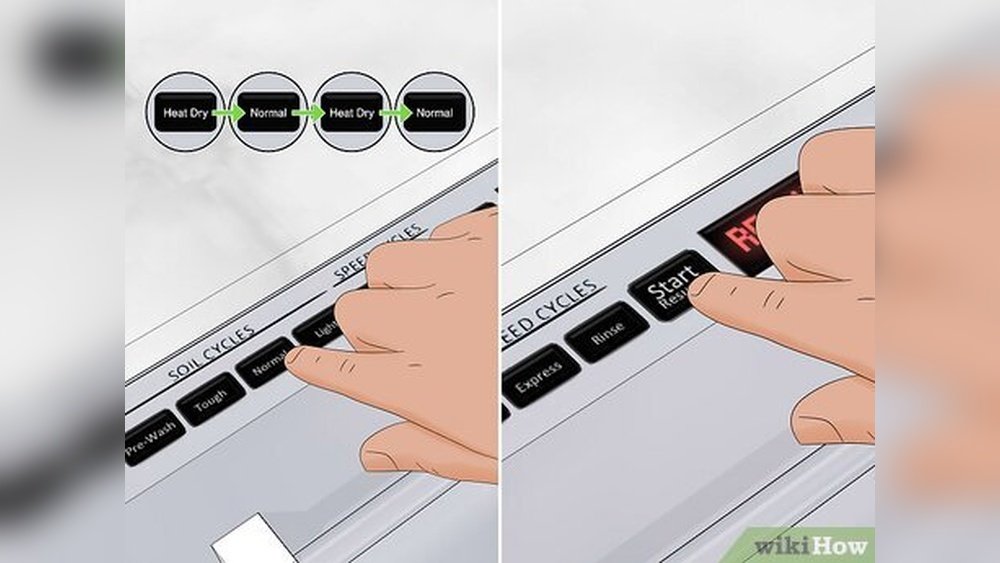
3. Reset Using The “heated Dry” Sequence
Some Kitchenaid models use a specific button sequence to force a reset. The most common is the Heated Dry reset.
Steps:
- Open the dishwasher door.
- Press the following sequence quickly: Heated Dry > Normal > Heated Dry > Normal
- Close the door.
- The control panel lights should all illuminate, and the dishwasher will enter a short diagnostic test.
- After the test finishes (about 2–3 minutes), try starting a cycle.
If your model doesn’t have a “Heated Dry” button, try “High Temp Scrub” or “Energy Saver Dry” instead.
4. Factory Reset (for Smart Models)
Recent Kitchenaid dishwashers with Wi-Fi or smart controls may support a full factory reset. This wipes all settings and returns the appliance to its original state.
Steps:
- Press and hold the Cancel or Reset button for 3–5 seconds.
- Wait until the display clears or the unit beeps.
- Unplug for 5 minutes (power cycle).
- When you restart, all custom settings will be lost.
Not all models have this feature. Check your manual for “Factory Reset” instructions.
5. Diagnostic Mode Reset
For persistent problems, you can run a diagnostic cycle. This mode tests all components and resets the control board.
Steps:
- With the door closed, press any three buttons in sequence (e.g., “1-2-3”) three times quickly, for a sequence like “1-2-3, 1-2-3, 1-2-3.”
- All panel lights should turn on. The dishwasher will run a diagnostic test.
- After the test, power cycle the dishwasher.
This is an advanced method and may not work on older models.
Troubleshooting: What To Do If Your Dishwasher Won’t Reset
Sometimes, a reset doesn’t solve the problem. If your Kitchenaid dishwasher stays unresponsive or shows the same errors, here’s what you can do:
Check For Locked Controls
Many Kitchenaid dishwashers have a control lock feature to prevent accidental presses. If the control panel does not respond, look for a small lock symbol or “Control Lock” light.
- Press and hold the Control Lock button for 3–5 seconds to unlock.
If the control panel is still locked after this, try a power cycle.
Inspect The Door Latch
The dishwasher will not start or reset if the door latch is not closed properly. Gently press on the door until you hear a “click.” If the latch is broken or loose, the dishwasher won’t operate.
A common mistake is slamming the door or overloading the racks, which can misalign the latch.
Examine The Power Supply
If the dishwasher is still dead after resetting, check the following:
- Is the outlet working? Try plugging in another device.
- Is the circuit breaker tripped?
- Is the power cord damaged?
Never try to repair electrical parts yourself unless you’re trained.
Look For Error Codes
Most Kitchenaid dishwashers display error codes when something is wrong. Common codes include:
- F2E2: Control board error
- F6E6: Water inlet problem
- F8E4: Drip tray full
Consult your user manual or visit the official Kitchenaid website to decode these messages.
Call For Professional Service
If you’ve tried all the reset methods and the dishwasher still won’t work, it’s time to call for help. Persistent issues could mean a faulty control board, wiring problem, or failed component.
Reset Methods Comparison Table
To help you choose the best reset method for your situation, here is a quick comparison:
| Method | Best For | Time Required | Difficulty |
|---|---|---|---|
| Control Panel Reset | Minor glitches, error codes | 1-2 minutes | Easy |
| Power Cycle | Unresponsive controls | 5-10 minutes | Easy |
| Heated Dry Sequence | Stuck cycles, software errors | 2-5 minutes | Medium |
| Factory Reset | Smart models, software bugs | 5-10 minutes | Medium |
| Diagnostic Mode | Persistent or unknown issues | 5-15 minutes | Advanced |
Common Problems That A Reset Can Fix
Resetting a Kitchenaid dishwasher can solve many everyday problems. Here are some examples:
Stuck Wash Cycle
Sometimes the dishwasher will run the same cycle endlessly. A reset usually breaks the loop and allows you to start fresh.
Unresponsive Touchpad
If you press buttons and nothing happens, a power cycle or control panel reset can often restore normal function.
Lights Blinking Or Flashing
Blinking lights usually signal a software glitch or an unfinished cycle. Resetting clears the lights and lets you try again.
Error Codes Displayed
Many error codes are temporary. A soft or hard reset may clear them without further action.
Water Not Draining
Some drainage errors are caused by the control board freezing. Resetting can restart the pump and clear minor blockages.
When A Reset Won’t Help
Not all dishwasher problems can be fixed with a reset. Here’s when a reset probably won’t solve the issue:
- Mechanical failures: Broken door latch, faulty motor, or damaged pump
- Water leaks: Cracked hoses or seals
- Serious electrical issues: Burnt wires, failed control board
- Repeated error codes: Same code appears after multiple resets
If you notice any of these, contact a certified technician. Resetting repeatedly can sometimes make the problem worse.
Tips To Prevent The Need For Frequent Resets
Regular maintenance helps avoid many problems that require a reset. Here are practical tips:
- Clean the filter monthly to prevent clogs.
- Check the spray arms for debris or blockages.
- Use the right detergent—never use regular dish soap.
- Do not overload the racks. This keeps the door latch and spray arms working well.
- Wipe the control panel with a dry cloth, not a wet sponge.
- Run hot water at the sink before starting the dishwasher. This helps sensors work better.
- Inspect the door seal for cracks or debris.
- Keep the drain area clear—leftover food can cause pump errors.
- Update software for smart models, if available.
- Read your user manual for model-specific advice.
Non-obvious Insights For Kitchenaid Dishwasher Owners
Many guides skip these important points, but they can make a big difference:
- Don’t rush the reset process. Waiting 5–10 minutes during a power cycle lets all capacitors discharge fully, which is important for stubborn software bugs.
- Button sequence matters. On some models, pressing buttons too slowly cancels the reset. Try to press each button within 1–2 seconds of the last.

Credit: www.youtube.com
Model Numbers Matter: How To Find Yours
Different Kitchenaid dishwashers may require slightly different reset methods. Your model number is usually found:
- Inside the door, on the left or right edge
- On a sticker or metal plate
Knowing your model number helps you find the right instructions and parts.
How To Avoid The Most Common Reset Mistakes
Resetting a dishwasher seems easy, but beginners often make these errors:
- Forgetting to close the door: The reset won’t work unless the door is latched.
- Turning power back on too soon: Wait at least 5 minutes before restoring power.
- Skipping the manual: Always check your user manual for special steps or warnings.
- Mixing button sequences: Not all button combos work for every model.
- Ignoring error codes: Some codes need service, not just a reset.

Credit: www.wikihow.com
Real-world Example: Resetting A Kitchenaid Kdtm404kps
Let’s walk through a reset on a popular model, the KDTM404KPS:
- The dishwasher stops mid-cycle and displays “F2E2.”
- User presses Start/Resume, closes the door—error remains.
- User unplugs the unit, waits 7 minutes, plugs it back in.
- All lights flash, then the error clears.
- User runs a new cycle—dishwasher works as normal.
This shows how a power cycle can solve even stubborn electronic issues.
Comparing Kitchenaid Reset Methods To Other Brands
How Does Resetting A Kitchenaid Dishwasher Compare To Other Brands?
| Brand | Typical Reset Method | Button Sequence Required? | Power Cycle Needed? |
|---|---|---|---|
| Kitchenaid | Control panel or power cycle | Often yes | Sometimes |
| Bosch | Hold Start for 3 seconds | No | Rarely |
| Whirlpool | Heated Dry & Normal sequence | Yes | Sometimes |
| GE | Disconnect power for 30 seconds | No | Yes |
Kitchenaid often uses button sequences and power cycles, which is different from some competitors. Always follow your model’s instructions.

Credit: partsfe.com
Where To Find Official Reset Instructions
If you’ve lost your user manual, you can find official reset guides at the Kitchenaid website or contact their support team. For more technical info, check manufacturer support forums or Kitchenaid Product Help.
Frequently Asked Questions
How Do I Know If My Kitchenaid Dishwasher Needs A Reset?
If your dishwasher is unresponsive, displays error codes, or cycles do not complete, a reset may be needed. Repeated beeping, blinking lights, or stuck buttons are also common signs.
Will Resetting My Dishwasher Erase Custom Settings?
On most standard models, a reset will not affect your preferences. On smart models, a factory reset will erase Wi-Fi connections and custom cycles, so only use this if necessary.
What Should I Do If The Dishwasher Keeps Showing The Same Error After Resetting?
Persistent errors mean the problem is not just a software glitch. Check for blocked filters, door latch issues, or call a professional for deeper faults.
How Often Is It Safe To Reset My Kitchenaid Dishwasher?
Occasional resets are safe. However, if you need to reset frequently (more than once a month), there may be a larger issue that needs attention.
Where Can I Find The Model-specific Reset Instructions?
Check inside your dishwasher door for the model number. Then, visit the Kitchenaid website or your user manual for exact steps.
Resetting a Kitchenaid dishwasher is a simple skill that can keep your kitchen running smoothly. By following these clear steps and tips, you can solve most common problems yourself and avoid unnecessary service calls. If you ever feel unsure, don’t hesitate to reach out to a professional.
Your dishwasher is a valuable helper—knowing how to reset it means you’ll always get the most from it.