
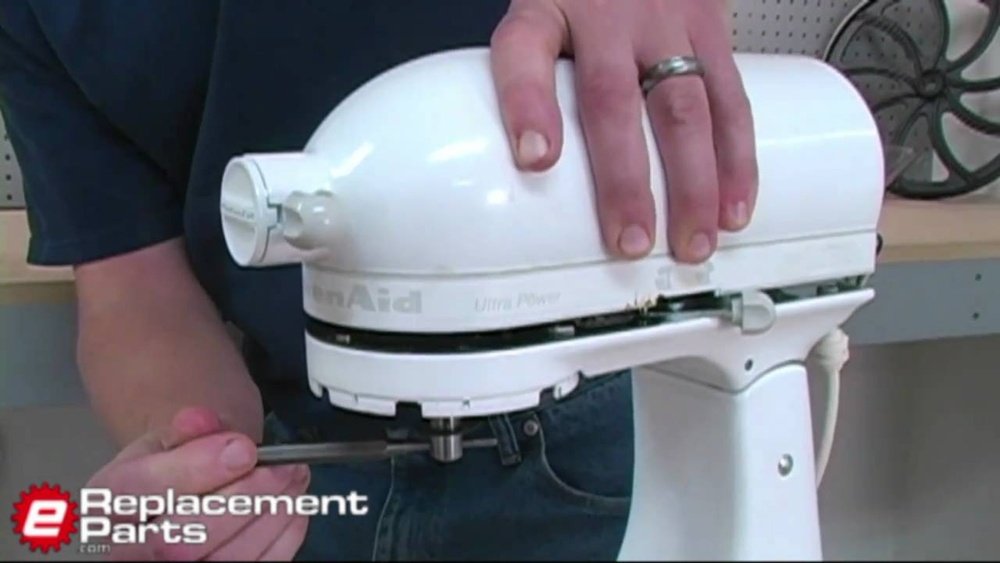
If your KitchenAid mixer stops spinning, it can feel like a big problem. Maybe you’re in the middle of baking bread, making cookies, or whipping cream, and suddenly the mixer’s head or attachments will not move. This situation is frustrating, especially if you rely on your mixer regularly. The good news: most issues that cause a KitchenAid mixer to stop spinning are fixable at home. Whether you’re a hobby baker or a kitchen pro, this guide will help you solve the problem step by step—using simple language, clear steps, and practical tips, even if English is not your first language.
Understanding Why Your Kitchenaid Mixer Isn’t Spinning
Before you try to fix the problem, it’s important to understand what might be wrong. KitchenAid mixers are tough machines, but several things can cause them to stop spinning. Here are the most common reasons:
- Power issues: The mixer might not be getting electricity.
- Speed control problems: The speed lever or switch might be stuck or broken.
- Worn or broken gears: Inside the mixer, gears turn the attachments. If they’re damaged, the mixer won’t spin.
- Obstructions: Something could be blocking the movement.
- Overheating: The motor can stop if it gets too hot.
- Loose or damaged attachments: If the beater or bowl isn’t fitted right, the mixer may not work.
Knowing these causes helps you fix the mixer faster. Now let’s move on to what you need before starting repairs.
Safety First: Preparing To Fix Your Mixer
Working with electrical appliances can be dangerous if not done carefully. Always follow these safety tips:
- Unplug the mixer. Never work on it while it’s plugged in.
- Wait for moving parts to stop. Let the mixer cool down if it was running.
- Work in a clean, dry area. Water and electricity do not mix.
- Keep small parts away from children and pets.
You’ll also need some basic tools:
- A flathead screwdriver
- A Phillips-head screwdriver
- Clean towels or cloths
- A flashlight for better visibility
- Replacement parts (if needed)
If you’re not comfortable opening or fixing appliances, consider getting help from a professional. But many common mixer issues are easy to solve on your own.
Credit: www.youtube.com
Quick Checks: Simple Fixes Before Disassembly
Before you open your mixer, try these quick solutions. Often, the problem is minor.
1. Check The Power Source
- Make sure the mixer is plugged in securely.
- Try a different outlet to rule out a faulty socket.
- Check your home’s circuit breaker—sometimes, the outlet loses power.
2. Test The Speed Control Lever
Sometimes the lever is stuck between speeds or not making good contact. Move the speed control to all positions. If the mixer suddenly works, the lever was likely the issue.
3. Inspect The Attachments
- Remove the beater, dough hook, or whisk.
- Clean off any dried dough or batter.
- Reattach it firmly.
- If the attachment is bent or damaged, replace it.
4. Look For Bowl Problems
If the mixing bowl isn’t locked in place, the mixer may not spin. Take out the bowl, clean the base, and lock it back in.
5. Let The Mixer Cool Down
If you’ve been mixing for a long time, the mixer motor may overheat. Unplug it, let it cool for 30 minutes, and try again.
If these quick fixes don’t work, it’s time to dig deeper.
Diagnosing The Problem: What’s Stopping The Mixer?
When simple solutions fail, the issue is usually mechanical or electrical inside the mixer. Here’s how to figure out what’s wrong.
Listen And Observe
- No sound at all: This points to a power or electrical problem.
- Humming but not spinning: The motor is trying, but something is jammed or broken.
- Grinding or clicking: This often means the gears are damaged.
Smell For Trouble
If you smell burning or electrical odors, the motor or wiring may be damaged. Stop immediately and unplug the mixer.
Feel For Heat
If the mixer base is hot, let it cool. Overheating can trip a safety shutoff.
Look For Movement
Sometimes the head moves, but attachments don’t spin. This could mean the attachment hub or gears are the problem.

Credit: www.instructables.com
Step-by-step Guide: How To Fix A Kitchenaid Mixer That Isn’t Spinning
Now that you’ve checked the basics, let’s look at the most common repairs—starting from the easiest.
1. Resetting The Mixer
Some models have a reset button or a safety feature that stops the motor if it gets too hot.
- Unplug the mixer.
- Wait 20–30 minutes for it to cool.
- Plug it back in and try turning it on.
If it works now, you just needed a reset.
2. Cleaning And Reattaching The Bowl And Beater
If batter or dough has dried and hardened, it can block the movement.
- Remove the bowl and beater.
- Wash them with warm soapy water.
- Dry them and reattach.
- Lock the bowl firmly in place.
Try again. Sometimes, a simple cleaning solves the problem.
3. Checking The Power Cord
A frayed or broken power cord means the mixer can’t get electricity.
- Unplug the mixer.
- Inspect the cord for cuts, splits, or burn marks.
- If damaged, you will need a replacement cord. This is often a simple repair, but if you’re not comfortable with electrical work, ask a professional.
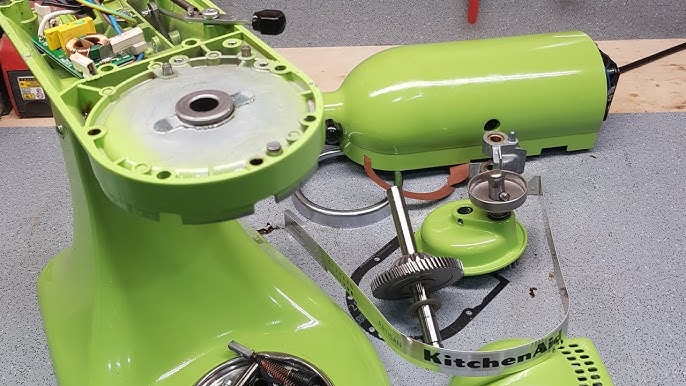
4. Opening The Mixer Head
If the mixer still isn’t spinning, you may need to open the top (the “head”). This step is more advanced, but you can do it with patience.
Steps To Open The Mixer Head
- Unplug the mixer.
- Remove the rear cover: There is usually a screw at the back.
- Remove the motor housing screws: These are on the sides and sometimes under the mixer.
- Lift off the top cover carefully.
Inside, you’ll see the gears, motor, and wires.
5. Inspecting And Replacing Broken Gears
The gears inside a KitchenAid mixer are made to protect the motor. If something jams, a gear will break before the motor burns out. The most common failure is a stripped or broken worm gear.
How To Spot A Broken Gear
- The gear teeth look worn, chipped, or broken.
- There may be metal shavings inside the head.
- The mixer makes a grinding or clicking noise.
Replacing The Gear
- Identify the broken gear. Usually, it’s the large, white plastic worm gear.
- Remove the old gear. This might require taking out a pin or circlip.
- Clean away old grease and metal pieces.
- Install the new gear. Make sure it fits snugly.
- Apply fresh food-grade grease to all gears.
- Reassemble the mixer head.
Replacement gears and grease are easy to find online or at appliance stores.
6. Checking The Planetary Assembly
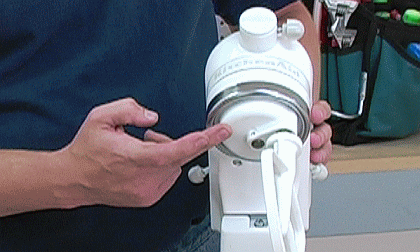
The planetary assembly is the part that spins the beater. If it’s loose, stuck, or damaged, the beater won’t turn.
- Flip the mixer upside down (with the bowl and attachments removed).
- Look for screws or pins holding the planetary in place.
- Tighten any loose screws.
- If it’s damaged, you may need to replace the entire assembly.
7. Inspecting The Speed Control
A broken or worn speed control lever or switch can stop your mixer from spinning.
- With the top off, look at the speed control plate and lever.
- Check for bent or broken parts.
- Make sure the lever moves smoothly across all speeds.
- Replace any broken parts.
8. Checking The Motor Brushes
The mixer’s motor brushes can wear out over time, causing poor performance.
- On each side of the mixer’s head, you’ll find a black cap. Unscrew it.
- Pull out the brush (a small block of carbon with a spring).
- If it’s very short or broken, replace it.
- Reinstall the caps.
Many users miss this simple fix—even though worn brushes are a common cause of spinning problems.
9. Examining The Motor And Wiring
If everything else looks fine, the motor or wiring may be at fault.
- Look for burned wires, loose connections, or signs of melting.
- Test the motor with a multimeter (if you have one).
- If the motor is burned out, you may need a new motor. This repair can be expensive and complicated.
10. Grease Replacement
KitchenAid mixers need food-safe grease inside the gears. If the grease dries out or leaks, the gears may jam.
- Open the head as described earlier.
- Clean out old, dirty grease.
- Apply new food-grade grease.
- Reassemble the mixer.
A well-lubricated mixer runs smoother and lasts longer.
Comparing Common Mixer Problems And Solutions
Sometimes it helps to see problems and solutions side by side. This can make troubleshooting easier.
| Problem | Most Likely Cause | Solution |
|---|---|---|
| Mixer does not turn on | No power, broken cord, faulty outlet | Check outlet, replace cord |
| Mixer hums but doesn’t spin | Jammed gears, broken worm gear | Open head, replace gear |
| Mixer stops during use | Overheating, loose attachment, motor brushes | Let cool, check brushes |
| Beater doesn’t turn | Loose planetary, bowl not locked | Tighten screws, lock bowl |
Preventing Future Problems: Maintenance Tips
Once your mixer is working again, you want to keep it running smoothly. Regular care makes a big difference.
Clean After Every Use
- Wipe down the mixer body with a damp cloth.
- Wash bowl and beaters with warm, soapy water.
Check Attachment Fittings
- Make sure attachments and bowl are always fitted and locked properly.
Grease The Gears (every 1–2 Years)
- Replace the food-grade grease inside the head every couple of years, especially if the mixer gets heavy use.
Store In A Safe Place
- Keep the mixer in a dry spot away from heat sources.
Don’t Overload The Mixer
- Follow the recommended maximum quantities for dough and batter.
- Overloading can strain the gears and motor.
Listen For Strange Noises
- Grinding, clicking, or buzzing sounds mean it’s time for maintenance.
Real-life Example: Fixing A Mixer With A Broken Gear
Let’s look at a real-life situation. Sarah, a home baker, found her KitchenAid mixer suddenly stopped spinning while making bread dough. She heard a loud click, and then the beater wouldn’t move, even though the motor still hummed.
Sarah checked the power and attachments—no problem there. She opened the mixer’s head and saw a white gear with broken teeth and metal shavings nearby. She ordered a new worm gear and some food-grade grease online.
After replacing the gear (with help from a YouTube video), Sarah’s mixer worked like new. The whole repair took about an hour and cost $20 for parts—much less than buying a new mixer.
When To Call A Professional
Some repairs are easy at home, but sometimes it’s safer to call a professional:
- You smell burning or see melted wires.
- The mixer still doesn’t spin after gear and brush replacement.
- You’re not confident with electrical repairs.
- The warranty is still active (trying DIY fixes may void it).
If you need help, contact KitchenAid customer support or a local appliance repair shop.
How To Find Kitchenaid Mixer Parts
It’s important to use genuine or high-quality replacement parts. Here’s how to find them:
- KitchenAid’s official website: Genuine parts and guides.
- Appliance parts stores: Both physical and online.
- Amazon or eBay: Many sellers offer compatible gears and brushes.
- Local repair shops: Some keep parts in stock.
Always check your mixer’s model number (found on the bottom or back) before ordering parts.
Comparing Diy Vs. Professional Repair Costs
Let’s compare fixing your mixer yourself vs. hiring a pro.
| Repair Type | DIY Cost (Parts Only) | Professional Repair | Time Needed |
|---|---|---|---|
| Replace worm gear | $10–$25 | $60–$100 | 1 hour (DIY), 1–2 days (Pro) |
| Change motor brushes | $10–$20 | $40–$70 | 30 min (DIY), 1 day (Pro) |
| Replace power cord | $10–$15 | $40–$60 | 30 min (DIY), 1 day (Pro) |
| New motor | $60–$120 | $120–$200 | 2–3 hours (DIY), 2–3 days (Pro) |
Pro tip: If the repair cost is more than half the price of a new mixer, it may be better to buy a new one.
Troubleshooting Flowchart: Mixer Not Spinning
A visual guide can help you quickly find where the problem is.
| Step | Yes | No |
|---|---|---|
| Is the mixer plugged in? | Check power, try another outlet | Plug it in |
| Does the mixer make any noise? | Go to gear inspection | Check power cord and outlet |
| Are the attachments moving? | Problem solved | Check planetary and gears |
| Are you comfortable opening the mixer? | Open head and check gears/brushes | Contact a professional |
Credit: www.instructables.com
Two Non-obvious Insights Beginners Miss
- Motor Brushes Wear Out: Many beginners overlook the motor brushes. These small parts wear down slowly, and when they do, the mixer can stop spinning or run weakly. Replacing them is cheap and easy, but often forgotten.
- Food-Grade Grease is Critical: Not all grease is safe for food appliances. Using the wrong grease can damage your mixer and make it unsafe. Always use food-grade grease when servicing gears.
Extra Tips For Long Mixer Life
- Run your mixer on lower speeds for heavy doughs.
- Don’t use attachments from non-KitchenAid brands unless they’re certified.
- Register your mixer for warranty support.
- Keep a small repair kit handy (screwdrivers, spare gear, and brushes).
Frequently Asked Questions
Why Does My Kitchenaid Mixer Hum But Not Spin?
A humming sound usually means the motor is working, but something is blocking the gears or the attachment. Often, a broken worm gear is the cause. Open the mixer head and inspect the gears for damage.
How Often Should I Grease The Gears In My Mixer?
If you use your mixer often (weekly), replace the food-grade grease every 1–2 years. For light use, every 3 years is usually fine. If you hear grinding or see leaking grease, replace it sooner.
Can I Use Regular Grease For My Kitchenaid Mixer?
No, you should only use food-grade grease. Regular grease can contaminate your food and damage the mixer. Look for products labeled “food-safe” or recommended by KitchenAid.
What Should I Do If My Mixer Smells Like Burning?
Unplug the mixer immediately. A burning smell often means the motor or wiring is overheating or damaged. Check for visible damage. If you’re unsure, contact a professional repair service.
Where Can I Find Official Kitchenaid Replacement Parts?
You can buy parts directly from the KitchenAid Replacement Parts website or from trusted appliance stores. Always check your mixer’s model number first.
Restoring your KitchenAid mixer to working order is possible, even if it’s not spinning. With the right steps, tools, and a bit of patience, you can save money and keep baking for years to come. Remember, regular care and quick repairs are the keys to a long-lasting mixer.