
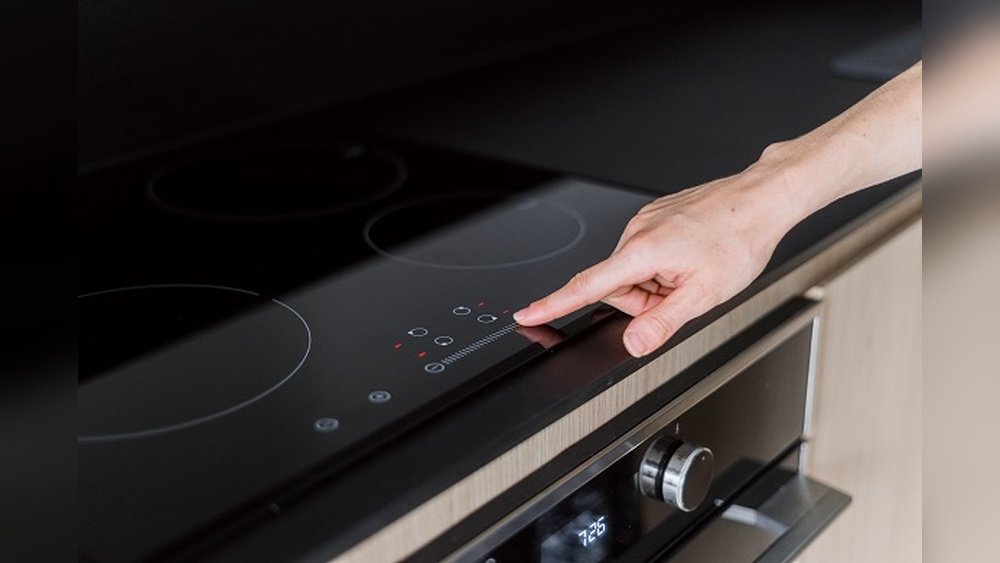
Unlocking an induction stove can be confusing, especially if you’re using it for the first time. Many people buy induction stoves for their speed, energy savings, and safety, but then get stuck at the control panel. If your stove shows a lock symbol or doesn’t respond, you’re not alone.
This guide will help you understand why induction stoves lock, how to unlock them step by step, and what to do if things don’t work as expected. You’ll also learn useful tips to avoid lock issues in the future, key differences between popular brands, and answers to common questions.
Why Induction Stoves Have Locks
Induction stoves are packed with technology to make cooking safer and easier. One important feature is the child lock or control lock. This function keeps the stove from turning on by accident—whether someone brushes the controls, pets jump on the counter, or kids are curious.
Most induction stoves lock themselves after cleaning, power cuts, or when you press certain buttons. Some even lock automatically after a few minutes of inactivity. This is especially common in modern brands like Bosch, Samsung, and Whirlpool.
Besides safety, locks help you clean the surface without starting the stove or changing settings. When the stove is locked, you can wipe the panel without worry.
Common Lock Types On Induction Stoves
It’s important to know what kind of lock your induction stove uses. Here are the most common:
- Child Lock: Blocks all controls. Needs a button combination to unlock.
- Control Panel Lock: Stops you from changing settings but may let you turn the stove off.
- Auto Lock: Turns on after a set time or when power comes back.
- Cleaning Lock: Lets you wipe the surface without activating controls.
Each brand may use different names, but the function is similar. Check your manual if you see unfamiliar symbols.
How To Tell If Your Induction Stove Is Locked
Before trying to unlock, look for these signs:
- A lock symbol (sometimes a padlock or key icon) lights up on the display.
- Buttons do not respond, even when you press hard.
- The stove makes a beep or error sound when you touch the panel.
- The stove powers on, but you can’t select heat levels or use any function.
Knowing these signs saves time—you won’t think your stove is broken or call for service when it’s just locked.
Step-by-step: How To Unlock Induction Stove
Unlocking an induction stove depends on the model, but most use similar methods. Let’s break down the main ways. Try these steps in order.
1. Find The Lock Button Or Symbol
Look closely at your control panel. You’ll usually see a lock icon or a button labeled “Lock,” “Control Lock,” or “Child Lock.” It might be a simple padlock symbol.
- On some stoves, the button is separate.
- Others use a combination (like holding two buttons).
2. Press And Hold The Lock Button
Most stoves unlock if you press and hold the lock button for 3 to 10 seconds. Wait for a beep or for the lock symbol to disappear. Be patient—it can take longer than expected.
Example: On a Bosch induction stove, hold the “Panel Lock” key for 4 seconds.
3. Try The “+” And “-” Button Combo
If there’s no lock button, some brands use a button combination. The most common is holding down both the “+” and “-” buttons (sometimes called “Increase” and “Decrease”) at the same time for several seconds.
- Try this if your lock button is hard to find.
- Watch for a beep or the symbol turning off.
4. Touch And Hold The Power Button
Some models unlock if you touch and hold the power button for 5 to 10 seconds. This method works for older or simpler induction stoves.
5. Use The “function” Or “options” Button
A few advanced stoves have a “Function,” “Menu,” or “Options” button. Hold this for a few seconds and see if the lock turns off.
6. Check The User Manual
If none of these work, find your stove’s manual. Search online for your model number if you lost the paper copy. Manuals give the exact method and explain what each symbol means.
7. Unplug Or Reset The Stove
If the panel is stuck, try turning off power at the wall switch or unplugging the stove for 1 minute. This can reset the controls and remove the lock. Plug back in and try again.
Caution: Don’t do this often—only use it as a last resort if nothing else works.
Unlocking Methods For Popular Brands
Different brands have their own unlocking steps. Here’s how the most popular induction stove brands handle locks.
Bosch Induction Stove
- Look for the key symbol or “Panel Lock.”
- Hold the key or lock button for 4 seconds.
- If it doesn’t work, unplug for 1 minute and try again.
Samsung Induction Stove
- Find the “Child Lock” or “Lock” button.
- Press and hold for 3 seconds until the symbol disappears.
- On some models, hold the “Power” button and “+” at the same time.
Whirlpool Induction Stove
- Hold the “Control Lock” or padlock symbol for 3 seconds.
- Some models need you to press “Cooktop Lock” for several seconds.
Lg Induction Stove
- Press and hold the “Lock” or “Child Lock” icon for 3 to 5 seconds.
- Listen for a beep and check if the light goes out.
Ge Induction Stove
- Touch and hold the “Lock Controls” pad for 3 seconds.
- For older models, use “+” and “-” together.
Frigidaire Induction Stove
- Hold the “Lock” key for 3 seconds.
- If the lock stays on, try unplugging and plugging back in.
Here’s a quick comparison of unlock methods:
| Brand | Unlock Method | Time to Hold |
|---|---|---|
| Bosch | Hold Lock/Key button | 4 seconds |
| Samsung | Hold Child Lock or Power + + | 3 seconds |
| Whirlpool | Hold Control Lock | 3 seconds |
| LG | Hold Lock/Child Lock | 3-5 seconds |
| GE | Hold Lock Controls or + and – | 3 seconds |
| Frigidaire | Hold Lock key | 3 seconds |
What To Do If Unlocking Fails
Sometimes, standard methods don’t work. Here’s what you can try:
1. Clean The Control Panel
Moisture, grease, or dirt can confuse the touch sensors. Use a soft, dry cloth to wipe the panel. Avoid wet sponges or harsh chemicals.
2. Check For Error Codes
If your display shows a strange code (like “F” or “E”), check the manual or look it up online. Some stoves lock themselves when they detect a problem, such as overheating or power issues.
3. Power Cycle The Stove
Turn off the power at the breaker or unplug the stove. Wait 1-2 minutes before turning back on. This can reset the electronics.
4. Test The Power Supply
A weak or unstable power supply can cause control problems. Make sure your outlet is working and not overloaded.
5. Contact Customer Support
If nothing works, call the brand’s service center. Give them your model number and explain the steps you’ve tried. They may walk you through a deeper reset or send a technician.
How Induction Stove Locks Work
Modern induction stoves use capacitive touch sensors. When you touch the glass, the sensor detects your finger and sends a signal to the control board. The lock function disables these signals, so nothing happens until you unlock.
Some stoves use simple on/off locks. Others let you lock only certain features (like temperature, timer, or individual burners).
Interesting fact: Induction stove locks are not mechanical—they are 100% electronic. That means software bugs, static electricity, or even spilled water can sometimes cause them to “stick.”
Safety And Lock Features: What You Need To Know
Locks are just one part of induction stove safety. Here’s what else helps keep you safe:
- Pan Detection: The stove heats only when a pan is on the burner.
- Auto Shutoff: Turns off if left on too long.
- Residual Heat Indicator: Warns if the surface is hot.
- Overheat Protection: Shuts down if the internal temperature is too high.
- Error Codes: Show when something’s wrong.
These features work together to reduce burns, fires, and electrical problems.
How Locking Affects Cooking And Cleaning
You might worry that the lock slows down your cooking or makes cleaning harder. Actually, it’s the opposite.
When locked, you can clean the glass panel with a damp cloth and not worry about turning the stove on. Many people accidentally activate burners while wiping—locks prevent this.
For cooking, unlocking is usually quick. If you unlock the stove right before you cook, you avoid accidental changes to temperature or timer.
Common Mistakes When Unlocking Induction Stoves
Even experienced users make these mistakes:
- Pressing buttons too quickly: Most stoves need you to hold the button, not tap it fast.
- Using wet or greasy fingers: Moisture can confuse the touch sensors. Dry your hands first.
- Not waiting for the beep: Some stoves beep when unlocked—wait for the sound or light change.
- Skipping the manual: Every model is different. If you’re stuck, check the manual or search the model online.
- Forcing the panel: Pressing too hard or with objects can damage the touch surface.
Tips To Prevent Lock Problems
Stuck locks are annoying. Here are ways to avoid them:
- Clean the panel regularly with a dry cloth.
- Keep liquids away from the touch controls.
- If you have kids, teach them not to play with the stove.
- Use gentle pressure—don’t bang or press hard.
- After power cuts, check if the lock is on before cooking.
- Write down your unlock method and keep it near the stove.
Unlocking Vs. Resetting: What’s The Difference?
Many people confuse unlocking and resetting.
- Unlocking: Removes the lock so you can use the stove. All your settings stay the same.
- Resetting: Restarts the electronics and clears all settings. Use this only if unlocking fails.
Here’s a quick table to show the difference:
| Action | What It Does | When to Use |
|---|---|---|
| Unlock | Removes safety lock, keeps settings | After cleaning, power cut, or child lock |
| Reset | Restarts all controls, clears errors | If unlocking fails or error codes show |
Induction Stove Lock Features By Model: Examples
Some models have unique lock features. Here are examples:
- Bosch Serie 6: Has a panel lock and a child lock. You can lock the whole panel or just the timer.
- Samsung Chef Collection: Child lock includes the timer, but not the power button.
- LG Studio: Lets you lock individual burners for multi-tasking.
- Whirlpool FlexiCook: Lock turns on after 1 minute of no use.
If you want to buy a new induction stove, compare lock features in the specs.
What To Do If The Lock Symbol Stays On
Sometimes, even after you unlock, the symbol stays on. Try these steps:
- Wipe the control panel with a dry cloth.
- Hold the lock button again for 10 seconds.
- Turn off power for 2 minutes, then restart.
- If the symbol still shows, call for service—it may be a control board issue.

Credit: www.youtube.com
When To Call A Technician
Most lock problems can be solved at home, but call a professional if:
- The lock symbol blinks or flashes rapidly.
- You smell burning or see smoke.
- The stove won’t unlock after a reset.
- Buttons don’t work at all, even after cleaning and power cycling.
Pro tip: If your stove is under warranty, don’t open it yourself. This can void your coverage.
Induction Stove Lock: Myths Vs. Facts
Many people believe myths about induction stove locks. Let’s clear up the confusion.
- Myth: Unlocking is the same on every stove.
- Fact: Methods change by brand and model.
- Myth: If unlock fails, the stove is broken.
- Fact: Most issues come from dirt, moisture, or power cuts.
- Myth: You can unlock by pressing any button.
- Fact: You need the right button or combo.
- Myth: Child locks are only for families with kids.
- Fact: They prevent accidental activation for everyone.

Credit: www.reddit.com
Real-life Example: Unlocking A Locked Bosch Induction Stove
Let’s say you just cleaned your Bosch induction cooktop. Now it won’t turn on, and the key symbol is lit.
Steps:
- Dry your hands and the panel.
- Find the key symbol button.
- Press and hold for 4 seconds.
- Listen for a beep. The symbol turns off.
- The stove is now ready to use.
If this doesn’t work, check for error codes or unplug for 1 minute.
Why Induction Stove Locks Are Becoming Standard
In the US, over 60% of new electric stoves sold in 2023 included touch controls with lock features. As more homes use induction, safety and convenience drive these designs.
Locks reduce accidents, especially in homes with children or pets. They also protect your investment—accidental activation can damage both the stove and your cookware.
For more on induction stove technology and safety standards, see the Induction Cooking Wikipedia page.
Advanced Tips For Power Users
If you use your induction stove daily or have a high-end model, here are advanced tips:
- Firmware updates: Some smart stoves let you update software to improve locks.
- Custom lock settings: Set the lock to activate after a custom time.
- Partial locks: Lock only the timer or specific burners if your model allows.
- Mobile app control: High-end models let you lock/unlock via app.
Check your manual or the brand’s website for these advanced features.
Unlocking Induction Stoves: Key Takeaways
Unlocking an induction stove is usually fast and simple if you know your model. Remember to:
- Identify the lock type.
- Use the right button or button combo.
- Keep the panel clean and dry.
- Check your manual or search online if stuck.
- Reset only as a last resort.
Understanding how to unlock your induction stove gives you confidence in the kitchen and keeps your home safe.
Credit: www.ciarraappliances.com
Frequently Asked Questions
What Does The Lock Symbol Mean On My Induction Stove?
The lock symbol means your stove’s controls are locked. This prevents accidental activation, usually for safety or cleaning. You need to unlock the stove before using any functions.
How Long Do I Need To Hold The Lock Button To Unlock?
Most stoves require you to hold the lock button for 3 to 10 seconds. Wait for a beep or the symbol to disappear. If nothing happens, try holding longer or check your user manual.
Why Won’t My Induction Stove Unlock After A Power Cut?
Some stoves auto-lock after a power outage to protect the electronics. Wait 1-2 minutes, then follow your unlock steps. If it still won’t unlock, unplug for 1 minute and try again.
Can I Unlock My Induction Stove Without The Manual?
Yes, in most cases. Try the common methods: hold the lock button, or hold “+” and “-” together for several seconds. If these don’t work, search your model number online for instructions.
Is It Safe To Unlock An Induction Stove If I Smell Burning?
No. If you smell burning, see smoke, or hear popping sounds, turn off power immediately and call a technician. The lock might be stuck because of an internal problem. Safety comes first.
Unlocking your induction stove is easy once you know how. With these tips and steps, you’ll cook and clean with confidence—no more frustration or wasted time.