
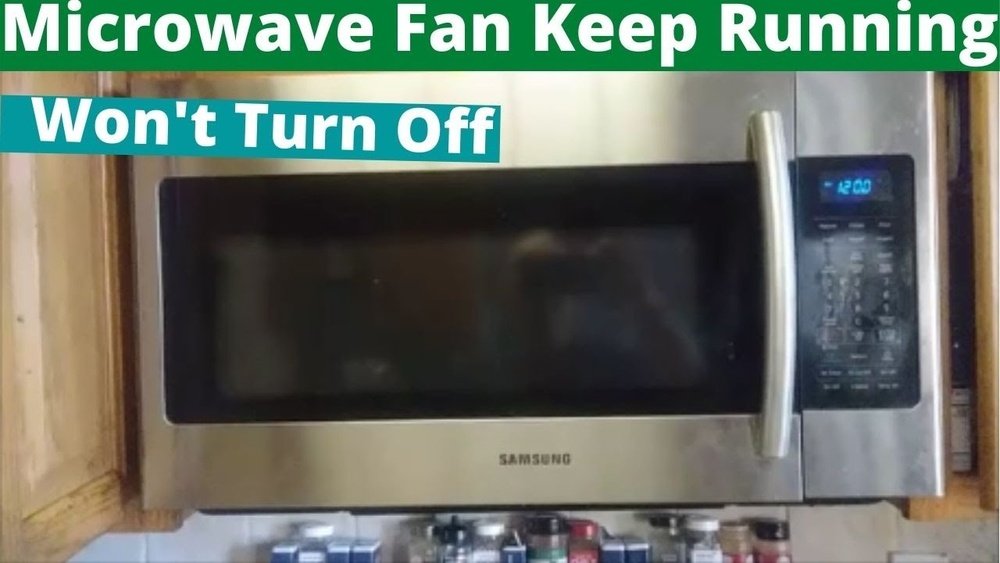
If you have a GE microwave with a vent fan, you probably know how useful it can be for removing steam, smoke, and odors while cooking. But sometimes, you might want to turn off the vent fan—maybe it’s too noisy, or it keeps running after you finish cooking. If you’re frustrated or unsure about how to control this feature, you’re not alone. Many owners find themselves confused by the different fan settings and auto functions. In this guide, you’ll learn exactly how to turn off the vent fan on a GE microwave, why it sometimes keeps running, and what you can do if it won’t turn off.
This article explores everything you need to know, including step-by-step instructions for different GE models, troubleshooting tips, and advice for both basic and advanced users. By the end, you’ll understand not just how to turn off the vent fan, but also how to manage it smarter—saving time, energy, and maybe even your patience.
Understanding The Ge Microwave Vent Fan
Before you can turn off the vent fan, it helps to know what it does and how it works. The vent fan is designed to pull air, smoke, and steam away from your stove or cooktop. In most GE microwaves, especially over-the-range models, the fan is built into the bottom of the unit.
There are usually two main types of venting:
- Recirculating: The air is pulled through a filter and pushed back into the kitchen.
- External venting: The air is pushed outside your home through ductwork.
Knowing which type you have can make a difference in how the fan behaves and how you can control it. Over-the-range models often have automatic sensors that turn the fan on if the microwave detects too much heat from the cooktop.
A common beginner mistake is confusing the vent fan with the microwave’s cooling fan. The cooling fan is internal and helps prevent overheating—it cannot be turned off manually.
Common Reasons You Want To Turn Off The Vent Fan
People often want to shut off the vent fan for several reasons:
- Noise: The fan can be loud, especially on high speed.
- Energy savings: Running the fan uses electricity.
- Not needed: If you’re not cooking on the stove, the fan isn’t necessary.
- Odor control: Sometimes, you want to keep kitchen smells in one area.
However, some users don’t realize the fan is also a safety feature. It helps protect your microwave from heat damage. Turning it off at the wrong time can risk your appliance or even void the warranty.
How The Vent Fan Is Controlled On Ge Microwaves
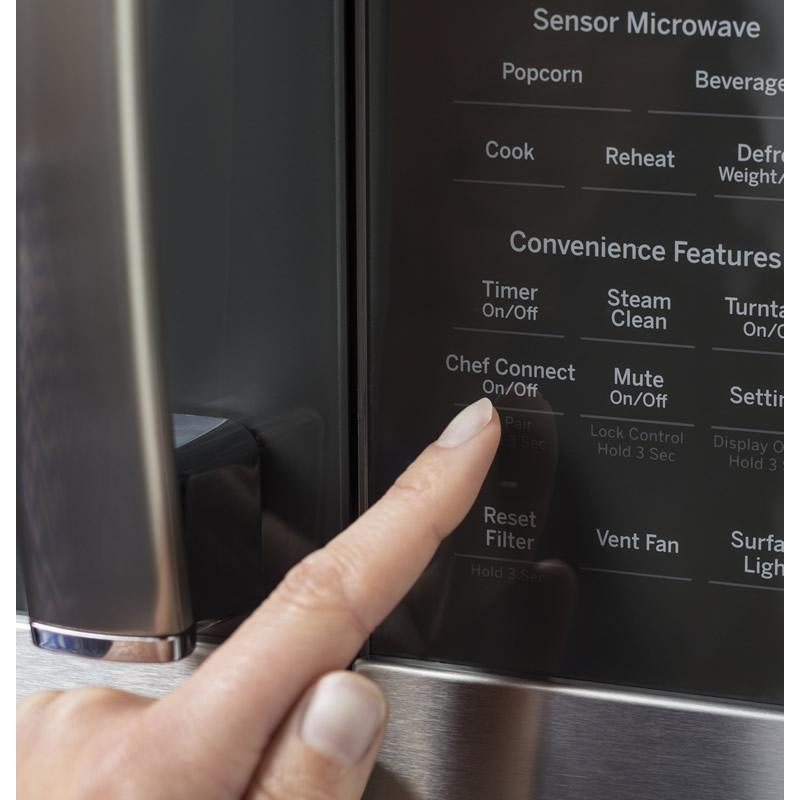
Most GE microwaves use a simple touchpad or control panel to operate the vent fan. You’ll usually find a button labeled “Vent Fan,” “Fan,” or with a fan icon. Depending on your model, there may be multiple speeds (Low, High, Off) or just an On/Off toggle.
Here’s what you typically see:
- Push once: Fan turns on low.
- Push again: Fan switches to high.
- Push again or hold: Fan turns off.
Some newer models have a digital display showing fan speed or status. On older models, you might only have indicator lights. GE’s website offers manuals for every model, but not everyone knows how to interpret the symbols or settings.
Step-by-step: How To Turn Off The Vent Fan On A Ge Microwave
Let’s walk through the process for most GE microwaves. If you have a model-specific question, check your manual, but these steps cover about 90% of situations.
1. Locate The Fan Control Button
The fan button is usually on the microwave’s front control panel, often near the cooking settings or with other ventilation options.
- Look for words like: “Vent Fan,” “Fan,” or a small fan-shaped icon.
- Some models put this button below the number pad or beside the “Light” button.
2. Cycle Through Fan Speeds
Press the button once. Most models will:
- Start on LOW speed.
- Press again for HIGH speed.
- Press a third time (or hold for 2 seconds) to turn it OFF.
If your microwave has a display, it may show “Fan Low,” “Fan High,” or “Fan Off. ” If there’s no display, listen for the sound or watch the indicator lights.
3. Confirm The Fan Is Off
- Wait a few seconds after pressing “Off.”
- The noise should stop, and any indicator lights should go out.
- If the fan keeps running, check if the automatic heat sensor is active (see next section).
4. If Fan Won’t Turn Off, Try This
Some GE microwaves have an auto-fan feature. If the unit senses heat from the cooktop, it will turn the fan on—even if you press “Off.” This is normal and protects the microwave.
- Let the microwave and cooktop cool down.
- After a few minutes, the fan should shut off automatically.
If it doesn’t, there may be a stuck button or a problem with the sensor (see troubleshooting below).
5. For Microwaves With Touch Screen Controls
A few newer models have a touch screen. Look for a “Settings” or “Options” menu.
- Tap “Fan.”
- Tap “Off” or swipe to adjust the speed.
- Confirm the fan status changes.
6. Models With Remote Or App Control
Some high-end GE microwaves connect to Wi-Fi and can be controlled with the SmartHQ app.
- Open the app, find your microwave, and look for the fan controls.
- Tap “Off” to turn the vent fan off.
Not all models support this feature, but it’s becoming more common.
Table: Ge Microwave Fan Control Methods
To help you quickly see the differences, here’s a comparison of common GE microwave fan control options:
| Model Type | Control Method | Fan Speed Options | Auto-Fan Feature |
|---|---|---|---|
| Standard Over-the-Range | Physical button | Low, High, Off | Yes |
| Touch Screen | On-screen menu | Multiple (Low, Med, High) | Yes |
| Wi-Fi Enabled | SmartHQ app | Low, High, Off | Yes |
| Basic Countertop | N/A (no vent fan) | N/A | No |
Why Does The Ge Microwave Vent Fan Sometimes Stay On?
This is a common issue. Your GE microwave might keep the vent fan running even after you press “Off.” This usually happens for two reasons:
- Automatic heat sensor: If the microwave detects high temperatures from the cooktop, it will keep the fan running to cool itself.
- Fan delay setting: Some models have a built-in delay (usually 2-5 minutes) before the fan shuts off.
This feature prevents damage to the microwave, especially if you’ve been boiling water or frying. It’s not a fault—just a safety design.
Non-obvious Insight 1
Many users don’t realize that blocking the microwave’s vents with objects or cabinets can make the fan run longer. The microwave has to work harder to cool itself, so always leave space around the vents.
Non-obvious Insight 2
If you often cook with high heat on the stove, the auto-fan may activate more often. Lowering your cooktop temperature can reduce how often the microwave fan runs.
Credit: aaappliancecenter.com
How To Turn Off The Auto-fan Feature
Most GE microwaves do not allow you to disable the auto-fan completely. It’s a built-in safety measure, and trying to override it may void your warranty or damage the appliance.
However, you can:
- Wait for the cooktop and microwave to cool down.
- Keep the area around the microwave clear for better ventilation.
- Use the cooktop at lower temperatures when possible.
If your manual says you can adjust or disable the auto-fan, follow those instructions. Most models, especially recent ones, do not offer this option for safety reasons.
Table: Fan Auto-activation Scenarios
Here’s a summary of when the vent fan will automatically turn on:
| Situation | Auto-Fan Activates? | User Control? |
|---|---|---|
| Cooking on cooktop under microwave | Yes | No (until cooled) |
| Microwave cooking only | No (unless overheating) | Yes |
| High kitchen temperature | Possible | No (until cooled) |
| Manual fan activation | No (user controlled) | Yes |
Troubleshooting: When The Vent Fan Won’t Turn Off
Sometimes, the vent fan gets stuck or won’t respond to the controls. Here’s what you can try:
1. Reset The Microwave
Unplug the microwave from the wall or flip the breaker switch for 30 seconds. Plug it back in. This can clear minor glitches.
2. Check For A Stuck Button
Sometimes, the fan button gets stuck or debris gets inside. Gently press the button a few times or clean around it.
3. Inspect The Control Panel
If the touchpad is unresponsive, moisture or dirt might be the cause. Wipe it with a soft, dry cloth. Avoid using water.
4. Let The Microwave Cool
If the auto-fan is on, give it 10-15 minutes. If the fan still doesn’t stop, there may be a sensor issue.
5. Call For Service
If none of the above work, the problem could be a faulty fan relay or control board. Contact GE service or a licensed repair technician. Do not try to open the microwave yourself, as this can be dangerous.
Practical Tips For Managing The Ge Microwave Vent Fan
- Use the fan only when needed. If you’re not cooking on the stove, keep it off to save energy and reduce noise.
- Clean the filters regularly. Dirty filters make the fan work harder and can cause it to run longer.
- Leave space around the microwave. Don’t block the vents with kitchen items.
- Don’t try to override safety features. The auto-fan protects your appliance.
- Use a lower cooktop heat to avoid triggering the auto-fan.
Many people forget to clean the charcoal or grease filters. A clogged filter is a common reason for poor venting and longer fan run times.

Credit: www.youtube.com
How To Clean The Ge Microwave Vent Fan Filters
Your microwave vent system has filters that need regular care. Neglecting this step can make the fan less effective and even create a fire hazard.
1. Find The Filters
- Grease filters are usually metal mesh and can be seen under the microwave.
- Charcoal filters (for recirculating models) are often behind a grille or panel.
2. Remove The Filters
- Slide or push the release tab to remove the filter.
- Some models require a screwdriver—check your manual.
3. Clean Or Replace
- Grease filters: Wash with hot, soapy water, rinse, and dry completely.
- Charcoal filters: These cannot be washed—replace every 6-12 months.
4. Reinstall
- Make sure the filters are fully dry before putting them back.
- Slide or snap them into place.
A dirty filter will reduce airflow, causing the fan to run more or fail to clear smoke and odors effectively.
Table: Filter Maintenance Schedule
How often should you clean or replace your filters? Here’s a handy guide:
| Filter Type | How to Clean/Replace | Frequency |
|---|---|---|
| Grease (metal mesh) | Wash with soap and water | Monthly |
| Charcoal | Replace with new filter | Every 6-12 months |
Advanced Settings: Fan Delay And Customization
Some GE microwaves allow you to adjust the fan delay—how long the fan stays on after cooking. This setting is usually found in the “Options” or “Settings” menu.
- To adjust: Press and hold the “Fan” button or enter the settings menu. Look for “Fan Delay,” “Auto Off,” or similar.
- Set the time: Usually 1-10 minutes.
Not all models have this feature, but it can help you balance noise and kitchen air quality.
When To Contact Support
If you’ve tried everything and the vent fan still won’t turn off, it’s time to call for help. Signs you need professional service:
- Fan runs all the time, even when cool.
- Control panel doesn’t respond.
- Error codes appear on the display.
- The fan is making strange noises or rattling.
Do not open the microwave yourself. There are high-voltage parts inside that can be dangerous.
For manuals, troubleshooting, and service scheduling, the official GE Appliances support page is a reliable resource: GE Appliances Support.
Real-world Examples
Let’s look at some practical scenarios:
- You finish boiling pasta on the stove. The microwave’s vent fan comes on and won’t turn off, even when you press the button. Solution: Let the cooktop cool. The fan will shut off automatically.
- You’re microwaving popcorn. After the timer ends, the fan keeps running. This could mean your kitchen is warm, or the microwave’s sensor is still detecting heat.
- The fan never turns off. Even after cooling, the fan keeps running. This may indicate a stuck relay or control panel problem—call for service.
Understanding these real-life situations helps you avoid unnecessary worry and focus on solutions.
Energy Usage And The Ge Microwave Vent Fan
You might wonder how much energy the vent fan uses. On average, the fan motor draws about 20–40 watts on low and 50–80 watts on high. Compared to other kitchen appliances, this is relatively low, but over time, it adds up.
- Running the fan 1 hour/day: About 20–80 kWh per year, depending on speed.
- Cost: At $0.15 per kWh, that’s $3–$12 per year.
While not a huge expense, turning off the fan when not needed can add up, especially if you’re trying to save on utility bills.
User Mistakes To Avoid
- Pressing the wrong button: Some people accidentally turn on the fan light or another feature instead of the fan off.
- Forcing the controls: Don’t press too hard or repeatedly—this can damage the touchpad.
- Ignoring regular filter cleaning: This leads to poor performance and more noise.
- Blocking the vents: Never cover the microwave’s vent openings with kitchen towels or objects.
- Trying to bypass the safety auto-fan: This can damage your microwave and is not recommended.
Key Takeaways For Turning Off The Ge Microwave Vent Fan
- Use the fan button or control menu to turn off the fan.
- Wait for the auto-fan to turn off if the cooktop is hot.
- Clean filters regularly to keep the fan working efficiently.
- If the fan won’t turn off, try resetting the microwave or contact support.
- Don’t try to disable built-in safety features—they protect your appliance.
Frequently Asked Questions
How Do I Know If My Ge Microwave Has A Vent Fan?
Most over-the-range GE microwaves have a built-in vent fan. If your microwave is installed above a stove or cooktop and has vent slots on the bottom, it probably has a vent fan. Countertop models usually do not.

Credit: www.toplineac.com
Can I Disable The Auto-fan Feature On My Ge Microwave?
No, the auto-fan is a safety feature and cannot be disabled on most models. It helps protect your microwave from heat damage. Some older models may allow limited customization, but this is rare.
What Should I Do If The Fan Button Is Stuck?
Try gently pressing the button a few times to free it. If it doesn’t respond, unplug the microwave for 30 seconds and plug it back in. If it’s still stuck, contact GE service for repair.
Is It Safe To Use The Microwave With The Vent Fan Off?
Yes, as long as you are not cooking on the stove below. If the microwave gets too hot, the auto-fan will turn on to protect the appliance. Using the microwave without the fan is safe in most situations.
How Often Should I Clean Or Replace The Vent Filters?
Grease filters should be cleaned every month. Charcoal filters (for recirculating models) need to be replaced every 6-12 months. Keeping filters clean helps your fan work better and last longer.
Turning off the vent fan on your GE microwave is usually simple, but understanding how the system works helps you avoid frustration and keep your appliance running smoothly. If in doubt, always check your manual or visit the official support site for the latest advice.
With these tips, you’ll have full control over your kitchen’s air quality and your microwave’s performance.