
If you own a Samsung refrigerator, you might think the only way to turn it off is by unplugging it. However, unplugging a refrigerator can be inconvenient, especially if your power outlet is hard to reach or you want to avoid moving the heavy appliance.
Maybe you need to clean, defrost, or fix your fridge, or you want to save energy while you’re away. Luckily, many Samsung refrigerators offer ways to turn off the appliance—or just the fridge or freezer section—without unplugging. Understanding how to do this keeps your food safe, protects your appliance, and gives you more control over your home.
This guide will show you how to turn off a Samsung refrigerator without unplugging. We’ll cover different Samsung models, including French Door, Side-by-Side, and Top Freezer. You’ll learn about key features like Demo Mode, Power Cool, and Power Freeze. We’ll walk through every method, step by step, with examples and simple explanations. You’ll also find helpful tables comparing methods, a troubleshooting section, and answers to common questions. By the end, you’ll feel confident handling your Samsung fridge like a pro.
Why You Might Want To Turn Off Your Samsung Refrigerator
There are many situations when you may want to turn off your refrigerator without disconnecting it from power:
- Defrosting: If ice builds up in your freezer, you may need to turn off the freezer or the whole fridge to let it melt.
- Cleaning: When cleaning inside the fridge, turning it off can prevent electrical problems and make it safer.
- Maintenance or Repairs: Sometimes, you need the fridge off to check or replace parts.
- Moving the Appliance: If you’re moving the fridge to a new spot, turning it off first helps prevent damage.
- Vacation or Extended Absence: When you’ll be away for weeks, you may want to turn off your fridge to save electricity.
- Energy Savings: Turning off the fridge during periods of low use can reduce your electricity bill.
But unplugging is not always the best or safest way. Modern Samsung fridges have built-in features that let you do this more easily.
Understanding Samsung Refrigerator Features
Before learning the methods, it’s helpful to know some common features in Samsung refrigerators that allow you to turn off the fridge, freezer, or both without unplugging.
Demo Mode (cooling Off Mode)
Demo Mode (sometimes called Cooling Off Mode) is a special function for display models in stores. When activated, the fridge’s cooling system turns off, but lights and controls still work. This is useful if you want to turn off cooling without losing power to the control panel.
Vacation Mode
Vacation Mode keeps the freezer running but turns off the refrigerator section. This feature is perfect when you leave home for a long time and want to keep frozen foods safe but save energy on the fridge.
Power Cool And Power Freeze
These are quick-cooling features, not ways to turn off your fridge. But knowing how to turn them off is important, because they can keep your appliance working harder than you want.
Control Panel Lock
Some models have a Control Lock. You may need to unlock it before you can change settings.
Independent Compartment Control
Higher-end Samsung fridges let you control the fridge and freezer sections separately. This means you can turn off just one compartment, which is useful for cleaning or repairs.

Credit: www.reddit.com
How To Turn Off A Samsung Refrigerator Without Unplugging
Let’s look at all the main ways to turn off your Samsung refrigerator using the control panel, settings, or buttons.
1. Using The Control Panel To Turn Off Cooling
Most Samsung fridges have a digital control panel on the front. This panel lets you adjust temperatures and turn cooling on or off.
Steps:
- Find the Control Panel: Usually, it’s located above the ice dispenser or inside the fridge.
- Locate the “Fridge” and “Freezer” Buttons: Some models have separate buttons; others use a single “Power Cool” or “Power Freeze” button.
- Press and Hold: For many models, press and hold the “Fridge” and “Freezer” buttons together for 5 seconds. This usually activates Demo Mode or turns off cooling.
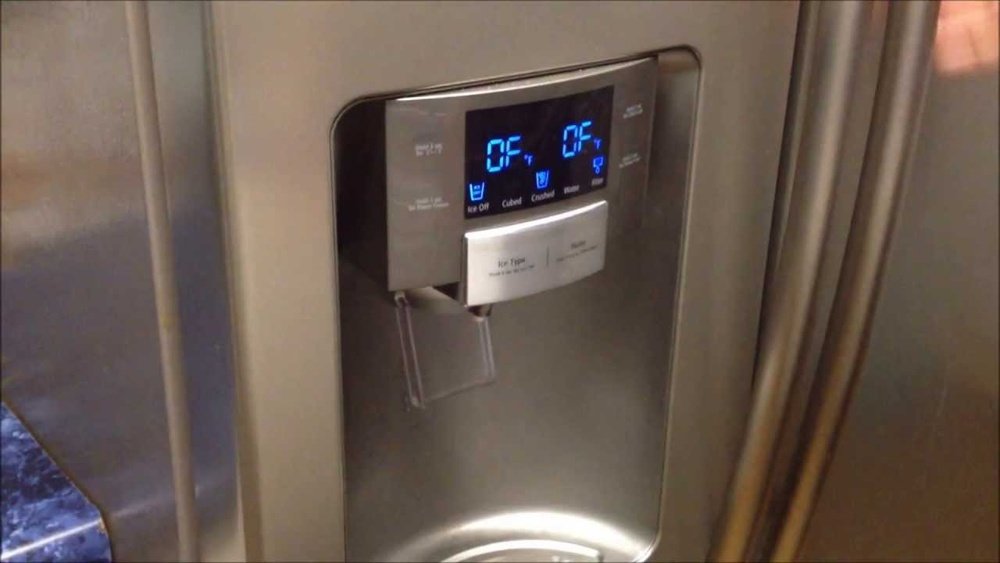
- Look for Confirmation: The display should show “OFF” or “O F F” for both the fridge and freezer. Some models display “OF-OF.”
- Check the Lights: The inside lights should still work, but the fridge will not cool.
Tip: Not all models use the same buttons. Check your owner’s manual if this does not work.
2. Activating Demo Mode (cooling Off Mode)
Demo Mode is the most common way to turn off a Samsung fridge without unplugging.
Steps:
- Access the Control Panel: Open the fridge door if the panel is inside.
- Press and Hold Specific Buttons: For many French Door models, press “Freezer” + “Fridge” together for 5–10 seconds. For some Side-by-Side models, press “Power Freeze” + “Freezer.”
- Wait for Confirmation: The display should read “OF-OF” or a similar message.
- Test: Open the fridge; if you don’t hear the compressor or fan, cooling is off.
Note: Some models require holding the “Lighting” button with another button, or even three buttons at once. Try combinations if the first does not work.
3. Using Vacation Mode
Vacation Mode is not a full shutdown—it turns off the fridge section but keeps the freezer running.
Steps:
- Find the Vacation Mode Button: It may be labeled “Vacation,” “Energy Saver,” or similar.
- Press the Button: Hold for 3 seconds.
- Check the Display: The fridge temperature indicator will often go blank, but the freezer stays on.
This is ideal if you want to save energy while keeping your frozen food safe.
4. Turning Off Only The Freezer Or Fridge Compartment
Some Samsung refrigerators let you turn off just the fridge or freezer section.
Steps:
- Access Compartment Control: On Twin Cooling or FlexZone models, look for buttons labeled “Fridge,” “Freezer,” or “FlexZone.”
- Set Temperature to “Off”: Press the compartment button until the display shows “OFF.”
- Verify: Only that compartment will stop cooling; the other will keep working.
This is helpful if you need to clean or repair one part but want to keep the other running.
5. Manual Temperature Adjustment
If your model doesn’t have Demo Mode, you can set the temperature to the highest setting to reduce cooling.
Steps:
- Press the “Fridge” or “Freezer” Button: Adjust until it shows the highest temperature (e.g., 44°F or 7°C for the fridge).
- Wait: This will not turn off the fridge, but it will minimize cooling.
Insight: This method is not as effective as Demo Mode but works for older models.
6. Using The Smartthings App
If your Samsung fridge supports Wi-Fi and the SmartThings App, you can control power and temperature remotely.
Steps:
- Connect Your Fridge to Wi-Fi: Set up using the fridge’s display.
- Open the SmartThings App: Find your fridge in the device list.
- Adjust Cooling Settings: Tap to turn off cooling or set compartments to “Off.”
Tip: This is handy for people who travel often or manage several appliances.
7. Power Off Button (rare Models)
A few Samsung refrigerators have a physical power button inside, often near the hinge or control panel.
Steps:
- Open the Fridge Door: Look near the top or side.
- Press and Hold the Power Button: The display should turn off.
- Verify: The fridge will stop cooling, but lights may stay on.
Non-obvious Insight: Not all users realize this button exists. Check your manual or look inside the fridge.
Comparing Methods: Which Is Best?
Different methods suit different needs. Here’s a quick comparison.
| Method | What It Does | Best For | Requires Manual? |
|---|---|---|---|
| Demo Mode | Turns off all cooling | Cleaning, maintenance | No (uses panel) |
| Vacation Mode | Keeps freezer on, fridge off | Long trips | No |
| Compartment Control | Turns off one section | Selective cleaning | No |
| Manual Temp Adjustment | Raises temp, reduces cooling | Older models | Yes |
| Physical Power Button | Full shutdown | Rare models | Yes |
| SmartThings App | Remote control | Smart models | No |
Pro Tip: Always check your user manual for exact button combinations. Samsung changes them often.
Samsung Refrigerator Models: Features And Compatibility
Your options depend on your fridge’s model. Here’s a summary of popular types and which features they support:
| Model Type | Demo Mode | Vacation Mode | Compartment Control | SmartThings Support |
|---|---|---|---|---|
| French Door | Yes | Yes | Yes | Some models |
| Side-by-Side | Yes | Yes | Some | Some models |
| Top Freezer | Maybe | No | No | Rarely |
| Family Hub | Yes | Yes | Yes | Yes |
Insight: The more expensive your Samsung refrigerator, the more control options you’ll likely have.
Step-by-step Examples For Popular Samsung Models
Let’s walk through examples for the most common Samsung refrigerators.
Samsung French Door Refrigerator
- Open the Right Door: Locate the control panel.
- Press and Hold “Fridge” + “Freezer”: Hold both for 5 seconds.
- Look for “OF-OF” on the Display: This means cooling is off.
- To Turn Cooling Back On: Repeat the step above.
Samsung Side-by-side Refrigerator
- Find the Control Panel: Usually on the front.
- Press and Hold “Power Freeze” + “Freezer”: Hold for 5–10 seconds.
- Check for “OFF” or “OF-OF” Display: Cooling is now off.
- To Reactivate: Repeat the same button combination.
Samsung Family Hub Refrigerator
- Go to Settings on the Touchscreen: Tap “Refrigerator Options.”
- Select “Cooling Off Mode”: Tap to activate.
- Confirm: The screen will display a message when cooling is off.
Pro Tip: If you see “O F” or “O FF” on the display, this is normal for Cooling Off Mode.

Credit: www.youtube.com
What To Do Before Turning Off Your Samsung Refrigerator
Before you turn off your fridge, a little preparation can prevent problems:
- Remove Perishable Foods: Milk, meat, and other items spoil quickly without cooling.
- Plan for Defrosting: If turning off for a long time, put towels to absorb melting ice.
- Disconnect the Water Line: If you’ll be cleaning or moving the fridge, turn off the water supply to avoid leaks.
- Unplug Only if Needed: If the control panel is broken, unplug as a last resort.
- Inform Household Members: Let everyone know the fridge will be off.
Non-obvious Insight: If you turn off only one section (fridge or freezer), you still need to remove food from that part, as mold or odors can develop quickly.
How To Turn Cooling Back On
When you’re ready to use your fridge again, reversing the process is simple:
- Hold the Same Buttons: Usually, holding the same combination as before will reactivate cooling.
- Wait for the Display: The temperature should reappear, and you may hear the motor start.
- Let the Fridge Cool: It can take several hours to reach the right temperature.
- Return Food to the Fridge: Only after it’s cold.
Tip: If the fridge doesn’t cool after reactivation, double-check that you exited Demo Mode.
Troubleshooting: When Turning Off Doesn’t Work
Sometimes, you might try these methods and find your fridge still cools, or the display doesn’t respond. Here’s what to check:
- Control Panel Is Locked: Look for a lock icon. Hold the “Lock” or “Child Lock” button for 3–5 seconds to unlock.
- Wrong Button Combination: Try different combinations or check your model number and manual.
- Firmware Issue: Smart fridges may need a reset. Unplug for 1 minute, then plug in and try again.
- Physical Power Button Hidden: On some models, the power button is inside, near the hinges or filter.
- Stuck in Demo Mode: If you can’t get out, repeat the button combination or consult Samsung support.
Safety Tips When Turning Off Your Refrigerator
- Never Leave Perishables Inside: Spoilage can lead to bad odors and health risks.
- Handle Water Carefully: Turning off the fridge can cause water from melted ice. Dry up spills quickly.
- Use Gloves for Deep Cleaning: Some cleaning agents can irritate your skin.
- Keep the Door Open: If the fridge is off for a long time, prop the door open to avoid mold.
- Do Not Force Buttons: Forcing buttons can damage the control panel.
Special Considerations For Older Samsung Refrigerators
If you have a Samsung fridge from before 2010, you may not have all these features. Here’s how to handle older models:
- No Demo Mode or Vacation Mode: The only options are adjusting temperature or unplugging.
- Manual Defrost: Some older freezers need manual defrosting. Turn the thermostat to zero and wait for ice to melt.
- External Temperature Dials: These dials can sometimes be turned to “OFF” or “0.”
Pro Tip: Always label your fridge with the model number. This helps you find the right instructions and order parts if needed.
Saving Energy Without Turning Off Completely
If your main goal is energy savings, but you can’t turn off your fridge, here are some extra tips:
- Keep the Door Closed: Every time you open the door, cold air escapes.
- Keep the Fridge Full: A full fridge stays cold longer, even if the power is off.
- Clean the Coils: Dusty coils make your fridge work harder.
- Set Temperatures Wisely: 37°F (3°C) for the fridge and 0°F (–18°C) for the freezer are recommended.
According to the U.S. Department of Energy, refrigerators use about 13% of the average home’s energy. Using Demo Mode or Vacation Mode when you’re away can lower this number.
For more energy tips, check the official Energy Saver site.
When To Call For Professional Help
If your fridge does not respond to any of these methods or you see error codes, it may be time to call Samsung customer support or a certified repair technician. Common signs include:
- Control Panel Not Responding: May require a circuit board reset.
- Frequent Demo Mode Activation: Could mean a faulty touch panel.
- Unusual Noises After Turning Back On: Could indicate a compressor issue.
- Leaks When Powering Off: Water line or defrost drain may be clogged.
A professional can diagnose and fix issues, ensuring your fridge is safe to use.
Real-world Example
Maria, a Samsung French Door refrigerator owner, wanted to deep-clean her fridge but didn’t want to unplug it (the plug was behind heavy cabinets). She tried the Demo Mode method: pressing “Fridge” and “Freezer” for 5 seconds. The display changed to “OF-OF,” and the fridge stopped cooling, but the lights still worked. She cleaned safely, then reversed the process to start cooling again. This simple step saved her time and effort.
Common Mistakes To Avoid
- Not Checking the Model Number: Button combinations can vary even for similar-looking fridges.
- Leaving Food Inside: Always empty the section you turn off.
- Forgetting to Unlock Controls: Control panels often have a lock function.
- Not Waiting for Full Shutdown: Give the fridge a few minutes to stop before cleaning or moving.
- Ignoring Error Codes: If you see strange symbols or error codes, check the manual or call for help.
Environmental Impact: Why It Matters
Turning off your fridge when not needed helps the environment. According to the U.S. Department of Energy, a typical refrigerator uses about 400–1,000 kWh per year. Using features like Demo Mode or Vacation Mode reduces your carbon footprint and saves money.
Credit: asappliancerepair.net
How Long Can A Samsung Refrigerator Stay Off?
- Short Periods (Up to 24 hours): Safe for cleaning or moving.
- Medium Periods (1–2 weeks): Use Vacation Mode; keep freezer on if needed.
- Long Periods (Months): Remove all food, clean, and prop the door open to prevent mold.
Insight: After a long shutdown, allow the fridge to run for at least 4 hours before refilling it with food.
Summary: Key Takeaways
- Most Samsung fridges let you turn off cooling without unplugging.
- Demo Mode is the simplest way for most models.
- Use Vacation Mode to turn off just the fridge section.
- Compartment control lets you turn off only one part.
- Always check your manual for exact instructions.
- Remove food before turning off any section.
- Reactivate cooling by repeating the button combination.
- Call for help if the fridge does not respond.
By following these steps, you can safely and easily manage your Samsung refrigerator’s power without unplugging.
Frequently Asked Questions
How Do I Know If My Samsung Fridge Is In Demo Mode?
When in Demo Mode, your Samsung refrigerator will show “OF-OF,” “O FF,” or “OFF” on the display, and the inside will not feel cold. The lights and control panel still work, but the cooling function is disabled. If you see these indicators and your food is not cold, it’s likely in Demo Mode.
Can I Turn Off Only The Freezer Or Fridge Section?
Yes, many modern Samsung refrigerators, especially French Door and FlexZone models, allow you to turn off just the fridge or freezer section. You can do this by pressing the compartment control button until the display shows “OFF. ” Always remove food from the section you turn off.
Will Turning Off My Samsung Refrigerator Erase My Settings?
No, turning off your refrigerator using Demo Mode or the control panel will not erase settings such as Wi-Fi, temperature preferences, or clock. However, unplugging the fridge may reset some advanced features, especially on smart models.
What Should I Do If The Control Panel Is Not Responding?
If the control panel is locked, look for a small lock symbol. Hold the “Lock” or “Child Lock” button for a few seconds to unlock. If the panel still doesn’t respond, try resetting the fridge by unplugging it for 1 minute.
If problems continue, contact Samsung customer support.
Is It Safe To Leave My Samsung Refrigerator Off For A Long Time?
Yes, but you should remove all food and clean the inside. Prop the door open to prevent mold and odors. For long absences, use Vacation Mode if you want to keep the freezer running. Before turning the fridge back on, let it run empty for a few hours before restocking with food.
By understanding your Samsung refrigerator’s features, you can turn it off safely and easily—without ever needing to unplug it. This knowledge helps you save energy, keep your appliance in good shape, and handle any situation with confidence.