
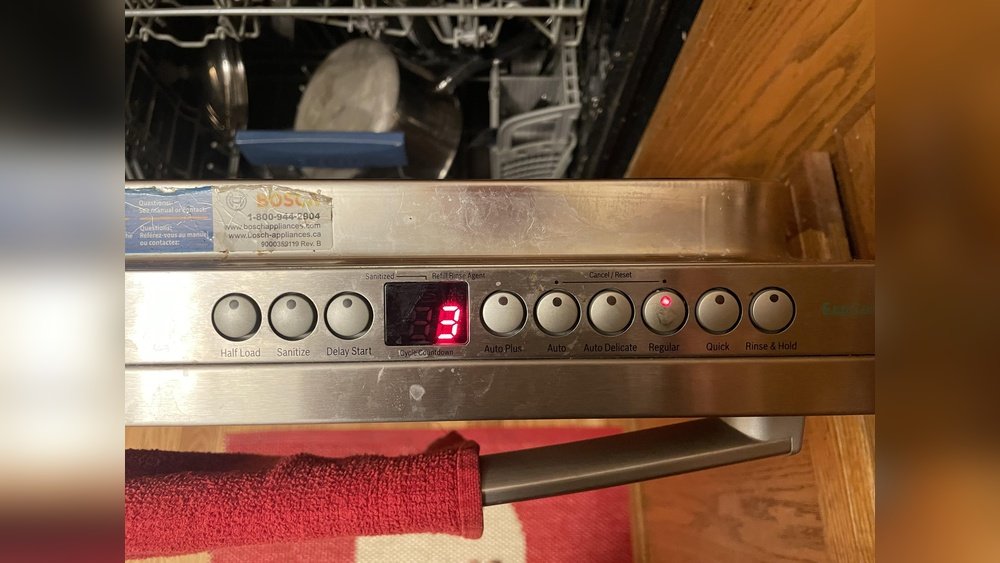
If you’ve ever loaded your dishwasher for a quiet evening only to hear a sudden beep when the cycle ends—or sometimes even in the middle of the wash—you’re not alone. Many modern dishwashers come with audio signals that alert you to different events, like the end of a cycle, errors, or when you forget to close the door properly. While these sounds serve a purpose, they can be annoying, especially if you run your dishwasher at night or live in a small space.
Turning off the dishwasher beep is not always as simple as pressing a mute button. Each brand and model has its own method, often hidden in the user manual or requiring a special button combination. This article will help you understand why dishwashers beep, how to disable or control beeps on popular brands, and what to do if things don’t go as planned.
We’ll also share tips, examples, and practical tables to make your experience smoother—no matter which dishwasher you have.
Why Do Dishwashers Beep?
Dishwasher beeps are not there just to annoy you. They have specific functions, and understanding them can help you decide whether you really want to turn them off.
- Cycle Completion: When a wash cycle finishes, the beep lets you know your dishes are ready.
- Error Alerts: Some beeps warn you about problems—like a blocked spray arm, water supply issues, or if the door is open.
- Button Feedback: Pressing buttons may cause a beep to confirm your input.
- Delayed Start: If you set a delayed start, you may hear a beep when the timer begins.
Non-obvious insight: The beeping sound can sometimes be a sign of an underlying error, not just a finished cycle. So, if the beep is different or repeats, check the display for error codes before turning it off.
Common Reasons To Turn Off Dishwasher Beep
Not everyone wants their dishwasher to beep. Here are some top reasons people look for the mute function:
- Noise sensitivity: Children, light sleepers, or pets can be disturbed by sudden beeps.
- Open floor plans: Noise carries further in homes without walls between kitchen and living spaces.
- Late-night washing: Many people run the dishwasher at night to save energy, but a beep can wake up the household.
- Frequent cycles: If you run multiple loads a day, the beeps can become disruptive.
Pro tip: If you’re using your dishwasher in a shared space (like an apartment), muting unnecessary sounds can help maintain good neighbor relations.
Credit: removeandreplace.com
How To Identify Your Dishwasher’s Beep Controls
Before you start pressing random buttons, it’s important to know how your dishwasher’s controls work. Not all dishwashers have an obvious mute setting, and some require a combination of buttons.
Check The User Manual
The user manual is always the best place to start. Look for sections labeled “Sound,” “Settings,” or “Signal. ” If you don’t have the manual, most brands offer free downloads on their official websites.
Control Panel Symbols
Modern dishwashers use icons or symbols. Common ones related to sound include:
- Speaker icon: Often indicates mute or volume control.
- Bell icon: Refers to alarms or signals.
- Gear or settings icon: Opens up advanced controls, sometimes including sound.
Model Number Matters
Even within one brand, different models have different methods. The model number, usually found on a sticker inside the door, is key to finding the exact instructions.
Non-obvious insight: Newer dishwashers sometimes let you control the beep volume, not just on/off.
How To Turn Off Dishwasher Beep: Step-by-step By Popular Brand
Let’s look at how to disable the beep (or adjust the volume) on the most common dishwasher brands. If your brand isn’t listed, the method is often similar to one of these.
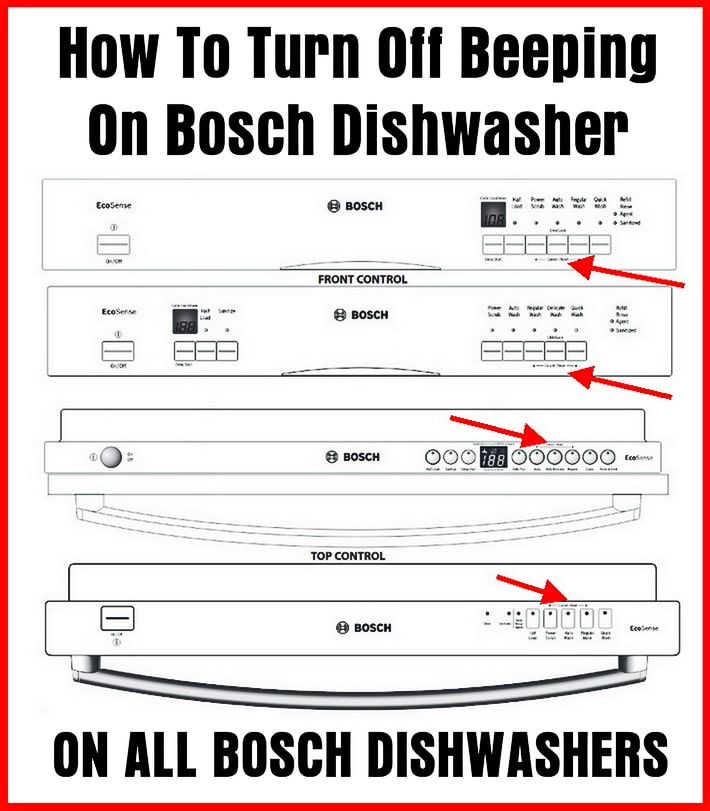
1. Bosch Dishwashers
Bosch is popular for being quiet, but their beeps can still be loud. Most Bosch models allow you to turn off the beep using a combination of buttons.
Steps:
- Open the dishwasher door (machine must be off).
- Press and hold the Start button while closing the door.
- Continue holding the Start button until the display shows “b: 01” or “b:00.”
- Use the < or **>** buttons to select “b: 00” (sound off).
- Press Start again to save.
Some Bosch models require holding the Delay and Start buttons together for 3–5 seconds. Always check your model’s manual.
Example: The Bosch 500 Series uses “b:01” for low beep, “b:00” for off.
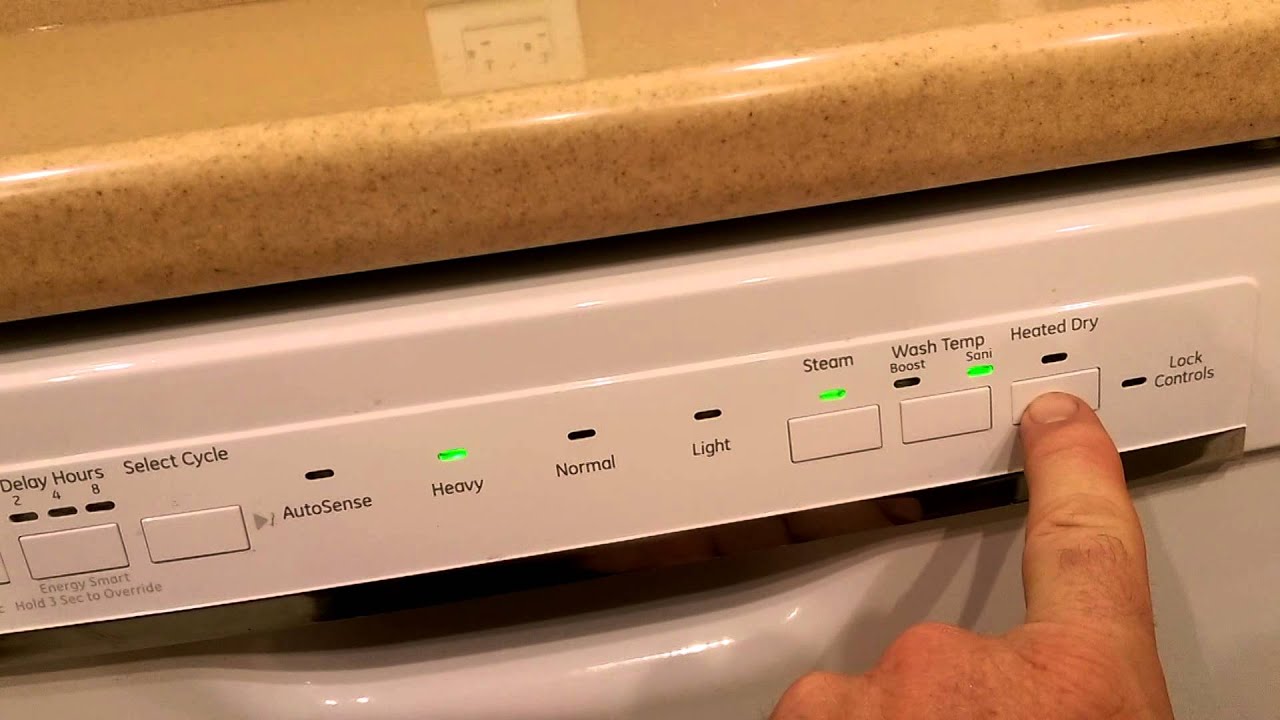
2. Ge Dishwashers
GE dishwashers have a clear mute option on many models.
Steps:
- Find the Heated Dry or Dry button.
- Press and hold it for 3 seconds.
- The display may flash or show “Sound Off.”
Some models use the Cycle Select and Start button combination.
Data point: According to GE, about 75% of their current models support the mute function directly on the panel.
3. Samsung Dishwashers
Samsung dishwashers often use symbols instead of words.
Steps:
- Press and hold the Sanitize or Hi-Temp Wash button for 3 seconds.
- The “Mute” icon or light will show up.
On some models, hold the Dry+ button instead.
Caution: On Samsung dishwashers, muting the beep may also mute error alarms. Check the display for error codes if you suspect a problem.
4. Whirlpool Dishwashers
Whirlpool’s approach depends on the model.
Steps:
- Press Heated Dry or Dry and hold for 3 seconds.
- Some models use Start/Resume + Cancel/Drain together.
If you see “Sound Off” on the display, the beep is off.
Tip: If this doesn’t work, unplug the dishwasher for 1 minute, then try again.
5. Lg Dishwashers
LG models often have a straightforward mute function.
Steps:
- Open the dishwasher door.
- Press and hold Dual Zone and Energy Saver at the same time for 3 seconds.
- The beep will toggle on/off.
Note: Some LG dishwashers call the setting “Chime” instead of “Beep.”
6. Kitchenaid Dishwashers
KitchenAid uses a similar method to Whirlpool (they are made by the same company).
Steps:
- Press and hold the Heated Dry or ProDry button for 3 seconds.
- If successful, the control panel will confirm “Sound Off.”
Practical tip: If the control panel is locked, unlock it first by holding the Control Lock button for 3 seconds.
7. Frigidaire Dishwashers
Frigidaire’s mute functions are less obvious.
Steps:
- Press the Hi-Temp Wash and Start/Cancel buttons together for 3 seconds.
- Some models require pressing Delay Start for 5 seconds.
Check for a “Mute” light on the panel.
8. Maytag Dishwashers
Maytag often uses the Heated Dry button for sound control.
Steps:
- Press and hold Heated Dry for 3 seconds.
- Some models use the Start/Resume and Cancel combination.
If you hear a single beep, the sound is off.
9. Miele Dishwashers
Miele’s controls are more advanced.
Steps:
- Open the door and turn off the dishwasher.
- Press and hold the Start button while turning the dishwasher on.
- Release Start when “Settings” appears.
- Use the arrow buttons to find “Signal Tones.”
- Set to “Off” or adjust the volume.
Bonus: Some Miele models let you adjust volume for end-of-cycle and error tones separately.
10. Other Brands
For dishwashers like Siemens, Beko, Electrolux, or Fisher & Paykel, the mute function is often a combination of holding down the Start button and another specific button for 3–5 seconds.
Always check the manual or the brand’s website for specifics.
Credit: www.youtube.com
Quick Reference: Popular Models And Mute Functions
Here’s a quick look-up table for fast reference.
| Brand | Common Mute Button(s) | Typical Hold Time | Notes |
|---|---|---|---|
| Bosch | Start + arrows | 5 sec | Use b:00 setting |
| GE | Heated Dry | 3 sec | Watch for display change |
| Samsung | Sanitize/Hi-Temp Wash | 3 sec | Mutes all sounds |
| Whirlpool | Heated Dry | 3 sec | Try unplugging if not working |
| LG | Dual Zone + Energy Saver | 3 sec | Called “Chime” on some models |
| KitchenAid | Heated Dry/ProDry | 3 sec | Unlock controls if needed |
| Frigidaire | Hi-Temp Wash + Start | 3 sec | “Mute” light may show |
| Maytag | Heated Dry | 3 sec | Listen for a single beep |
| Miele | Start + arrows | Varies | Advanced volume settings |
What If There’s No Mute Option?
Not every dishwasher has a built-in mute or volume control. Here’s what you can do if your model seems to lack a beep-off function.
Consult The Manual Or Manufacturer Website
Even if your control panel doesn’t mention mute, the manual might have a “hidden” feature. Search for your exact model online.
Use A Power Cycle
Some dishwashers reset sound settings after a power cycle:
- Turn off the dishwasher.
- Unplug from the outlet (or switch off the circuit breaker) for 1 minute.
- Plug back in.
This doesn’t always work, but can reset beeping errors.
Cover The Speaker
As a last resort, you can locate the speaker (usually a small grill behind the control panel) and cover it with a piece of tape to muffle the sound. Do not open the dishwasher’s internal panel unless you’re comfortable with electronics.
Safety warning: Opening the control panel can void your warranty or cause injury. Use this method only if other options fail.
Seek Professional Help
If the beep is due to a technical fault (like a persistent error code), a technician can often disable it or fix the cause.
Advanced Settings: Adjusting Beep Volume
Some high-end dishwashers allow you to adjust the beep volume instead of turning it off completely. This can be helpful if you want a quieter reminder, not total silence.
Example: Miele Beep Volume Levels
| Volume Level | Description | How to Set |
|---|---|---|
| 0 | Off | Settings > Signal Tones > 0 |
| 1 | Low | Settings > Signal Tones > 1 |
| 2 | Medium | Settings > Signal Tones > 2 |
| 3 | High | Settings > Signal Tones > 3 |
If your dishwasher offers multiple sound settings, try setting it to low instead of off. This way, you’ll still get important alerts without a loud beep.
Dishwasher Beep Troubleshooting
Sometimes, turning off the beep doesn’t work as expected. Here are some common issues and solutions.
Problem 1: Beep Returns After Power Outage
Some dishwashers reset all settings after a power cut. If your beep comes back, repeat the mute steps.
Problem 2: Persistent Error Beep
If your dishwasher beeps continuously and won’t stop, it’s likely an error. Check:
- The display for error codes (e.g., “E24,” “F2”)
- The door latch (must be fully closed)
- Water supply (make sure tap is open)
Don’t mute error beeps until the problem is fixed—they protect your appliance.
Problem 3: Control Panel Not Responding
If the buttons don’t respond, try:
- Unlocking the control panel (usually a “Control Lock” button for 3 seconds)
- Power cycling the machine
- Checking for child lock features
Problem 4: Beep Is Very Quiet/loud
Some users report that the beep is too quiet or too loud even on low settings. This can be a hardware design issue. Check your manual for volume adjustment or try contacting support.
Problem 5: Beep Only During Certain Cycles
Some dishwashers beep for specific cycles (like drying or rinse aid warning). In these cases, only that alert may be muted or adjusted—not all sounds.
The Impact Of Muting Dishwasher Beeps
Turning off your dishwasher’s beep is a personal choice, but it can have some side effects.
Pros:
- Quieter home environment
- No late-night disruptions
- Less stress for children or sensitive pets
Cons:
- May miss important alerts (cycle done, errors)
- Forgetting to unload dishes can lead to odor or spotting
- If the dishwasher leaks or malfunctions, you might not hear the warning beep
Recommendation: If you turn off all beeps, check your dishwasher display regularly for warning symbols or error messages.
When To Keep The Beep On
There are situations where it’s better to keep the beep enabled:
- Shared appliances: In offices or shared apartments, the beep tells the next user when the machine is free.
- Error-prone models: If your dishwasher tends to have leaks, clogs, or other issues, keeping the error beep can prevent bigger problems.
- Busy households: The beep serves as a reminder to unload dishes, especially in busy families.
Practical tip: If you only want to avoid nighttime beeps, try using a delay start timer so the cycle finishes during the day.
Silent Running: Other Ways To Reduce Dishwasher Noise
If you’re bothered not just by beeps but by overall dishwasher noise, here are a few strategies:
- Choose a quiet model: New dishwashers advertise decibel (dB) ratings. Under 45 dB is considered very quiet.
- Install insulation: Adding a sound blanket around the dishwasher can reduce operational noise.
- Level the dishwasher: An unbalanced machine can vibrate and be noisier.
- Run during the day: If possible, schedule cycles for when you’re not at home or awake.
Here’s a comparison of typical dishwasher noise levels:
| Noise Level (dB) | Description | Example Models |
|---|---|---|
| 38–44 dB | Very quiet, barely noticeable | Bosch 800, Miele G7000 |
| 45–50 dB | Quiet, low hum | GE Profile, KitchenAid Quiet Series |
| 51–60 dB | Normal conversation level | Older Whirlpool, Frigidaire |
| 61+ dB | Loud, can disturb sleep | Basic or older models |
Fact: The quietest dishwashers are now almost as silent as a library (40 dB).
Best Practices For Managing Dishwasher Sounds
To get the most out of your dishwasher’s sound settings:
- Test the mute function during the cycle, not just when idle.
- Record your steps: If you find a working method, write it down for next time.
- Update firmware: Some smart dishwashers can update through Wi-Fi and offer new settings, including sound control.
- Ask support: If you’re stuck, call customer support with your model number ready. They can walk you through advanced settings.
Extra tip: If you run the dishwasher when leaving the house, the beep won’t bother you—and your dishes will be ready when you return.
Credit: www.hunker.com
Frequently Asked Questions
Why Does My Dishwasher Keep Beeping Even When Off?
Some dishwashers beep to warn you about unfinished cycles, errors, or a door that’s not fully closed. If your dishwasher beeps when off, check for a flashing error code on the display. Also, try unplugging it for one minute to reset the electronics.
Will Muting The Beep Affect Error Warnings?
On most dishwashers, muting the beep disables all sounds, including error alerts. This means you need to check the display or indicator lights for problems. Some high-end models let you mute only the cycle end tone, not errors. Check your manual to be sure.
Can I Lower The Beep Volume Instead Of Turning It Off?
Yes, many newer dishwashers let you adjust the beep volume instead of just on/off. Look for “Signal Volume” or “Chime Level” settings in your manual or on the control panel. If your model doesn’t allow volume control, the only options are full beep or mute.
Is It Safe To Cover The Speaker To Stop The Beep?
Covering the speaker with tape can muffle the sound, but it’s not the safest or most effective method. Never open the control panel unless you know what you’re doing, as this can void warranties or cause electric shock. Always try the official mute function first.
Where Can I Find My Dishwasher’s User Manual?
You can usually find your dishwasher’s user manual on the manufacturer’s official website. Enter your model number (found inside the door) into the support or “manuals” section. For example, Bosch, GE, and Whirlpool all offer free PDF downloads. For more info, see Wikipedia’s dishwasher entry.
If you’re tired of the constant beep and want a quieter kitchen, following the steps above will help you regain control over your dishwasher’s sounds. Always refer to your model’s manual for the most accurate instructions, and don’t hesitate to reach out to customer support if you need extra guidance.
Remember, a silent kitchen is just a few button presses away!