
When you own a Traeger grill, you get the pleasure of wood-fired cooking with smart, digital controls. But one part that many users find confusing is how to shut down a Traeger the right way. Maybe you just finished a tasty brisket and want to turn off your grill safely, or perhaps bad weather is coming, and you need to pack up quickly. Whatever your reason, shutting down a Traeger is not as simple as unplugging it. If you do it wrong, you can damage your grill, waste pellets, or even create a safety risk.
In this article, you’ll get a complete guide to shutting down any Traeger model. You’ll learn step-by-step instructions, the “why” behind each action, common mistakes, and special tips for long-term storage. If you’re worried about leaving pellets in the auger, how to power off after a smoke session, or just want to care for your grill, you’ll find all the answers here.
By the end, you’ll have the confidence to shut down your Traeger like a pro, every single time.
Understanding Why Proper Shutdown Matters
Many new Traeger owners make the mistake of treating their pellet grill like a simple electric appliance. But a Traeger is more advanced—it has moving parts, a firepot with burning pellets, a fan, and an auger. If you simply unplug or “kill” the power, you can leave hot embers in the firepot. This can cause:
- Back-burn: Pellets continue to smolder inside, risking damage or fire.
- Clogged auger: Pellets may jam, leading to expensive repairs.
- Component damage: Sudden stops can stress the electronics.
A proper shutdown lets the grill safely burn off extra pellets, cool down internal parts, and keep everything working smoothly for years. Think of it like cooling down after exercise—you prevent injury and keep your grill in top shape.
The Different Types Of Traeger Grills
Before learning the shutdown process, it’s important to know which type of Traeger you own. Each model has its own controls, but all use the same basic shutdown steps. The main types are:
- Pro Series: The most popular models, with a digital display and “Shutdown Cycle” button.
- Ironwood/Timberline Series: Advanced models with WiFIRE controls and app connectivity.
- Older models (pre-2016): Simpler controls, often with a manual dial and no “shutdown” button.
- Tailgater/Ranger/Portable: Smaller, portable models with compact control panels.
Most new Traegers have a clear “Shutdown Cycle” option, but older or portable grills may not. Always check your user manual for your specific model.
Step-by-step: How To Shut Down A Traeger Grill
Now, let’s walk through the standard shutdown procedure that works for most Traeger models. These steps ensure your grill is safe and ready for next time.
1. Finish Cooking And Remove Food
When your food is done, use heat-resistant gloves to remove everything from the grill. Leaving food inside can cause overcooking or drying, and it’s easier to clean while the grill is hot.
2. Set Temperature To “shutdown Cycle”
If your Traeger has a digital controller (most models after 2016), you’ll see a “Shutdown Cycle” setting:
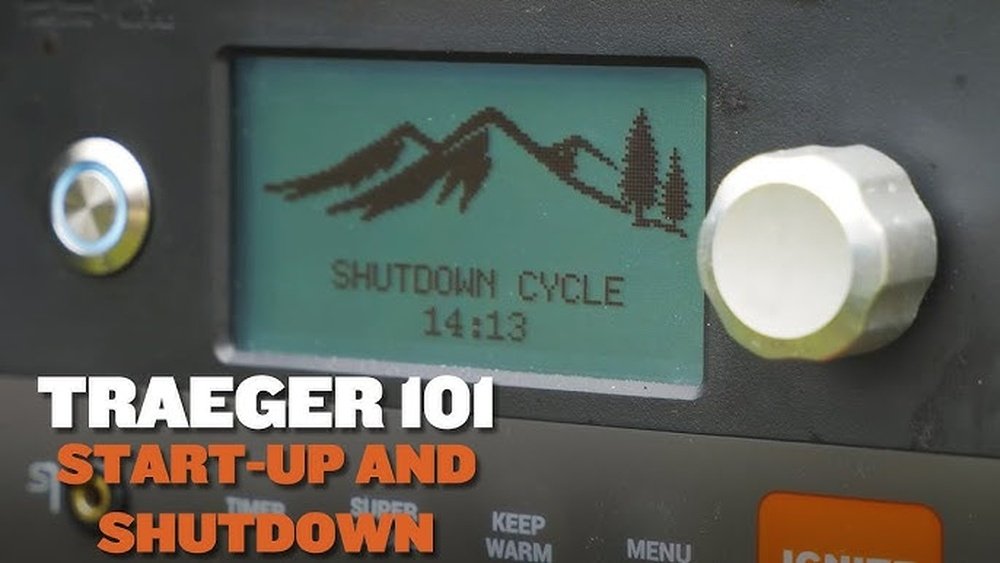
- Turn the dial to “Shutdown Cycle” or press the dedicated button.
- If there’s no shutdown option, turn the dial to “Off,” but read the manual for your model—some older grills require a manual cooldown.
The “Shutdown Cycle” tells the grill to stop feeding pellets but keeps the fan running. This burns off remaining fuel and cools the firepot safely.
3. Let The Fan Run Its Course
The fan will continue to run for 10-20 minutes, depending on your model. This is the most important part:
- Do not unplug or turn off the grill during this stage.
- The fan keeps the firepot from overheating and clears any smoke or embers.
- You may hear the fan stop and start—this is normal.
Interrupting this process can leave hot pellets in the auger, leading to jams or fires later.
4. Wait For Complete Shutdown
Once the fan has finished its cycle, the grill will power off automatically. You may hear a click or see the display go blank. Only then should you:
- Unplug the grill if you wish (for storms or long storage).
- Cover the grill to protect from weather.
On older models, you may need to manually turn the dial to “Off” once the fan stops.
5. Clean The Grill (optional But Recommended)
While the grill is still warm, use a grill brush to remove food residue. Empty the grease tray and drip bucket if needed. This prevents buildup and keeps the grill ready for your next cook.
6. Store Or Cover
If you’re done for the day, close the lid and cover the grill with a waterproof cover. If you plan to store the grill for weeks, see the storage section below.
Shutdown Procedure For Wifire And App-controlled Traeger Grills
If you own a newer WiFIRE-enabled Traeger (like Ironwood or Timberline), you can start the shutdown process from the Traeger app:
- Open the Traeger app on your phone.
- Tap “Power” or select “Shutdown Cycle.”
- The grill will begin its cooldown automatically.
- Wait until the app shows the grill is “Off” before unplugging.
WiFIRE models often have sensors and alerts for shutdown issues. If you get an error or the grill doesn’t power off, check for firmware updates or consult support.
What To Do If There’s No “shutdown Cycle” Option
Some old or portable Traeger grills lack a “Shutdown Cycle” mode. In these cases:
- Turn the temperature dial to “Smoke” or the lowest setting.
- Let the grill run for 10-15 minutes with the lid open.
- After this cooldown, turn the dial to “Off.”
- Wait for the fan to stop before unplugging.
This manual approach mimics the automatic shutdown by letting the grill burn off extra pellets and cool safely.
Common Shutdown Mistakes To Avoid
Even experienced users make errors. Here are mistakes to watch for:
- Unplugging too early: This leaves burning pellets in the auger and can damage your grill.
- Skipping the fan cycle: The fan must run after cooking, or smoke/embers stay trapped inside.
- Leaving the lid open during shutdown: This can allow rain or debris to enter the grill, causing rust or jams.
- Forgetting to clean grease: This can cause fires next time you cook, as grease builds up quickly in pellet grills.
- Not checking pellet hopper: Leaving wet pellets in the hopper during storage can cause swelling and blockages.
Remember, a good shutdown is as important as a good startup.
Detailed Comparison Of Shutdown Cycles By Model
To make it easier, here’s a comparison of shutdown times and methods for popular Traeger models.
| Model | Shutdown Cycle | Fan Duration | Manual Needed? |
|---|---|---|---|
| Pro 575 | Automatic | 15 min | No |
| Ironwood 650 | App or Grill Button | 20 min | No |
| Tailgater | Manual (Smoke/Off) | 10 min | Yes |
| Texas Elite 34 (pre-2016) | Manual (Smoke/Off) | 15 min | Yes |
| Ranger (Portable) | Manual | 10 min | Yes |
This table shows that most newer models handle shutdown for you, but older or portable grills require a manual process.
What Happens If You Don’t Shut Down Properly?
Failing to shut down a Traeger correctly isn’t just a small mistake—it can lead to serious problems:
- Pellet jams: Unburned pellets can swell with moisture and block the auger.
- Fire risk: Hot embers left in the firepot can flare up unexpectedly.
- Electronics failure: Sudden power cuts can damage the controller or sensors.
- Smoke and odor: A poorly shut down grill can fill your storage area with bad smells.
In the worst case, a blocked auger or stuck firepot means you’ll need expensive repairs. Some users have even reported total unit failure from repeated shutdown mistakes.

Credit: www.reddit.com
How To Shut Down For Long-term Storage
If you won’t use your Traeger for weeks or months, you need a few extra steps:
- Run a full shutdown cycle to clear all pellets from the firepot.
- Empty the pellet hopper completely. Pellets can absorb moisture, swell, and cause jams.
- Vacuum the firepot and auger with a shop vac. Remove ash and any leftover pellets.
- Wipe down grates and interior to remove grease and food particles.
- Cover the grill tightly with a waterproof cover. If possible, store indoors.
- Unplug from power to prevent electrical surges or pest problems.
Taking these extra steps keeps your grill safe and ready for the next season.
Do You Need To Unplug Your Traeger After Every Use?
Unplugging your Traeger is not required after every cook, but it can help with safety and power savings:
- If storms or power surges are common in your area, unplug after shutdown.
- If you use the grill often, it’s fine to leave it plugged in.
However, never unplug while the shutdown cycle is still running. Always wait until everything is cool and the fan has stopped.
Credit: support.traeger.com
Emergency Shutdown: What To Do In Case Of Fire Or Malfunction
Sometimes, you may need to shut down your Traeger quickly due to a grease fire, malfunction, or other emergency. Here’s what to do:
- Turn the dial to “Off” immediately.
- Unplug the grill from power.
- Keep the lid closed to starve the fire of oxygen.
- Do not use water—use a fire extinguisher rated for grease or electrical fires.
- Let the grill cool completely before inspecting or cleaning.
If the fire doesn’t go out or you see sparks, call emergency services. Never risk your safety for the grill.
Cleaning And Maintenance After Shutdown
A good shutdown is also a great time for basic cleaning:
- Brush the grates with a stiff brush while still warm.
- Empty the grease tray and bucket.
- Vacuum ash from the firepot every 2-3 uses for best performance.
- Check the pellet hopper for sawdust or wet pellets.
Regular cleaning after shutdown prevents flare-ups and keeps food tasting fresh.
Credit: support.traeger.com
Troubleshooting Shutdown Problems
Sometimes things don’t go as planned. Here’s how to solve common shutdown issues:
Grill Won’t Power Off
- Check if the shutdown cycle is complete.
- For WiFIRE models, try shutting down from the app.
- If the display won’t turn off, unplug the grill after the fan stops.
Fan Keeps Running
- Some fans run longer on hot days. Wait up to 30 minutes.
- If the fan never stops, check for error codes or blocked vents.
Error Message On Display
- “Pellet Jam” or “Low Temp” errors may appear if shutdown is interrupted.
- Let the grill cool, then clean the firepot and check the auger.
Unusual Smells Or Smoke
- Excess smoke after shutdown means pellets or grease are left inside.
- Clean out the firepot and drip tray before next use.
How To Shut Down A Traeger During A Power Outage
A power outage during shutdown can be tricky. Here’s what to do:
- Keep the lid closed.
- Do not open the grill until it’s cool (about 30-45 minutes).
- Once cool, unplug the grill and check the firepot for unburned pellets.
- Before your next cook, vacuum the firepot and auger to prevent jams.
A power surge or blackout can leave pellets burning in the auger, so always inspect and clean before restarting.
Advanced Shutdown: Pellet Purge And Auger Clearing
For expert users, you may want to clear pellets from the auger during shutdown:
- Run the shutdown cycle as normal.
- After the fan stops, remove the hopper access panel (if your model allows).
- Use a shop vac to suck out any leftover pellets from the auger area.
- This is especially useful before long-term storage or after using flavored pellets.
Not all users need to do this every time, but it’s a great way to prevent jams and keep your grill running like new.
Comparison: Traeger Shutdown Vs. Other Pellet Grills
How does Traeger’s shutdown process compare to other brands? Here’s a quick look.
| Brand | Shutdown Cycle | Automatic Cooldown | Manual Steps |
|---|---|---|---|
| Traeger | Yes (most models) | Yes | Older models only |
| Pit Boss | No | No | Required |
| Camp Chef | Yes | Yes | Optional |
| Z Grills | No | No | Required |
Traeger’s automatic shutdown cycle is one of its unique features, making it safer and easier for beginners. Other brands often require careful manual steps to avoid problems.
Non-obvious Insights For Traeger Shutdown Success
Here are two important tips that many beginners miss:
- Don’t remove pellets from the hopper while the grill is hot. Pellets can fall into the auger and cause a jam if the grill is cooling down or the auger is still turning. Wait until the shutdown cycle is complete and the grill is cool before removing pellets.
- Use a shop vac for deep cleaning after shutdown. A regular brush won’t remove fine ash and sawdust from the firepot and auger. A shop vac makes it quick and prevents buildup that can cause shutdown errors or fires.
Another overlooked detail: Always check the power cord and plug after every few uses. A loose or damaged cord can interrupt the shutdown cycle and cause electrical problems.
The Role Of Software Updates In Shutdown
For WiFIRE Traeger grills, software updates can affect how the shutdown process works. Traeger often releases updates to improve fan operation, safety, and pellet management.
- Always keep your grill’s firmware up to date.
- Updates can change fan duration or add new shutdown features.
- Check the Traeger app or website for the latest changes.
Software updates are one reason why your shutdown cycle might take longer or behave differently after an update. It’s not a malfunction—just an improvement.
Expert Tips For Extending Your Traeger’s Life
- Always complete the shutdown cycle. Skipping or rushing leads to problems.
- Clean the firepot every 2-3 uses.
- Store pellets in a dry place to prevent swelling and jams.
- Use a surge protector if your area has frequent power issues.
- Read your manual for model-specific shutdown advice.
Taking shutdown seriously is one of the best ways to keep your Traeger running smoothly for years.
When To Call Traeger Support
If you’ve followed all steps and your grill still won’t shut down correctly, it’s time to call Traeger support:
- Unusual fan noise or non-stop running
- Error codes that won’t clear
- Repeated pellet jams after shutdown
- Electrical smells or sparks
Don’t risk your safety or your investment—let the experts help. You can find support resources at the official Traeger Support page.
Frequently Asked Questions
How Long Does The Shutdown Cycle Take On A Traeger?
Most Traeger models complete the shutdown cycle in 10 to 20 minutes. Pro Series grills usually take about 15 minutes, while Ironwood and Timberline models can take up to 20 minutes. Always wait for the fan to stop before unplugging.
Can I Unplug My Traeger Right After Turning It Off?
No, you should never unplug your Traeger immediately after cooking. Always let the shutdown cycle finish. The fan needs to run to cool the grill and burn off leftover pellets. Unplugging too soon can cause jams or even fire risk.
What Should I Do If My Grill Was Unplugged During The Shutdown Cycle?
If you accidentally unplug your grill during shutdown, keep the lid closed and let it cool completely (about 30-45 minutes). Once cool, check the firepot and auger for leftover pellets or ash, and clean before your next use.
Is It Okay To Leave Pellets In The Hopper After Shutdown?
It’s safe to leave pellets in the hopper for a few days, but for long-term storage or wet weather, always empty the hopper. Moisture can cause pellets to swell, leading to jams and problems with the auger.
Why Does My Traeger Fan Keep Running After Shutdown?
The fan runs during the shutdown cycle to cool down the firepot and burn off extra pellets. This is normal and part of the safety process. If the fan runs for more than 30 minutes, or doesn’t stop, check for error codes or contact support.
Shutting down your Traeger properly is simple once you know the steps. Take your time, follow the advice here, and you’ll enjoy many years of safe, delicious grilling.