
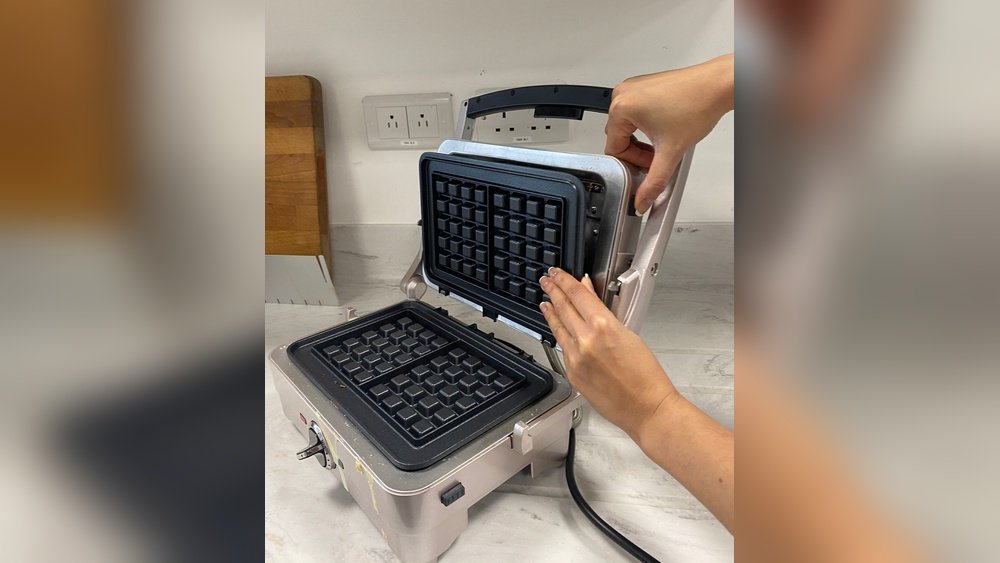
If you own a Cuisinart waffle maker, you already know the joy of fresh, crisp waffles at home. But after the last waffle is served, cleaning becomes the next challenge. Many people struggle with removing the plates from their Cuisinart waffle maker, unsure of the proper technique or worried about damaging the appliance. If you have ever found yourself searching for answers, this guide is for you. Here, you will discover all the steps, tips, and insights needed to safely and easily remove the plates from your Cuisinart waffle maker—no matter which model you own.
Why is this important? Removable plates make cleaning more thorough and extend the life of your machine. But if you handle them incorrectly, you could break a clip or scratch the non-stick surface. This article gives you clear, step-by-step instructions, highlights key mistakes to avoid, and offers pro-level advice you won’t find in a basic manual.
Whether you’re a first-time user or want to improve your cleaning routine, you’ll find practical, reliable guidance below.
Understanding Your Cuisinart Waffle Maker
Before you start, it’s essential to know which type of Cuisinart waffle maker you have. Not all models have removable plates, and the removal mechanism can vary. Understanding your model will make the process smoother and prevent accidental damage.
Common Models With Removable Plates
Cuisinart has several popular waffle makers with removable plates, including:
- Cuisinart Belgian Waffle Maker (WAF-300 Series)
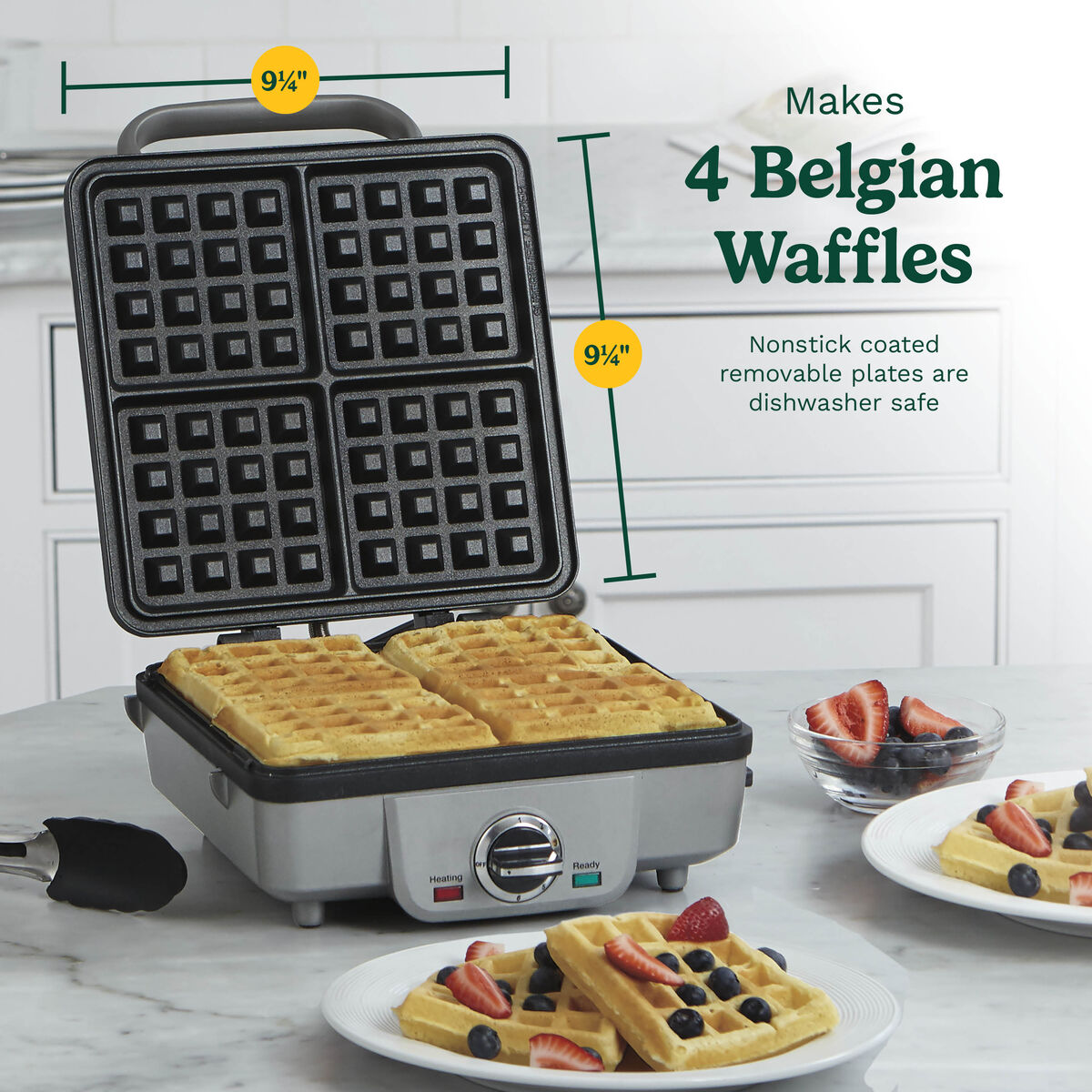
- Cuisinart 4-Slice Belgian Waffle Maker (WAF-150)
- Cuisinart Griddler & Waffle Plates (GR-4N, GR-5B, etc.)
These models feature snap-out or slide-lock plates. Some Griddler models use the same mechanism for both waffle and grill plates. If you’re unsure about your model, check the bottom or side of the appliance for the model number. Taking a moment to identify your specific model can save you time and frustration later, especially since not all Cuisinart waffle makers have this convenient feature.
How To Identify Removable Plates
Look for release buttons, levers, or tabs near the hinge or under the plate edge. Some plates have obvious push buttons on the side, while others have a sliding latch. If you see screws or no visible release, the plates are likely non-removable. Some models hide the release mechanism under a small plastic cover, which can confuse first-time users. Always gently test for movement—removable plates usually have a slight give, while fixed plates are solid.
Table: Cuisinart Models And Plate Removal
Below is a quick comparison of popular models and their plate removal types:
| Model | Removable Plates | Release Mechanism |
|---|---|---|
| WAF-300 | Yes | Side buttons |
| WAF-150 | No | — |
| GR-4N Griddler | Yes | Slide latch |
| WAF-F20 Double Belgian | No | — |
| WAF-V100 Vertical | No | — |
Pro Tip: Always unplug your waffle maker and let it cool before attempting to remove the plates. Even if you’re in a rush, skipping this step can lead to burns or damage.
Why Remove The Plates?
You might wonder if you really need to remove the plates every time. The answer depends on how often you use your waffle maker and how much batter spills or sticks.
Main Benefits
- Deep Cleaning – Removable plates let you wash away stuck batter and oil, preventing build-up and odors. This is especially important if you use flavored batters or add-ins like cheese, which can leave stronger smells.
- Longer Appliance Life – Clean plates reduce strain on the non-stick coating and heating element. Over time, baked-on residue can cause hot spots, making the machine heat unevenly or work harder than necessary.
- Hygiene – Food residue can hide in grooves; removing plates ensures all surfaces are clean. This helps prevent cross-contamination and keeps your waffles tasting fresh.
When Should You Remove The Plates?
- After every few uses, or whenever batter spills over. Even a small overflow can harden and stick.
- If you notice burnt spots, old oil, or sticking. These are signs that cleaning is overdue.
- Before storing your waffle maker for a long period. Clean plates prevent musty smells and make your next use easier.
A less obvious reason: If you switch between making waffles and grilling other foods (in multi-use models), removing and cleaning the plates avoids mixing flavors between dishes.
Tools And Materials You Will Need
Having the right tools makes the process easier and safer. Here’s what you need:
- Heat-resistant gloves or a thick towel (for extra safety): These protect your hands from unexpected hot spots, especially on models with metal frames.
- Soft sponge or dishcloth: For gentle cleaning, keeping the non-stick safe.
- Non-abrasive brush (for crevices): Useful for cleaning batter stuck in corners.
- Dish soap (mild, non-citrus): Strong enough to cut grease, gentle enough to avoid damage.
- Dry towel: For drying plates completely before reinstallation.
- Small bowl or sink (for soaking plates): Soaking helps loosen stubborn residue.
- User manual (optional, for model-specific tips): Sometimes, the manual includes helpful diagrams or troubleshooting advice.
Avoid using metal or sharp tools, as these can damage the non-stick surface. Even plastic knives can leave scratches over time.
Step-by-step Guide: Removing Plates From Cuisinart Waffle Maker
Now let’s get practical. Follow these steps for a smooth, safe process.
1. Unplug And Cool Down
Always unplug your waffle maker first. Wait until it is completely cool—usually 20–30 minutes. This protects you from burns and prevents warping of the plates. For faster cooling, open the lid and let air circulate. Don’t use cold water or fans, as rapid temperature changes can warp the plates or crack the non-stick layer.
Non-obvious insight: Even a “warm” plate can be hot enough to cause burns or bend slightly if removed too early.
2. Open The Waffle Maker Fully
Open the lid so you have full access to both the top and bottom plates. Make sure it’s on a stable, flat surface. If your counter is crowded or wet, move the machine to a safe spot before starting.
3. Locate The Release Mechanism
Find the release buttons, tabs, or latches. These are usually:
- On the side of the plate (WAF-300)
- Under the edge (Griddler models)
- Near the hinge (some older models)
Check your manual or look for small icons showing a plate being removed. If you’re unsure, gently feel around the edge of the plate for movement or loose sections.
4. Release The Plate
Most Cuisinart waffle makers use a push button or slide tab.
- For button models: Press the button firmly. You may hear a “click” as the plate pops out slightly.
- For latch models: Slide the latch away from the plate. Gently lift the plate from the side opposite the latch.
Pro Tip: Hold the plate with one hand while releasing with the other, so it does not fall. Sudden drops can chip the non-stick coating or bend the plate.
5. Remove The Plate
Lift the plate straight up or out, depending on the model. Some plates slide out at an angle, while others lift directly. If you feel resistance, double-check that the release is fully engaged—never force the plate.
- Top plate: Remove first, as it is lighter.
- Bottom plate: Remove after, as it may be more snug.
Set the plates on a towel or soft surface to avoid scratching. If you plan to clean them right away, take them straight to the sink.
6. Repeat For The Other Plate
Follow the same steps for the second plate. If the plates are identical, you can interchange them. If not, note which plate is for the top and which is for the bottom. Some models have small markings or shapes to show which plate fits where.
7. Clean The Plates (optional But Recommended)
Take this opportunity to wash the plates. Use warm water, mild dish soap, and a soft sponge. For stubborn spots, let the plates soak for 5–10 minutes. If you have a lot of built-up residue, a non-abrasive brush works well in the grooves.
If you notice a sticky or oily feel after washing, rinse again with warm water. Residue left behind can burn during your next use and affect the taste of your waffles.
Table: Plate Removal Steps Overview
Here’s a quick summary for reference:
| Step | Action | Details |
|---|---|---|
| 1 | Unplug & Cool | Wait 20–30 minutes |
| 2 | Open Lid | Full access to plates |
| 3 | Find Release | Button, tab, or latch |
| 4 | Release Plate | Press or slide, lift gently |
| 5 | Remove Plate | Straight up or angle |
| 6 | Repeat | Top and bottom plates |
| 7 | Clean Plate | Soft sponge, mild soap |
Model-specific Plate Removal Instructions
Let’s look at the most common Cuisinart models with removable plates, so you’ll know the exact process.
Cuisinart Waf-300 Series
- Locate the gray release buttons on the side of each plate.
- Press the button while pulling gently on the edge of the plate.
- The plate will pop out. Remove top, then bottom.
- To reattach, align the plate and snap it into place.
Some users find the buttons a little stiff the first few times. If that’s the case, gently wiggle the plate as you press the button. This helps release any tension in the mechanism.
Cuisinart Griddler (gr-4n, Gr-5b, Etc.)
- Each plate has a slide latch under the handle.
- Pull the latch toward you and lift the plate at an angle.
- The top and bottom plates use the same method.
- When reinstalling, slide the plate in and push the latch to lock.
For Griddler models, remember that the grill and waffle plates are often interchangeable, but always use the correct set for the function you want.
What About Non-removable Plate Models?
If your Cuisinart model does not have removable plates, do not try to force them out. This can damage the appliance and void your warranty. Instead, clean the plates in place using a damp cloth and brush.
Non-obvious insight: Some users mistake screws for removable plate mechanisms. These are for assembly only and should not be unscrewed. If you’re unsure, look up your exact model online or contact Cuisinart before attempting removal.
Safety Tips For Removing Waffle Plates
To keep your appliance and yourself safe, follow these extra tips:
- Always wait for the appliance to cool.
- Do not use metal objects to pry plates out.
- Hold the plate firmly to avoid dropping it.
- Check for cracks or loose parts before reattaching.
- Never soak the entire waffle maker in water.
Never use excessive force. If a plate doesn’t release easily, double-check that you’re using the correct mechanism and the machine is cool. Patience helps prevent costly mistakes.
Cleaning And Caring For Removable Plates
Proper cleaning extends the life of your non-stick plates and keeps waffles tasting great.
Step-by-step Cleaning
- Soak the plates in warm, soapy water for 5–10 minutes.
- Scrub gently with a soft sponge or brush.
- Rinse and dry thoroughly with a towel.
- Air-dry plates before reinstalling to prevent moisture damage.
For extra shine, you can wipe the plates with a little white vinegar and water solution (mix 1:1). This removes stubborn smells and leaves the plates fresh.
What To Avoid
- No steel wool or abrasive pads.
- No dishwasher unless the manual says it’s safe (most are not dishwasher-safe).
- Avoid citrus-based cleaners, which can degrade non-stick coating.
Even “gentle” scouring pads can leave tiny scratches that shorten the life of the plates. If in doubt, stick with soft sponges.
Regular Maintenance
- Wipe the outside of the machine with a damp cloth.
- Check that release buttons/latches are free of crumbs.
- Store plates loosely if not using the appliance for a long time.
Dust, crumbs, and oil can build up in the release mechanism over time. Cleaning these areas every few months keeps everything working smoothly.
Troubleshooting Common Problems
Even with clear instructions, you might encounter some challenges. Here’s how to fix them.
Plates Won’t Release
- Make sure the machine is unplugged and cool.
- Push the release button or latch firmly; sometimes it gets sticky.
- Gently wiggle the plate while pressing the release.
- If stuck, use a wooden chopstick wrapped in a towel to help lift the edge—never force it.
A common cause of stuck plates is batter hardening around the edges. Soaking with a damp cloth placed over the stuck area for a few minutes can help loosen it.
Plates Stuck After Cooking
- Let the plates cool completely—heat can make them expand.
- Check for hardened batter near the latch; clean it out with a toothpick.
- If still stuck, contact Cuisinart support for help.
Trying to force a hot plate can actually make it more difficult to remove and may damage the locking mechanism.
Plate Clips Broken
- Do not use the machine with broken clips.
- Replacement plates and parts are available from Cuisinart’s website.
- Avoid homemade repairs, which can be dangerous.
If you notice a clip is cracked but not fully broken, stop using the plate until you can replace it. Continuing to use it can cause further damage to your appliance.
Table: Troubleshooting Quick Guide
| Problem | Likely Cause | Solution |
|---|---|---|
| Plates won’t release | Not cool, sticky latch | Cool fully, wiggle gently |
| Clips broken | Excess force, age | Order replacements |
| Plates dirty after cleaning | Batter build-up | Soak longer, use brush |
Credit: www.cuisinart.com
Common Mistakes To Avoid
Many users accidentally damage their Cuisinart waffle makers by making these mistakes:
- Removing plates while hot – Can cause burns or warping.
- Using metal tools – Scratches the non-stick finish.
- Forcing stuck plates – Breaks clips and latches.
- Washing plates in dishwasher (unless specified) – Can strip non-stick coating.
- Mixing up top and bottom plates – Some models use different plates for each side.
Pro tip: If you’re unsure, always refer to your user manual or contact Cuisinart support. Taking a photo of the plates before removal can help you remember the correct position.
How To Reattach The Plates Correctly
Putting the plates back is just as important as removing them. Here’s how to do it right:
- Check for cleanliness – Make sure plates are dry and clean.
- Align the plate – Match the plate’s tabs or notches with the machine’s slots.
- Snap or slide in – Press gently until you hear a “click” or feel the latch engage.
- Test the fit – Wiggle the plate lightly; it should not move.
- Plug in and preheat – If the plate comes loose during heating, reattach it.
If the plate doesn’t sit flat, take it out and check for crumbs or debris in the grooves. Never force the plate into place—this can bend the tabs or break the locking mechanism.

Credit: www.ifixit.com
When To Replace Your Waffle Plates
Even with good care, waffle plates wear out over time. Look for these signs:
- Non-stick coating is peeling or scratched
- Plates are warped or bent
- Latch or clip is broken
Replacement plates are available for most Cuisinart models. Use only official parts to ensure safety and a proper fit. Using generic or wrong-sized plates may result in poor performance or even damage to your waffle maker.
Storing And Maintaining Your Cuisinart Waffle Maker
Proper storage helps avoid damage and keeps your waffle maker ready for next time.
- Store with plates removed and separated, if possible. This prevents pressure on the locking mechanism and helps the non-stick last longer.
- Keep the machine in a cool, dry place. Avoid humid areas, as moisture can cause rust or mildew on metal parts.
- Do not stack heavy items on top of the waffle maker.
Experience-based tip: If you use your waffle maker often, store plates in a soft cloth bag to avoid scratches. Labeling bags as “top” and “bottom” helps you reinstall plates correctly next time.
Where To Find More Help And Parts
If you have lost your manual or need new plates, visit the official Cuisinart website or their customer support page. They offer:
- PDF manuals for all models
- Replacement parts store
- Troubleshooting guides
You can also find helpful tips on Cuisinart’s official support page. If you’re unsure about your model or part compatibility, Cuisinart’s support team usually responds quickly to email or phone inquiries.
Frequently Asked Questions
How Do I Know If My Cuisinart Waffle Maker Has Removable Plates?
Check your model number and look for visible release buttons or latches near the plates. Most models with removable plates have these features. If you see no buttons or tabs, the plates are likely fixed. The user manual or the Cuisinart website can help you confirm.
Can I Wash The Plates In The Dishwasher?
For most Cuisinart waffle makers, hand washing is recommended. Some newer models have dishwasher-safe plates, but always check your manual first to avoid damaging the non-stick coating. When in doubt, hand washing is the safest option.
What Should I Do If The Release Button Is Stuck?
First, make sure the appliance is unplugged and cool. Clean around the button with a brush or toothpick to remove crumbs or batter. If it remains stuck, contact Cuisinart support for repair or replacement options. Avoid forcing the button, as it may break.
Is It Safe To Use The Waffle Maker If A Plate Is Loose Or Doesn’t Fit Well?
No. Using the appliance with a loose or improperly attached plate can cause uneven cooking and may damage the machine. Always secure the plates fully before use. Loose plates can also cause batter to leak into the machine, making cleaning much harder.
Where Can I Buy Replacement Plates For My Cuisinart Waffle Maker?
You can purchase official replacement plates directly from Cuisinart’s website or through authorized retailers. Avoid generic plates, as they may not fit correctly or could damage your appliance.
Removing plates from your Cuisinart waffle maker doesn’t have to be difficult or stressful. With the right knowledge and a careful approach, you can keep your appliance clean, safe, and ready for the next batch of waffles. Whether you’re a busy parent, a weekend chef, or just love homemade breakfasts, these steps will help you extend the life of your waffle maker and enjoy better-tasting waffles every time.
Credit: www.youtube.com