
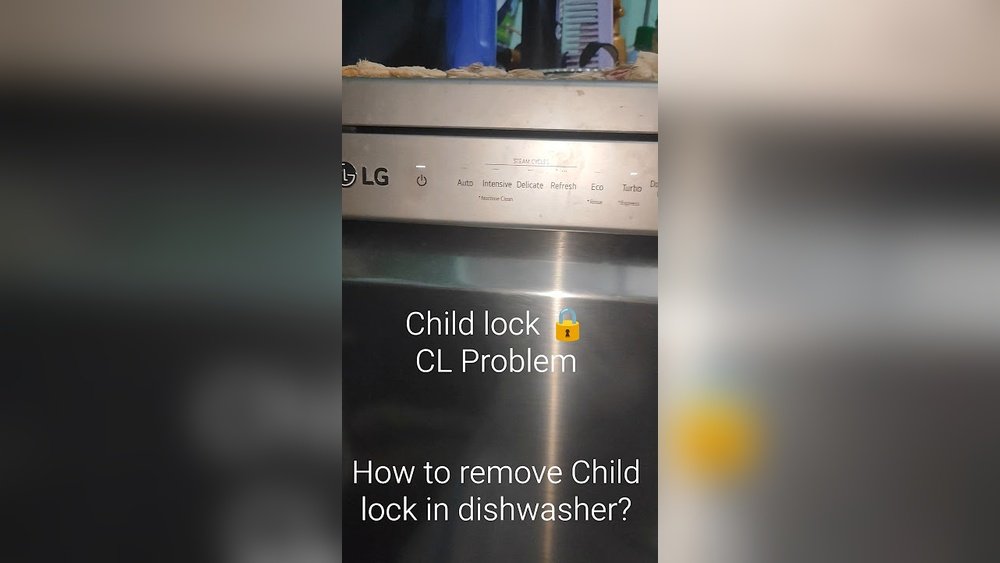
If you own an LG dishwasher, you might one day see the “CL” code flash on the display. For many users, this code can feel confusing and even alarming. You may wonder if your dishwasher is broken or if you need to call a technician immediately. The good news is that the “CL” code is not an error—it’s a child lock indicator. While it’s designed to keep your home safe, it can also prevent you from using the dishwasher until you clear it.
This guide will help you understand what the CL code means, why it appears, and exactly how to remove it. You’ll also learn how to use the child lock feature, ways to prevent future confusion, and how to troubleshoot if the code will not clear.
After reading, you’ll be ready to handle this situation confidently, saving both time and unnecessary stress.
What Does The Cl Code Mean On An Lg Dishwasher?
The CL code on an LG dishwasher stands for Child Lock. This feature is built into most LG dishwashers to keep children from starting the dishwasher or changing its settings during a cycle. When the child lock is active, the control panel buttons will not respond to touches, except for the power button on some models. The “CL” code will usually appear on the display, and the machine will not start or allow changes until the lock is deactivated.
Why Is The Child Lock Important?
The child lock feature is more than just a convenience. It’s a safety tool that prevents:
- Children from accidentally starting a wash cycle
- Changes to cycle settings during a wash
- Unintentional interruption or cancellation of cycles
This is especially useful in homes with small children or even curious pets.
How Does It Get Activated?
The child lock may be activated in several ways:
- Accidentally pressing the child lock button or a button combination
- Turning it on intentionally for safety
- Children playing with the dishwasher controls
On most LG models, the lock stays on even after the dishwasher is powered off and then back on. This means you may see the CL code even after a reset.
How To Remove The Cl Code On Lg Dishwasher (step-by-step)
Getting rid of the CL code is usually simple once you know the steps. However, the exact method can vary depending on your LG dishwasher model. Below are the most common ways to deactivate the child lock.
1. Identify Your Lg Dishwasher Model
First, look at the control panel of your dishwasher. LG uses different button layouts on different models. Check your owner’s manual or look for a model number sticker (often on the door edge or side panel). This will help you know which instructions to follow.
2. Locate The Child Lock Button Or Symbol
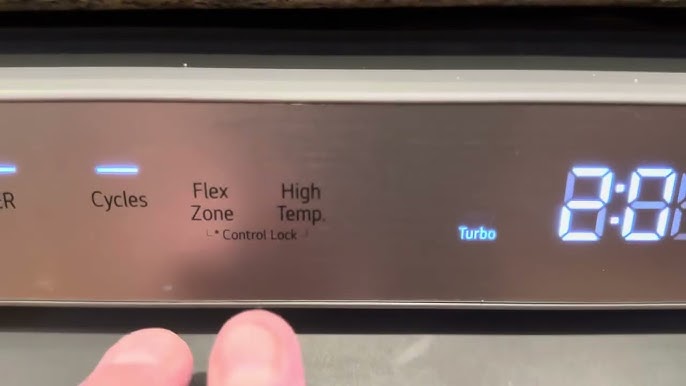
Most LG dishwashers have a dedicated Child Lock button or a button with a small lock icon. Others use a button combination. On the control panel, look for:
- A button labeled “Child Lock” or “CL”
- A button with a key or padlock symbol
- An option printed in smaller letters under another button
3. Common Ways To Turn Off The Child Lock
Depending on your model, try these methods:
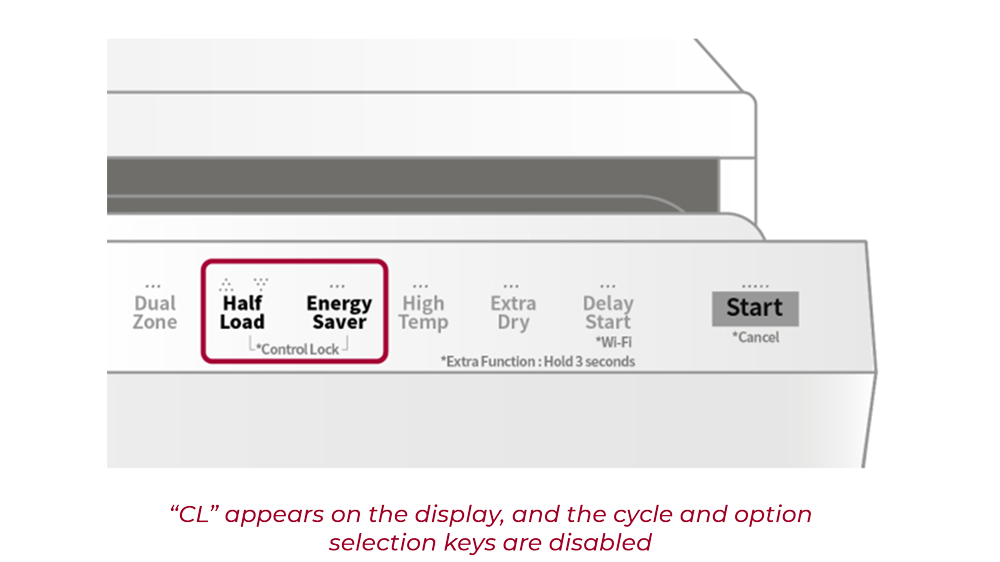
A. Hold The Child Lock Button
- Press and hold the “Child Lock” button for 3 to 5 seconds.
- The “CL” code should disappear from the display.
- You should now be able to use the dishwasher as normal.
B. Hold Two Buttons Together
On some models, you need to press and hold two buttons at the same time. The most common combinations are:
- “Dual Zone” + “Spray” (hold both for 3-5 seconds)
- “Rinse” + “Spray” (hold both for 3-5 seconds)
- “Delay Start” + “Sanitize” (hold both for 3-5 seconds)
Release the buttons after 3-5 seconds and check if the CL code goes away.
C. Power Cycle The Dishwasher
If the above steps don’t work:
- Turn off the dishwasher using the power button.
- Unplug it from the wall or turn off the breaker for 1 minute.
- Plug it back in and turn on the power.
Sometimes, this resets the control board and clears the code.
D. Consult The User Manual
If you still see the CL code, check your dishwasher’s user manual. Look in the “Child Lock” or “Control Lock” section for instructions specific to your model. If you can’t find your manual, you can search for your model number on the official LG website.
4. Step-by-step Example (most Common Lg Models)
Here is a typical process for many LG dishwashers:
- Locate the “Child Lock” or “Control Lock” button on the control panel.
- Press and hold the button (or the two required buttons) for 3-5 seconds.
- Watch for a beep or the “CL” code disappearing.
- Try pressing other control buttons to see if they now work.
5. What If The Child Lock Will Not Turn Off?
If you follow the steps exactly and the code will not clear, try these extra tips:
- Make sure you are pressing the correct buttons (check for small lock icons).
- Clean the control panel with a dry cloth (moisture or dirt can block touch sensors).
- Try unplugging the dishwasher for 10 minutes before repeating the steps.
- Test the buttons to see if any are physically stuck or damaged.
If the code still remains, there may be a problem with the control board or touchpad. In this case, you may need a professional repair.
Common Lg Dishwasher Models And Their Child Lock Methods
To help you further, here’s a comparison of popular LG dishwasher models and their child lock deactivation methods:
| Model Series | Child Lock Deactivation | Special Notes |
|---|---|---|
| LG LDF5545ST | Press and hold “Dual Zone” for 3-5 seconds | Control lock light turns off when deactivated |
| LG LDP6797ST | Press and hold “Rinse” + “Spray” together | Look for lock icon near buttons |
| LG LDS5040ST | Press and hold “Child Lock” button | Some models beep when unlocked |
| LG LDT7808SS | Press and hold “Dry” + “Half Load” together | Display flashes when unlocked |
These are just examples. Always check your manual for model-specific instructions.
Why The Cl Code Might Not Go Away
Sometimes, the CL code will not clear even after you follow the steps. This is rare, but possible. Here are the main reasons:
1. Stuck Or Faulty Buttons
If a button on your control panel is stuck down or not working, the dishwasher may not register your attempt to turn off child lock.
- Try pressing all the buttons to make sure none are sticking.
- Wipe the panel with a dry microfiber cloth.
2. Moisture Or Dirt On The Control Panel
If the control panel is wet or dirty, the touch sensors may not work correctly.
- Dry the panel with a clean cloth.
- Avoid spraying cleaner directly on the panel; instead, spray on the cloth first.
3. Control Board Issues
The electronic control board inside the dishwasher could be malfunctioning.
- Try unplugging the dishwasher for 10-15 minutes to reset the electronics.
- If the problem continues, you may need to have the control board checked or replaced.
4. Software Glitches
Rarely, a software bug can cause the lock to stay on. LG may release firmware updates for some models, but these usually require a technician.
5. Incorrect Button Combinations
Each model has its own method. Using the wrong combination will not work. Double-check your manual or the LG website for your exact model.
How To Use Child Lock Properly
The child lock is a valuable feature, but only if you use it as intended. Here’s how to use it safely:
- Activate the lock when children are present or when cleaning the kitchen.
- Deactivate the lock only when you need to use the controls.
- Do not use the lock as a fix for other issues (like random beeping or cycle errors).
Activating Child Lock
Most often, you activate the lock the same way you deactivate it—by pressing and holding the button or combination for 3-5 seconds until the “CL” code appears.
When To Use Child Lock
- During parties or family gatherings with small children
- If your dishwasher is near a play area
- When cleaning the front of the machine
When Not To Use Child Lock
- If adults need to use the dishwasher regularly throughout the day
- If you suspect a button is malfunctioning
Preventing Future Cl Code Confusion
Many people see the CL code and think something is wrong with their dishwasher. Here’s how you can avoid confusion next time:
- Label the Button: If your buttons are not clearly marked, consider using a small sticker to highlight the child lock button.
- Educate Family Members: Show everyone in the house how to turn the feature on and off.
- Keep the Manual Handy: Store the manual in a drawer near the kitchen.
- Regularly Clean the Control Panel: Prevents accidental activation from dirty hands or spilled liquids.
- Write Down the Process: Put a small note on the inside of a cabinet as a reminder for guests or family.
Credit: sparkservice.ca
Troubleshooting: Cl Code Still Won’t Clear?
If you’ve tried all the steps above and the code will not go away, try these advanced troubleshooting steps:
1. Hard Reset The Dishwasher
- Unplug the dishwasher from the wall.
- Wait at least 15 minutes.
- Plug it back in and try again.
This can clear minor electronic glitches.
2. Inspect For Physical Damage
Check for:
- Cracked or broken control panel
- Signs of water damage inside the door
- Loose wiring if you are comfortable removing the door panel (only if you have experience)
3. Check For Error Codes
Some LG dishwashers can display other codes alongside CL. If you see codes like “LE”, “OE”, or “HE”, you may have a separate issue. In this case, resolve the error code first.
4. Contact Lg Support
If all else fails, contact LG customer support or an authorized repair service. You can find contact info on the LG official site or in your manual.
The Difference Between Cl Code And Other Error Codes
It’s important to know that CL is not an error—it’s a status code. Here’s how it compares to other LG dishwasher codes:
| Code | Meaning | Action Needed |
|---|---|---|
| CL | Child Lock is active | Deactivate lock to resume normal use |
| OE | Drain error | Check for clogs in the drain hose or filter |
| LE | Motor error | May need professional repair |
| HE | Heater error | Check for faulty heater or wiring |
Remember: If you see “CL” alone, it’s just the child lock. If you see another code, address that code first.
Real-world Example: How A Family Fixed The Cl Code
Maria, a busy mother of three, noticed her LG LDF5545ST dishwasher was not responding. The display showed “CL,” and none of the buttons worked. At first, she thought the dishwasher had broken. After searching online, she learned about the child lock. She found the “Dual Zone” button and pressed it for five seconds. The “CL” code vanished, and the dishwasher worked again.
Maria now teaches her children not to play with the buttons. She also put a small label near the child lock button to avoid future confusion. Her experience shows how common this issue is and how easily it can be solved.
When To Call A Technician
Most CL code issues are simple, but sometimes you need expert help. Call a technician if:
- The control panel is unresponsive to all buttons
- The CL code comes back immediately after clearing
- There is visible damage or water inside the control area
- Other error codes appear alongside “CL”
A technician can test the control board and replace faulty parts if needed.
Credit: authorizedco.com
How To Find Your Lg Dishwasher Manual
If you don’t have a paper manual, you can download one from the LG official website. Go to the support section and enter your model number. Manuals are usually free and contain step-by-step guides, diagrams, and troubleshooting advice.
Here’s a helpful resource: LG Official Manuals & Documents
Extra Tips For Dishwasher Owners
Besides handling the CL code, here are some tips to make your LG dishwasher last longer and work better:
- Clean the filter regularly to prevent clogs and odors.
- Use the right detergent—avoid too much soap, which can cause residue.
- Run hot water before starting to improve cleaning power.
- Check spray arms for blockages every month.
- Wipe the door seal to prevent leaks and mold.
- Don’t overload racks—this lets water and detergent reach every dish.
- Leave the door slightly open after cycles to dry out the machine.
Credit: www.youtube.com
Pros And Cons Of The Lg Dishwasher Child Lock Feature
To help you decide when to use the child lock, here’s a quick comparison:
| Pros | Cons |
|---|---|
|
|
Knowing both sides can help you use the feature wisely and avoid frustration.
Frequently Asked Questions
What Does The Cl Code Mean On An Lg Dishwasher?
The CL code means the child lock is active. This feature locks the control panel to prevent children from starting or changing dishwasher cycles. It is not an error code, and the dishwasher will not run until you turn the lock off.
How Do I Turn Off The Child Lock If I Lost The Manual?
Most LG dishwashers require you to press and hold a button (like “Child Lock,” “Dual Zone,” or a combination such as “Rinse” + “Spray”) for 3-5 seconds. If you’re unsure, search your model number on the LG website or try the most common button combinations listed in this article.
Will Unplugging The Dishwasher Remove The Cl Code?
Sometimes, unplugging the dishwasher for a few minutes resets the electronics and clears minor glitches, including a stuck CL code. However, on most models, the child lock remains active even after losing power, so you’ll likely need to use the button method.
Can The Cl Code Mean Something Is Broken?
Usually, CL is not a sign of damage. It simply means the child lock is on. However, if the code will not clear after following all steps, there could be a problem with the control panel or electronic board, which may require professional repair.
Is The Child Lock Feature Available On All Lg Dishwashers?
Most modern LG dishwashers have a child lock feature, but older or basic models may not. Check your product’s manual or the LG official site to confirm if your model has this safety feature.
If you follow the steps in this guide, you’ll be able to remove the CL code from your LG dishwasher quickly and safely. Understanding how the child lock works not only solves the problem but also helps you keep your kitchen safer for everyone.
Take a few minutes now to check your model and practice turning the lock on and off, so you’re ready next time you see “CL” on your display.