
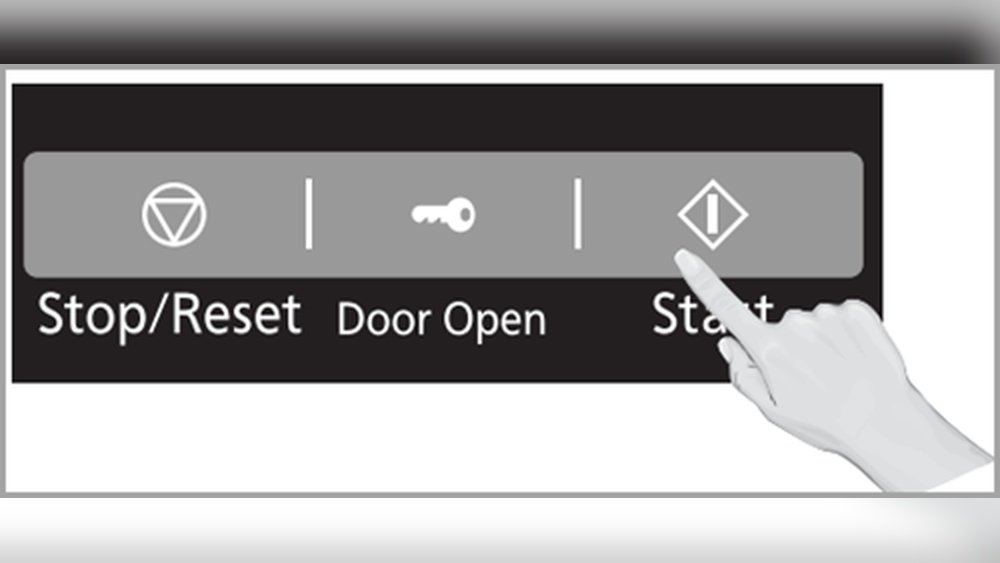
Every modern kitchen has a microwave. These machines make life easier by heating food in seconds. But what happens when a key symbol appears on your microwave’s display? For many, it’s confusing and sometimes scary. The microwave stops working, and you may worry something is broken. Don’t panic. The key symbol is a common issue and almost always simple to fix. This guide will walk you through what it means, why it happens, and how to solve it yourself, even if you are not a technical expert. You’ll also learn how to prevent this from happening again and when to call for help.
Understanding The Key Symbol On A Microwave
The key symbol (sometimes shown as a padlock or a small key) usually means your microwave’s child lock or control lock feature is active. This is not a malfunction. Instead, it’s a safety feature used to prevent accidental operation, especially by children. When active, you cannot use the microwave’s buttons or start it. This feature is available in almost every modern microwave model, including brands like Samsung, Panasonic, LG, and Whirlpool.
Some microwaves display a padlock; others show a small key or even a message like “LOC” or “LOCK.” All these mean the same thing: the controls are locked.
Why Do Microwaves Have A Key Symbol?
- Child Safety: Prevents children from starting the microwave and possibly hurting themselves.
- Cleaning Mode: Stops the microwave from starting if you are cleaning the control panel.
- Avoid Accidental Use: Prevents accidental presses when moving or cleaning the microwave.
Common Reasons The Key Symbol Appears
Before you start fixing, you need to know why the key symbol appeared. Here are the most common reasons:
- Child Lock Activated Accidentally: Sometimes, you may press a combination of buttons that turns on the child lock without realizing it.
- Power Outage or Reset: After a power cut or unplugging, some microwaves reset with the child lock on.
- Cleaning Touch Panel: Wiping the control panel can sometimes trigger the lock feature.
- Settings Changed: A family member may have turned it on for safety.
- Technical Glitch: Rarely, a software bug can cause the lock to activate or not turn off.

Credit: www.dreamstime.com
How To Identify If The Key Symbol Means Child Lock
If you see the key symbol and none of the buttons work, it is almost always the child lock. Try to press other buttons like “Start” or “Stop.” If you cannot use any function or if the microwave beeps but does not start, the lock is active.
Some models may show “LOC,” “LOCKED,” or “SAFE” instead of a symbol. Check your microwave’s display and see if you find any of these.
How To Fix The Key Symbol On Microwave
Now, let’s fix the problem. The steps will vary based on your microwave brand and model. Most brands use a similar process, but the button combinations may be different. Always start by reading your microwave’s manual. If you don’t have it, follow these general solutions.
General Steps To Unlock Child Lock
Most microwaves use a simple button combination to turn off the lock:
1. Press And Hold The Stop/cancel Button:
Hold the Stop/Cancel button for 3–5 seconds. You may hear a beep, and the key symbol disappears.
2. Use The Start/enter Button:
On some models, press and hold the Start/Enter button for 3–5 seconds.
3. Press Number ‘0’ Or ‘clear’:
For some microwaves, holding down the 0 or Clear button works.
4. Combination Of Buttons:
Some brands ask you to press Stop and Start together for a few seconds.
Here’s a quick comparison of common brands and their unlock methods:
| Brand | How to Unlock | Symbol/Text |
|---|---|---|
| Samsung | Hold Stop/Cancel 3 sec | Key or Lock |
| LG | Hold Stop/Clear 5 sec | Child Lock |
| Panasonic | Press Stop/Reset 3 sec | Padlock |
| Whirlpool | Hold Start 3 sec | LOC |
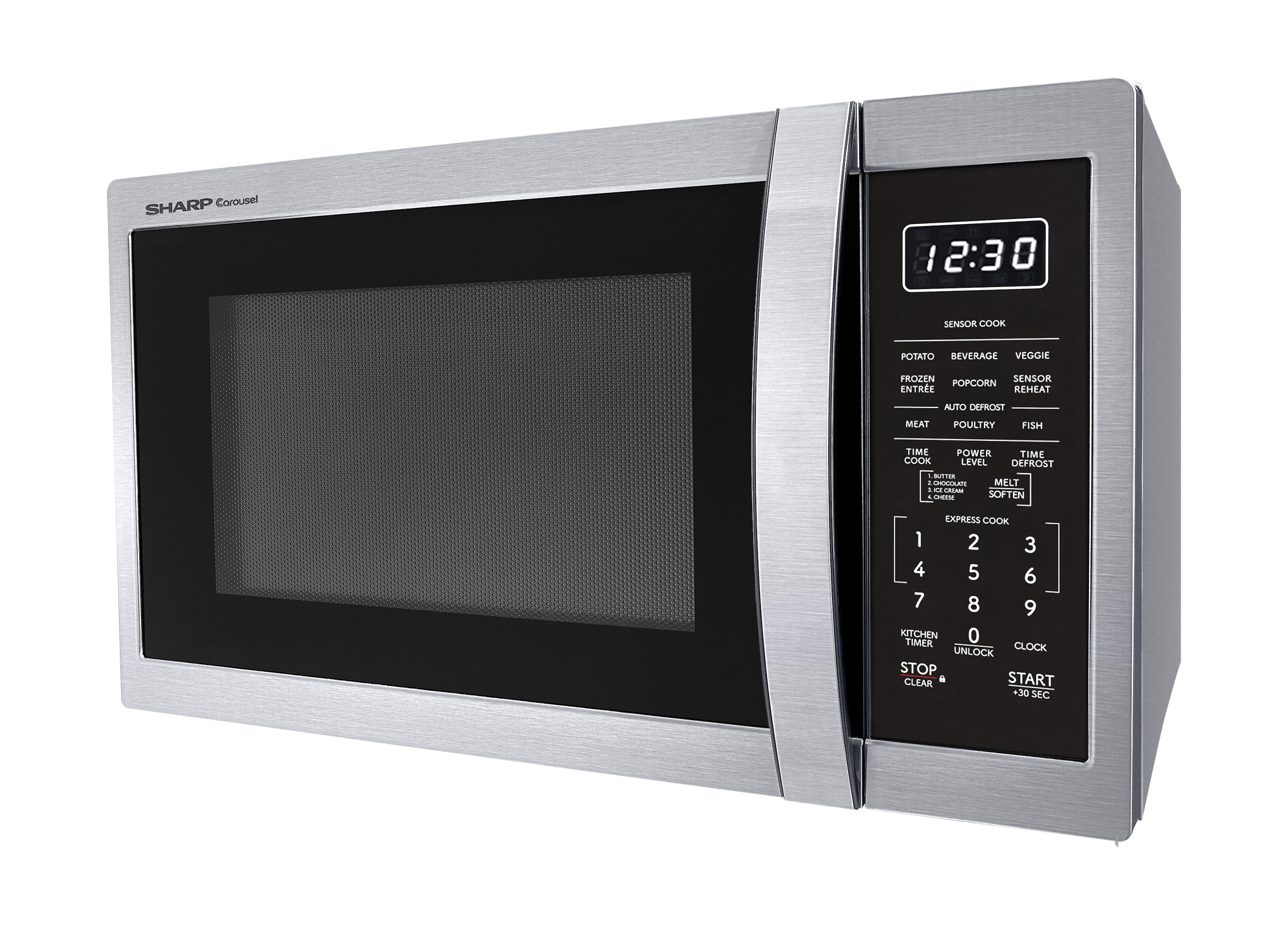
| Sharp | Press Stop/Clear 3 sec | Lock |
If you do not see your brand listed, try the above steps one by one. In most cases, one will work.
Brand-specific Unlock Instructions
Samsung Microwave
- Unlock: Hold the Stop/Cancel button for 3 seconds.
- Lock: Hold the same button for 3 seconds again to activate.
- Symbol: Usually a key or padlock.
Lg Microwave
- Unlock: Press and hold the Stop/Clear button for 5 seconds.
- Symbol: May show “Child Lock” or a key.
Panasonic Microwave
- Unlock: Press and hold the Stop/Reset button for 3 seconds.
- Symbol: Padlock or “LOCK.”
Whirlpool Microwave
- Unlock: Hold the Start button for 3 seconds.
- Symbol: “LOC” or a lock image.
Sharp Microwave
- Unlock: Press and hold the Stop/Clear button for 3 seconds.
What If The Steps Don’t Work?
If you tried all the above and the key symbol is still there:
1. Unplug The Microwave:
Unplug from the wall for 2–5 minutes. Plug back in and see if the lock is gone.
2. Check Manual:
Search online for your microwave’s model number and “child lock” to find the official manual.
3. Try All Buttons:
Some microwaves use other buttons like Clock, Timer, or number keys. Hold each for a few seconds.
4. Reset The Microwave:
Some models have a reset button inside the door or near the control panel.
If the lock is still active after all these steps, you may have a technical problem. Read below for more advanced troubleshooting.
Fixing Key Symbol When It’s Not Child Lock
In rare cases, the key symbol can mean something else:
- Stuck Key: A button on the control panel may be stuck.
- Control Panel Error: Internal electronics may have a problem.
- Firmware Glitch: Software inside the microwave can bug out.
How To Check For A Stuck Key
- Press Each Button: Gently press every button on the control panel. Feel for one that does not move or feels different.
- Clean the Panel: Dirt or sticky residue can cause a button to stay pressed. Use a soft cloth with a little water. Never spray water directly.
- Test Again: Try to unlock the microwave after cleaning.
Fixing Control Panel Errors
If you suspect a control panel problem:
- Unplug the Microwave: Leave it unplugged for 10–15 minutes to fully reset.
- Inspect for Damage: Look for cracks or signs of water damage.
- Call for Service: If the panel is damaged or unresponsive, you may need a technician.
Preventing Key Symbol Problems In The Future
Once you’ve fixed the key symbol issue, some simple steps can help you avoid it happening again.
Tips To Avoid Accidental Lock Activation
- Know Your Microwave’s Buttons: Read your manual or look up the model online to learn what each button does.
- Show Family Members: Tell everyone who uses the microwave how the lock works.
- Avoid Unnecessary Button Presses: Don’t press multiple buttons at once.
- Be Careful During Cleaning: Wipe the control panel gently.
Keep The Manual Handy
Many problems are easy to solve if you have the manual. If you lost it, most brands let you download it for free from their official websites. Search for your microwave’s model number and the word “manual. ”
Credit: shop.sharpusa.com
When To Call A Technician
Most key symbol problems are simple to fix. But sometimes, you need professional help. Call a technician if:
- The lock stays on after you tried all unlock methods.
- The control panel is unresponsive or buttons are stuck.
- The display shows error codes or strange symbols.
- You smell burning or see smoke.
A technician can check for:
- Damaged wiring
- Broken control board
- Internal faults
Never try to open the microwave yourself. Microwaves can store high voltage even when unplugged.
How Different Brands Handle The Key Symbol
Some microwaves use creative ways to show the key symbol or lock. Let’s see how some popular brands handle it.
| Brand | Child Lock Name | Activation Method | Unlock Method |
|---|---|---|---|
| Samsung | Child Lock | Stop/Cancel 3 sec | Stop/Cancel 3 sec |
| Panasonic | Control Lock | Stop/Reset 3 sec | Stop/Reset 3 sec |
| LG | Child Lock | Stop/Clear 5 sec | Stop/Clear 5 sec |
| Sharp | Lock | Stop/Clear 3 sec | Stop/Clear 3 sec |
| Whirlpool | Control Lock | Start 3 sec | Start 3 sec |
This table shows that most brands use a long press of a single button, usually Stop/Cancel or Start, to control the lock.
What If You Lost The Manual?
Many people lose their microwave manual. Don’t worry. You can find almost every manual online:
- Go to the official brand website.
- Enter your microwave’s model number (usually found inside the door or on the back).
- Download the manual as a PDF.
If you cannot find the manual, search for your model number plus “child lock” or “key symbol. ” Forums and support pages often have answers.
Non-obvious Insights And Advanced Tips
Many beginners miss these important details about the key symbol and microwave locks:
- Power Outages Can Reactivate Child Lock: After a blackout or unplugging, some microwaves turn the child lock back on. Always check after a power issue.
- Cleaning Can Trigger Lock: If you clean the control panel with a wet cloth and press buttons, you might accidentally turn the lock on. Clean gently, and avoid pressing buttons.
- Older Microwaves May Not Have This Feature: If your microwave is older than 15 years, it may not have a child lock. A key symbol in this case might mean a different issue, like a stuck button or electrical problem.
- Button Labels Differ: Not every microwave has a “Stop/Cancel” or “Clear” button. Some use symbols or different words like “Reset” or “Pause.”
- Some Models Use Codes: A few high-end microwaves let you enter a code to unlock. If nothing works, check if your model supports this.

Credit: www.kimecopak.ca
Safety Reminder: Never Disassemble Your Microwave
Microwaves are powerful electrical devices. Even unplugged, they can store dangerous electricity in their high-voltage capacitors. Never try to open or repair the inside of your microwave. If the key symbol will not go away and you suspect a hardware problem, call a qualified technician.
Real-world Examples
Let’s look at a few real-world stories to show how the key symbol can cause confusion and how people solved it.
Example 1: The Busy Family
A family with young children found that their Samsung microwave stopped working, showing a padlock. After trying to unplug and plug back in, nothing happened. They called customer support, who told them to hold the Stop/Cancel button for 3 seconds. The lock turned off, and the microwave worked again.
Example 2: Power Outage Surprise
After a storm, an LG microwave started showing “Child Lock” on the screen. The owner thought it was broken. Reading the manual online showed that holding the Stop/Clear button would unlock it. This worked, and they avoided an expensive service call.
Example 3: Cleaning Accident
Someone cleaned the control panel of their Panasonic microwave with a wet cloth. The next time they tried to use it, the key symbol was on. They tried pressing random buttons, but nothing worked. After searching online, they learned about the Stop/Reset button fix and solved the problem in seconds.
How To Avoid Common Mistakes
Many people make mistakes when trying to fix the key symbol problem. Here’s how to avoid them:
- Don’t Force Buttons: Press buttons gently. Forcing can damage the control panel.
- Avoid Using Sharp Objects: Never try to pry open the panel or buttons.
- Don’t Spray Water Directly: Always use a damp cloth to clean, never spray water on the control panel.
- Don’t Ignore Safety Signs: If you see error codes or smell burning, stop and call a professional.
The Real Cost Of Unfixed Lock Symbols
Leaving the key symbol active means you cannot use your microwave. For busy families or those who rely on microwaves for meals, this is a big inconvenience. In rare cases, a stuck lock could mean a deeper problem that needs repair. Fixing it early saves time and money.
Key Symbol Vs. Other Microwave Error Symbols
Not all symbols on your microwave mean the same thing. Here’s a quick comparison:
| Symbol | Meaning | Common Fix |
|---|---|---|
| Key/Padlock | Child Lock | Hold Stop/Cancel |
| “SE” | Stuck Button Error | Service Needed |
| “LOC” | Control Lock | Hold Start |
| “F3” | Sensor Issue | Service Needed |
Always check your manual or online for your exact model’s symbols.
How To Explain The Key Symbol To Others
If you live with family or roommates, explain what the key symbol means and how to unlock it. This helps everyone avoid confusion and saves unnecessary service calls. You might even print out simple instructions and tape them inside a kitchen cupboard.
Where To Get More Help
If you’re still stuck, these resources can help:
- Brand Support Websites: Most brands have troubleshooting guides.
- YouTube: Many people upload video tutorials for common models.
- Forums: Websites like Reddit or appliance forums have real user stories.
- Official Manuals: These always have the right steps.
For a comprehensive overview of microwave ovens, visit the Wikipedia page on Microwave Ovens.
Frequently Asked Questions
How Do I Know If My Microwave Is Locked?
If your microwave shows a key symbol, “LOC,” “LOCK,” or a padlock, and none of the buttons work, the child lock is active. Try pressing and holding the Stop/Cancel or Start button for a few seconds to unlock.
Why Did My Microwave Lock Itself After Cleaning?
Wiping the control panel can sometimes press button combinations that activate the lock. To avoid this, always clean gently and avoid holding down multiple buttons. If locked, use the unlock method for your brand.
Is The Key Symbol A Sign My Microwave Is Broken?
No, the key symbol usually means the child lock or control lock is active. It is a safety feature, not a malfunction. If unlocking does not work, then there may be a hardware problem.
What Should I Do If None Of The Unlock Methods Work?
Unplug the microwave for 5–10 minutes and try again. If the lock stays on, check your manual or search online for your model’s instructions. If you still cannot unlock it, call a professional technician.
Can I Disable The Child Lock Feature Permanently?
Most microwaves do not allow you to disable the child lock feature permanently, as it is a built-in safety function. You need to unlock it each time it is activated.
The key symbol on your microwave is not a cause for worry. With the right steps, you can fix it in minutes and get back to cooking. Understanding what it means and how to unlock it saves you time, stress, and service costs. Remember, always use your microwave safely, keep your manual nearby, and don’t hesitate to call a professional if needed. Your microwave is a valuable kitchen tool—keep it running smoothly by knowing how to handle simple problems like the key symbol.