
Changing the power level on your Toshiba microwave can make a big difference in your cooking results. Whether you’re reheating leftovers, defrosting meat, or cooking vegetables, understanding power settings is key. Many people use only the default “high” setting, but using the right power level can help avoid overcooked edges, rubbery textures, or uneven heating. In this guide, you’ll learn exactly how to adjust the power level on Toshiba microwaves, why it matters, and how to get the most from your appliance.
Why Power Level Matters In A Microwave
Microwaves are popular for their speed, but not everything cooks well on full power. The power level determines how much energy the microwave uses during cooking. On “high,” the microwave is on most of the time. Lowering the power means the magnetron (the part that makes microwaves) turns off and on, giving food a chance to cook more gently.
Think about defrosting chicken. On high power, the outside may start to cook while the inside is still frozen. With a lower power level, heat spreads more evenly, so you avoid half-cooked, half-frozen results. For delicate foods like fish or eggs, lower power stops them from drying out.
Many Toshiba microwave owners don’t realize that using only the default setting limits what their machine can do. Adjusting the power is a simple step that can improve texture, taste, and safety in your meals.
Getting To Know Your Toshiba Microwave
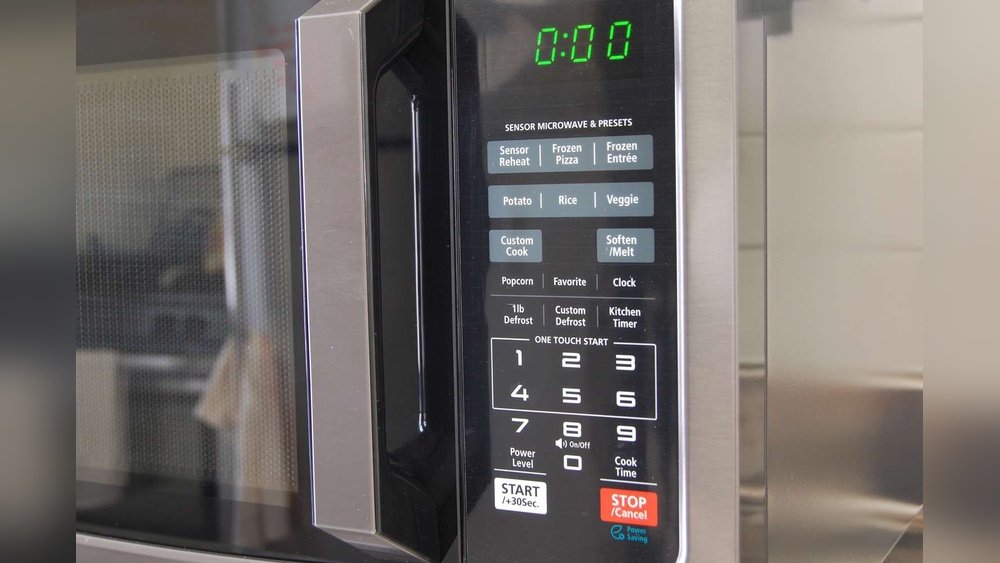
Toshiba offers a range of microwave models, from basic to advanced. While the core steps are similar, some buttons and displays may look a bit different. Most Toshiba microwaves have a numeric keypad, a “Power” button, and a digital display.
Here’s what you’ll usually see:
- Keypad: Numbers 1–9, sometimes with “10” or “0” for quick time entry.
- Power Level Button: Often labeled “Power,” “Power Level,” or “Level.”
- Start/Stop Button: Starts or cancels the microwave.
- Display: Shows time, power level, and sometimes cooking modes.
Fancier models might have touchscreens or preset cooking menus, but the basics remain the same. If you’re not sure about your model, check the manual or look for a label inside the door.
Step-by-step: How To Change Power Level On Toshiba Microwave
Changing the power level is easier than many people think. Here’s a clear, step-by-step method that works for most Toshiba microwave ovens.
1. Open The Microwave Door
Place your food inside on the turntable. Make sure you’re using a microwave-safe container, and cover the food if needed to avoid splatters.
2. Close The Door Securely
The microwave will not operate if the door isn’t closed properly. Listen for a “click” to confirm it’s shut.
3. Enter Cooking Time
Using the keypad, enter the total cooking time you want. For example, for 2 minutes, press “2-0-0.” The display should show “2:00.”
4. Press The Power Level Button
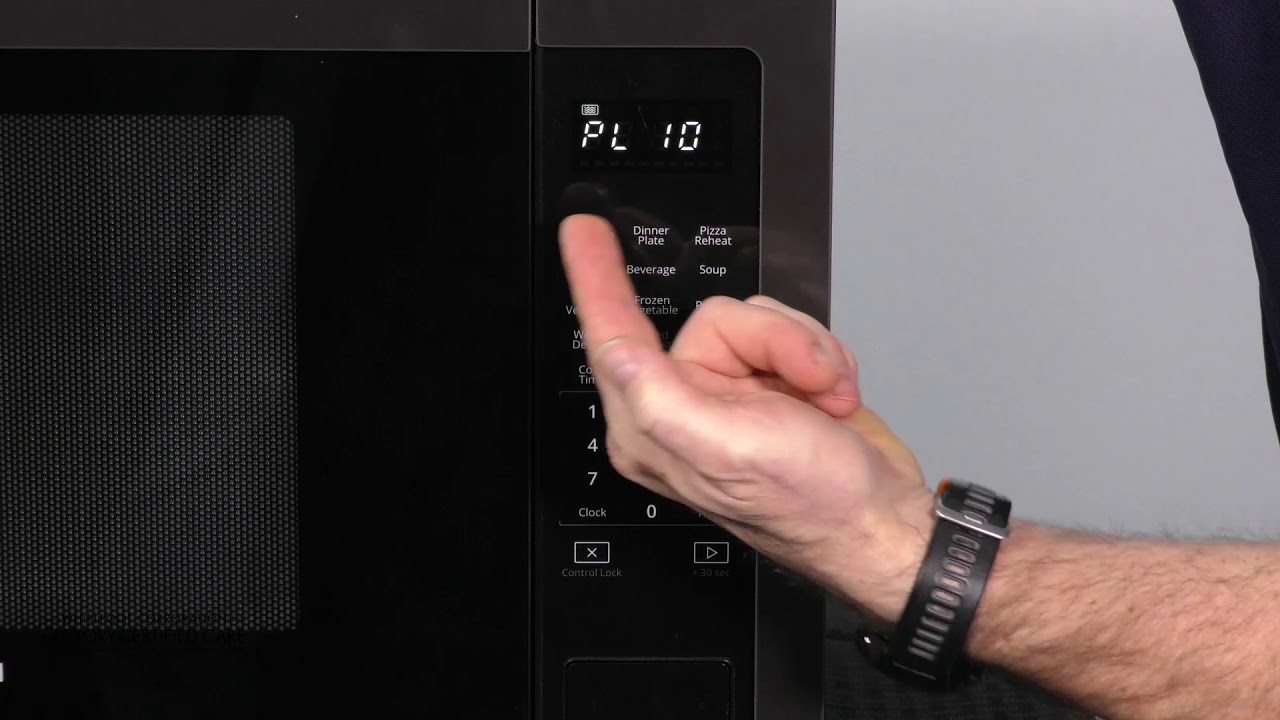
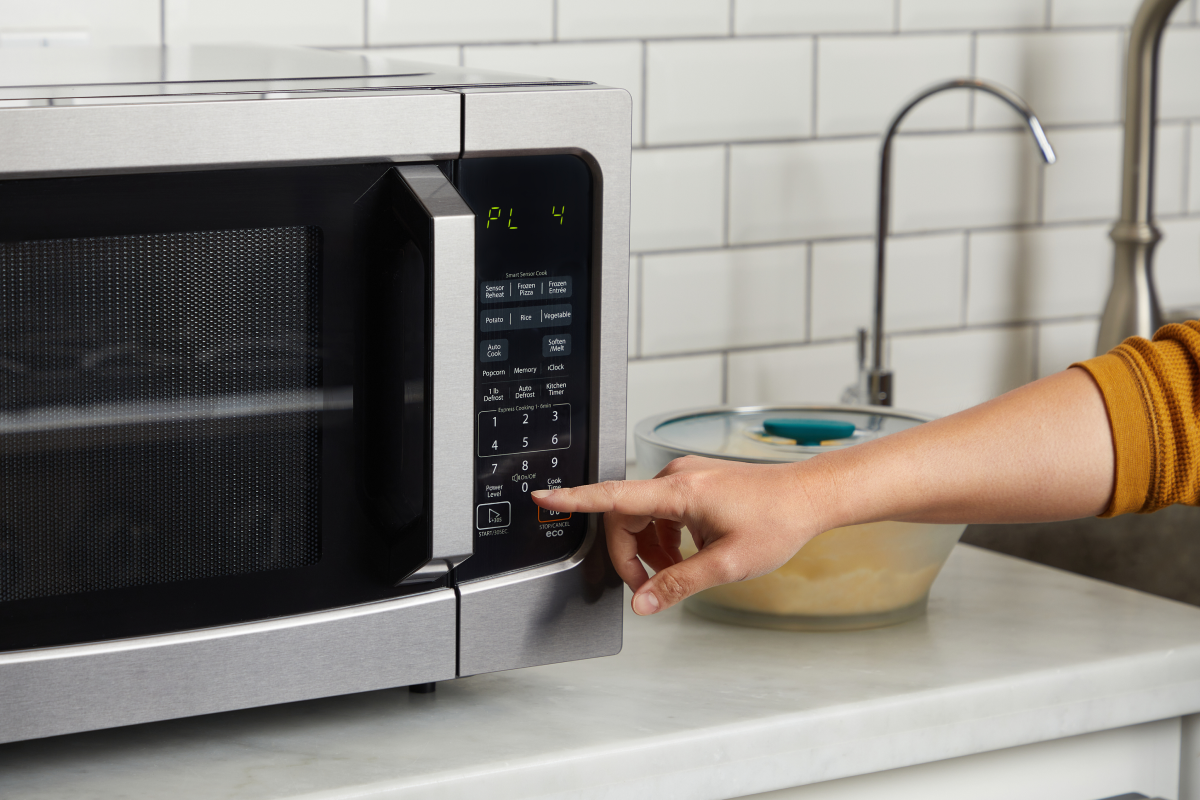
Find the Power Level button on your microwave. On most Toshiba models, it says “Power,” “Power Level,” or just “Level.” Press it once.
- Some models show “PL 10” or “100%” on the display, meaning full power.
- If you skip this step, the microwave will cook at full power.
5. Select Your Desired Power Level
Power levels are usually set by numbers. Here’s a common scale:
- “10” or “100%” = High
- “9” = 90%
- “8” = 80%
- “7” = 70%
- …down to…
- “1” = 10%
Press the number that matches the power you want. For example, for 50% power, press “5. ” The display should show “PL 5” or “50%. ”
6. Press Start
After setting the time and power, press “Start. ” The microwave will cook at your chosen power level for the time you entered.
7. Monitor And Stir
If possible, pause and stir or rotate your food halfway through cooking. This helps heat distribute evenly, especially at lower power.
8. End Or Add Time
When the timer beeps, check if the food is cooked to your liking. If not, you can add more time at the same or a different power level.
Common Toshiba Power Level Settings And Their Uses
Understanding what each power level is best for can help you get better results. Here’s a helpful comparison of common settings:
| Power Level | Percentage | Best For | Example Foods |
|---|---|---|---|
| 10 | 100% | Boiling, reheating liquids, cooking dense foods | Water, soup, potatoes |
| 7-9 | 70–90% | Reheating leftovers, cooking thick foods | Pasta, casseroles, rice |
| 5-6 | 50–60% | Slow cooking, thorough heating | Eggs, fish, meatloaf |
| 3-4 | 30–40% | Defrosting, softening butter or cheese | Ground meat, bread |
| 1-2 | 10–20% | Keeping food warm, gentle thawing | Chocolate, delicate desserts |
Choosing the right power level can prevent drying, overcooking, or uneven heating. For example, to gently melt chocolate, use 20% power in short bursts.
Toshiba Microwave Model Differences
While most Toshiba microwaves have similar controls, there are some model-specific differences. Here’s a comparison of popular Toshiba microwave models and how their power controls may look:
| Model | Power Button Label | Display Example | Special Features |
|---|---|---|---|
| EM925A5A | Power | PL 5, PL 10 | One-Touch Start, Eco Mode |
| ML2-EM25PAE | Power Level | PL 7, PL 3 | Sensor Reheat, Mute Option |
| ML-EM34P(SS) | Level | 50%, 100% | Smart Sensor, Inverter Tech |
| EM131A5C | Power | PL 6, PL 8 | Pre-programmed Buttons |
Always check your user manual for details. If you lose your manual, many Toshiba manuals are available online. Understanding your model helps you use all its features.
How Power Levels Work In Practice
When you set a lower power level, the microwave cycles its energy. For example, at 50% power, the magnetron is on half the time and off half the time. This doesn’t mean the microwave uses less energy per second—it means it delivers full power in bursts, with rest periods in between.
These cycles help heat food more slowly and evenly.
Let’s say you want to defrost a pound of ground beef. If you use full power, the outside may start to cook before the center thaws. At 30% power, the energy pulses give heat time to move inward, so you get a more even result.
Many microwave users don’t realize that food can “explode” or dry out when cooked too fast. Adjusting power levels is an easy way to prevent these problems.
Practical Tips For Using Power Levels
Here are some useful tips for getting the best results from your Toshiba microwave:
- Start with Lower Power: If you’re unsure, start with a lower power level and add time as needed. It’s easier to cook food longer than to fix overcooked food.
- Stir or Rotate Food: Especially for thick or mixed dishes, stirring halfway through helps avoid cold spots.
- Cover Food: A microwave-safe cover or wrap keeps moisture in and prevents splatters.
- Use Preset Modes Carefully: Some Toshiba microwaves have preset buttons (like “Popcorn” or “Defrost”). These usually set power automatically, but you can override them if you want more control.
- Check Doneness: After cooking, check several spots in your food for even heating. For meats, use a food thermometer if needed.
- Be Patient with Defrosting: Don’t rush defrosting by using high power. Lower power gives better, safer results.
- Read the Manual: Your model may have unique features, like a “soften/melt” function, that adjust power for you.
Troubleshooting: When Power Level Won’t Change
Sometimes, users find their microwave stays on full power, or the display doesn’t change when they press the power button. Here’s what to check:
- Sequence: On most Toshiba models, you must enter the cooking time before changing the power level.
- Button Issues: The “Power” button may need a firm press. Try again, or check for stuck keys.
- Model Differences: Some models use different terms (“Level” or a dial). Double-check your manual.
- Control Lock: If the display shows a lock symbol, the control panel may be locked. Hold “Stop/Cancel” for 3 seconds to unlock.
- Electrical Issues: If buttons don’t work at all, try unplugging the microwave for a minute, then plug it back in.
If problems continue, contact Toshiba customer support or check for a service center.
Credit: www.youtube.com
How To Change Power Level On Toshiba Inverter Microwaves
Some newer Toshiba microwaves use inverter technology, which gives more precise control over power. The steps are similar but with a few differences:
- Enter Time First: As usual, enter your desired cooking time.
- Press Power Level: On inverter models, the power level may display as a percentage (like “30%” or “60%”).
- Select Power: Use the keypad or dial to choose your level. Inverter microwaves can hold steady at lower power, so delicate foods cook even more gently.
- Start Cooking: Press “Start” to begin.
Inverter microwaves are great for foods like fish, custards, and chocolate because they avoid the “on-off” pulsing of traditional microwaves.
Power Level And Microwave Wattage
Microwave power levels work as a percentage of maximum wattage. Toshiba microwaves range from about 900 to 1200 watts. Here’s how power level affects cooking:
- High wattage (1000W+): Heats food quickly; lower power is useful for delicate foods.
- Lower wattage (900W or less): May need longer cook times; use higher power for most cooking.
For example, if your Toshiba microwave is 1100W, “PL 5” (50%) delivers about 550W on average.
Real-world Example: Reheating Pizza
Let’s say you want to reheat leftover pizza without making it rubbery. Here’s how using a lower power level helps:
- Place the pizza on a microwave-safe plate.
- Cover with a paper towel to absorb moisture.
- Enter “1: 00” for one minute.
- Press “Power,” then “5” for 50% power.
- Press “Start.”
At 50% power, the cheese melts gently, and the crust stays softer. If you used 100% power, the cheese might bubble and the crust could harden.
Common Mistakes With Power Levels
Many people make the same errors when learning to use their microwave’s power settings:
- Forgetting to Set Power: The microwave defaults to high power, which isn’t ideal for everything.
- Using High Power for Defrosting: This cooks the outside and leaves the inside icy.
- Ignoring Stirring or Rotating: Even at lower power, food needs to be moved for even heating.
- Not Adjusting for Wattage: Recipes written for 700W microwaves will cook faster in a 1100W model. Adjust time or power as needed.
- Setting Power After Starting: On most models, you must set the power before pressing “Start.” If you forget, press “Stop” and try again.
Adjusting Power Level For Different Foods
Some foods benefit greatly from the right power setting. Here are some common items and recommended levels:
- Vegetables: 70–80% power. Keeps them moist without overcooking.
- Meat: 50–60% for slow, even cooking.
- Eggs: 40–50% to prevent rubbery texture.
- Fish: 30–40% for gentle, moist cooking.
- Chocolate/Butter: 20–30% in short bursts to avoid burning.
Experiment to find the best settings for your favorite foods.
What If Your Toshiba Microwave Has No Power Button?
Some older or simpler models use a dial or only “High/Medium/Low” settings. Here’s what to do:
- High: Equivalent to 100% power.
- Medium: About 50–70% power.
- Low: 30–40% power, good for defrosting.
Turn the dial or press the labeled button for your desired level. For more control, stop and start the microwave as needed.
Cleaning And Maintenance Tips
Using your microwave at the right power level can help keep it cleaner, too. Foods are less likely to explode or splatter when cooked gently. Here are a few maintenance tips:
- Wipe After Each Use: Especially after cooking at high power.
- Cover Food: Prevents splashes and stains.
- Clean the Door Seal: Food particles can block the door from closing, affecting safety.
- Don’t Use Metal: Only use microwave-safe containers.
Regular cleaning ensures your microwave works well and power levels function as designed.
Safety And Power Level
Microwaves are safe when used properly, but misusing power levels can cause problems:
- Overheating: High power can boil water suddenly (“superheating”), leading to burns.
- Burns from Steam: Always open covers carefully after cooking.
- Uneven Cooking: Food cooked at too high a power may have hot spots, which can be dangerous with raw meat.
Use lower power for reheating baby food, liquids, or delicate items to avoid accidents.
How To Reset Or Change Default Power Level
If you want your Toshiba microwave to always start at a different power level, most models do not allow changing the default from “high. ” However, you can always set your preferred level before starting each session. Some advanced models let you program favorite settings—check your manual or settings menu.
If your microwave seems “stuck” at one power, try unplugging for a minute to reset the electronics.
Advanced Features Related To Power Level
Some Toshiba microwaves offer extra features that automatically adjust power:
- Sensor Cooking: Measures steam or humidity to set power and time.
- Inverter Technology: Provides steady, continuous power at lower levels.
- Soften/Melt Functions: Pre-programmed to use gentle power for butter or chocolate.
- Express Cook: Usually cooks at high power—be aware before using.
If your microwave has these features, use them for convenience, but remember you can always set power manually for custom results.
:max_bytes(150000):strip_icc()/Toshiba_Microwave_03-ea143bd0119e4066887178fef2a841ee.jpg)
Credit: www.thespruceeats.com
Comparison: Toshiba Vs. Other Brands’ Power Controls
How do Toshiba microwaves compare to others when it comes to power level adjustment?
| Brand | Power Level Control | Ease of Use | Special Notes |
|---|---|---|---|
| Toshiba | Button or dial, 1–10 scale | Simple and direct | Most models similar |
| Panasonic | Button, % display (10–100%) | Very easy | Inverter models common |
| Sharp | Button, 1–10 or “High/Med/Low” | Standard | Some models have sensor |
| GE | Button, 1–10 | Standard | Some models use dial |
Toshiba’s controls are user-friendly for both beginners and experienced cooks.
Two Insights Most Beginners Miss
- Power Level Is About Time, Not Strength: Setting “50%” doesn’t make the microwave weaker; it makes it pulse on and off for half the time. This is why some foods cook better and more evenly at lower settings.
- Manual Control Beats Presets: While preset buttons are convenient, setting your own time and power level gives you much better results for foods that aren’t in the preset menu.
When To Use The Default Power Level
There are times when full power is best. For example:
- Boiling water quickly
- Cooking dense root vegetables
- Sterilizing a kitchen sponge (with water)
In these cases, high energy is safe and effective. But for most other foods, a lower setting gives tastier, safer results.
Getting The Most From Your Toshiba Microwave
Here’s how to become a power level pro:
- Experiment with different foods and note the results.
- Use lower power for reheating and defrosting.
- Keep your microwave clean and dry for best performance.
- Teach other household members how to change power—kids and seniors often use only the default.
With practice, you’ll notice your meals taste better and have better texture, just by adjusting one simple setting.
If you need more information on how microwaves work, the Wikipedia microwave oven article offers a deeper look at the technology.
Credit: cookanyday.com
Frequently Asked Questions
How Do I Know What Power Level To Use For Different Foods?
Most foods have guidelines: use high power for liquids or dense foods, medium for reheating or cooking meats, and low for defrosting or melting. If you’re unsure, start lower and add time. Many recipes or your microwave’s manual include power suggestions.
Can I Change The Power Level After Starting My Toshiba Microwave?
On most models, you need to set the power level before pressing “Start. ” If you forget, press “Stop/Cancel,” then re-enter the time and power. Some advanced models allow mid-cooking adjustments—check your user manual.
Why Does My Microwave Only Cook At High Power?
This can happen if you skip the power level step, or if there’s a control issue. Make sure you’re pressing the power button after entering time. If the control panel is unresponsive, try unplugging the microwave or consult the manual for lock settings.
What Does “pl 5” Mean On My Toshiba Microwave Display?
“PL 5” stands for “Power Level 5,” which is 50% of the microwave’s maximum power. Each number from 1 to 10 (or 1 to 9) represents 10% increments. For gentle cooking, choose lower numbers.
Is It Safe To Always Use High Power On My Toshiba Microwave?
It’s safe for some foods, but not all. Using high power for delicate foods or defrosting can cause uneven cooking or dry, rubbery textures. For best results, match the power level to the food type.
Changing the power level on your Toshiba microwave is a simple but powerful way to get better cooking results. With a little practice, you’ll unlock a new range of possibilities in your kitchen.