
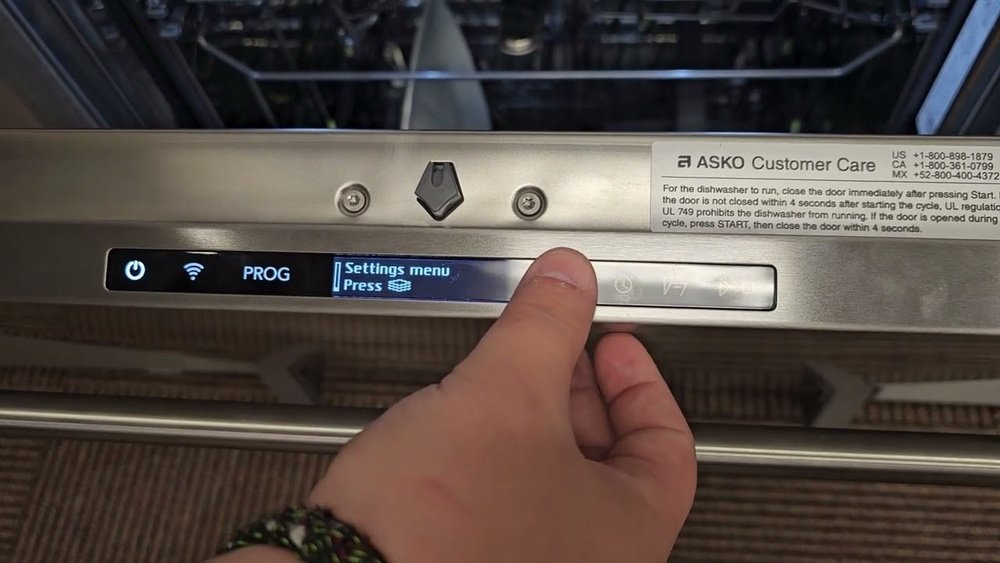
If your Asko dishwasher is locked and won’t start, it can quickly turn a simple kitchen routine into a frustrating puzzle. Many Asko owners face this issue, especially after power outages, child lock activations, or accidental button presses. The good news? You don’t need to be a technician to unlock your machine. With the right steps and a little patience, you can get your dishwasher running again—often in just a few minutes.
This guide is your complete resource for unlocking any Asko dishwasher model. Whether you’ve activated the child lock, see a padlock symbol on the display, or simply can’t open the door, you’ll find clear solutions here. We’ll break down the most common lock types, step-by-step instructions, and share expert tips that even many owners miss.
Along the way, you’ll learn how to prevent future lockouts and handle rare problems like stuck doors or control panel errors.
Unlocking your Asko dishwasher is about more than pressing a button—it’s about understanding why it locks, what the different symbols mean, and how to avoid damaging the appliance. Let’s dive in and solve your dishwasher lock problem for good.
Understanding Asko Dishwasher Locks
Before you start pressing buttons, it’s important to know why your Asko dishwasher locks in the first place. Asko uses several types of lock mechanisms for safety and convenience.
- Child Lock: Prevents children from starting or changing cycles.
- Door Lock: Keeps the door sealed during operation for safety and to prevent leaks.
- Control Lock (Key Lock): Locks all buttons to avoid accidental changes during a cycle or when cleaning the panel.
Most modern Asko dishwashers have electronic locks, usually shown by symbols like a padlock or key on the display. Understanding these locks helps you choose the right unlocking method.
Why Do Dishwashers Lock?
- Safety: Hot steam or water could escape if the door opens mid-cycle.
- Child Protection: Prevents children from changing settings or opening the door.
- Cycle Integrity: Stops accidental interruptions to washing cycles.
Some models also lock automatically after a few minutes of inactivity or if there’s a power cut.
Identifying The Locked State
First, check which kind of lock is active. Look at your dishwasher’s control panel:
- Padlock or Key Symbol: Usually means the child or control lock is on.
- Flashing Lights: Can signal a door lock or cycle error.
- No Response to Buttons: Often means the control lock is active.
Open the user manual if you’re unsure, or check the model number (found on the inside edge of the door). Knowing your model helps you follow the correct procedure.
How To Unlock Asko Dishwasher: Step-by-step
Unlocking an Asko dishwasher depends on the lock type and model. Below are the most common methods.
1. Unlocking The Child Lock
For most Asko dishwashers, the child lock can be activated or deactivated with a button combination.
- Press and hold the “Start” button for 3-5 seconds until the padlock symbol disappears.
- Some models require you to press and hold both the “Start” and “Mode” buttons at the same time.
- Wait for a beep or the symbol to disappear from the display.
If you see “CL” on the display, that means the child lock is still active.
Example: On the Asko D5436XLS, hold the “Start” button for 5 seconds to unlock.
2. Unlocking The Control (key) Lock
Control locks can be set to prevent accidental button presses.
- Hold the “Lock” or “Key” button (sometimes marked with a small key symbol) for 3-5 seconds.
- On touch models, you may need to press the “Power” button and the “Lock” button together.
Wait for the display to return to normal.
Tip: If you’re not sure which button is the lock, check for a small padlock or key icon next to a button.
3. Unlocking The Door Lock
If you can’t open the door after the cycle ends:
- Wait 1-2 minutes after the cycle finishes. Asko dishwashers keep the door locked until the internal temperature is safe.
- Try gently pulling the door. Never force it, as this can damage the latch.
- If the door remains stuck, unplug the dishwasher for 2-3 minutes, then plug it back in. This can reset the lock.
4. Unlocking After A Power Outage
Power interruptions can sometimes lock the controls.
- Turn off the dishwasher at the power outlet.
- Wait 60 seconds.
- Turn the power back on.
- If it’s still locked, repeat the child or control lock procedure.
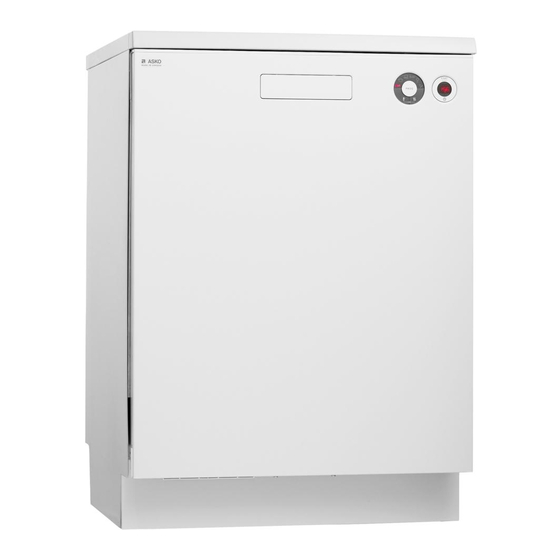
5. Unlocking Older Asko Models
Some older Asko models have mechanical locks or require different steps:
- Check for a small button or switch inside the door frame.
- Try holding the “Program” button for 5 seconds.
- If you have a rotary dial, turn it to “Off,” wait, then back to the desired cycle.
Note: Not all models have the same method. Always check your user manual for model-specific instructions.
Unlocking Asko Dishwasher: Model Comparisons
Different Asko dishwasher series have unique lock systems. Here’s a quick comparison of the most popular series.
| Model Series | Lock Type | Unlock Method | Display Symbol |
|---|---|---|---|
| Asko D5000 Series | Child, Control | Hold “Start” 5 sec | Padlock |
| Asko D3000 Series | Child | Hold “Start/Stop” 3 sec | Key |
| Asko D8000 Series | Control | Hold “Lock” button 5 sec | Padlock |
| Asko Classic (Older) | Mechanical | Switch inside door | None |
If you don’t know your model, check the inside of the door or the user manual.

Credit: www.youtube.com
Common Problems And Solutions
Unlocking isn’t always simple. Here are frequent issues and practical fixes.
Problem: Buttons Not Responding
- Solution: The control lock is likely on. Try holding the “Lock” or “Start” button for 5 seconds.
- Check if the panel is wet or dirty—wipe it clean and dry.
Problem: Door Won’t Open At End Of Cycle
- Solution: Wait 2 minutes for the internal lock to release.
- If still stuck, turn off the power at the outlet for 2-3 minutes.
- If the door is jammed, don’t force it. Call for service if it remains stuck.
Problem: Lock Symbol Won’t Disappear
- Solution: Repeat the unlock process. Sometimes, the panel needs a second or third try, especially after a power surge.
- Try a full reset (turn off power, wait, turn on).
Problem: Dishwasher Beeps But Won’t Unlock
- Solution: This often means a cycle is incomplete, or water is still present.
- Cancel the cycle by holding the “Start/Stop” button for 5 seconds.
Problem: Error Codes After Unlocking
- Solution: Error codes (like “F11”, “F12”) may show after unlocking. Check the user manual for meaning.
- Most codes clear after a reset.
Non-Obvious Insight: Sometimes, electrical noise from nearby appliances can cause your Asko’s touch controls to act “stuck.” Try plugging the dishwasher into a different outlet or turning off other devices temporarily.
How To Prevent Future Lockouts
Unlocking is easy once you know how, but it’s better to avoid lockouts completely. Here’s how:
- Read the Manual: Each model can have unique steps. Keep the manual handy.
- Teach Family Members: Show everyone in your home how to unlock and lock the controls properly.
- Clean the Panel Regularly: Water, soap, or grease can cause buttons to stick or not register.
- Avoid Rapid Button Presses: Give the dishwasher a second to register commands.
- Check for Firmware Updates: Some Asko models can be updated by service techs to fix lock-related bugs.
- Use Surge Protection: Protect the dishwasher from power surges that can trigger locks.
Pro Tip: If you have young children, keep the child lock on when not using the dishwasher. Unlock only when you need to start or stop a cycle.
Credit: www.manualslib.com
When To Call For Service
Sometimes, a dishwasher stays locked due to mechanical failure or electronic issues.
- If the door remains locked after all reset attempts.
- If you hear loud clicking, see error codes, or the display is blank.
- If the lock activates randomly or too often.
Don’t try to force the door open with tools or by pulling hard—this can break the latch or door. Contact an authorized Asko service center for help. They have tools and software to unlock and reset your dishwasher safely.
Advanced Troubleshooting Steps
Most lock problems are simple, but some require extra steps.
Resetting The Dishwasher (hard Reset)
If you’ve tried all unlock methods, do a hard reset:
- Turn off the dishwasher at the main power switch or unplug it.
- Wait 5 minutes (not just 1).
- Plug it back in or switch on.
- Try the unlock process again.
This resets the internal memory and clears many software bugs.
Checking The Door Latch Mechanism
If the door won’t open, the latch may be stuck:
- Remove the lower panel under the door (if accessible).
- Look for a small metal latch.
- Gently push the latch aside with a screwdriver (if comfortable and the power is off).
Warning: Only do this if you are sure the dishwasher is unplugged and you have basic DIY skills. Otherwise, call a technician.
Firmware/software Errors
Some Asko models can freeze or lock if there’s a software bug.
- Contact Asko support for possible firmware updates.
- In rare cases, a technician can update the software to fix lock issues.
Non-Obvious Insight: If your dishwasher locks up after a nearby lightning storm or power outage, a full electrical reset (turning off the circuit breaker for 5 minutes) often helps more than simply unplugging the appliance.
Asko Dishwasher Lock Symbols: What They Mean
Different lock symbols can appear on your Asko’s display. Here’s a guide to the most common:
| Symbol | Meaning | Action Needed |
|---|---|---|
| 🔒 (Padlock) | Child or control lock active | Hold lock or start button to unlock |
| 🔑 (Key) | Control lock | Hold key or lock button |
| CL | Child lock | Hold start button |
| Flashing lights | Door still locked | Wait, then try to open |
| Error code (e.g., F12) | Possible lock or water error | Check manual or reset |
If a symbol you don’t recognize appears, check the Asko website or your user manual.
Real-world Examples
Let’s look at a couple of real examples to make things clearer.
Example 1:
Maria has an Asko D5556 and sees a padlock symbol. She holds the “Start” button for 5 seconds, but nothing happens. She then tries holding both “Start” and “Mode” together for 5 seconds, and the lock turns off.
Lesson: If the first method doesn’t work, try the alternative button combinations. Some models need two buttons held together.
Example 2:
John’s Asko D5434 won’t unlock after a power cut. The display is blank. He unplugs the dishwasher for 2 minutes, plugs it in, and the control panel resets. He can now start a new cycle.
Lesson: A simple power reset can solve many electronic lockups.
Diy Safety Tips
Unlocking your dishwasher is safe if you follow these points:
- Unplug before trying mechanical fixes.
- Don’t use sharp tools or force on the door.
- If you smell burning or see sparks, disconnect power and call a technician.
- Never pour water or cleaning liquids on the control panel.
Comparing Asko Vs Other Brands
How does unlocking an Asko dishwasher compare to Bosch, Miele, or Whirlpool?
| Brand | Lock Symbol | Unlock Method | Common Issues |
|---|---|---|---|
| Asko | Padlock/Key/CL | Hold Start/Lock button | Power resets sometimes needed |
| Bosch | Padlock/Child | Hold “<” and “>” together | Panel lock confusing |
| Miele | Key/Padlock | Hold “Start” and “Stop” | Hidden button combos |
| Whirlpool | “Control Lock” | Press “Heated Dry” 3 sec | Lock activates accidentally |
Asko’s lock system is user-friendly once you know the right combination, but less obvious if you don’t.
Asko Dishwasher Lock Troubleshooting Checklist
If you’re still stuck, go through this checklist:
- Is there a padlock or key symbol on the display?
- Have you held the “Start” or “Lock” button for at least 5 seconds?
- Is the door fully closed and latched?
- Has the cycle finished (wait at least 2 minutes after completion)?
- Have you tried unplugging the dishwasher for 2-5 minutes?
- Are there any error codes displayed?
- Is the control panel clean and dry?
- Have you checked your user manual for model-specific instructions?
- If all else fails, contact Asko support or a certified technician.
Useful Resources
The official Asko website has downloadable user manuals and troubleshooting guides. For persistent problems, check their support page at Asko Customer Care.
You can also find community advice on forums and YouTube, but always double-check methods before trying them.
Credit: www.manualslib.com
Frequently Asked Questions
How Do I Know If My Asko Dishwasher Is Locked?
If the control panel doesn’t respond, or you see a padlock, key symbol, or “CL” on the display, the dishwasher is locked. The door may also refuse to open if the lock is engaged.
What Should I Do If The Unlock Method Doesn’t Work?
First, try the power reset (unplug for 2-5 minutes). Then repeat the unlock button combination for your model. If nothing works, check the user manual and call Asko support.
Is It Safe To Force The Dishwasher Door Open?
No. Forcing the door can break the latch or damage the control system. Always try the official unlock methods first. If the door is still stuck, call a technician.
Why Does My Asko Dishwasher Lock Itself?
Asko dishwashers lock for safety, especially during and after cycles. Power surges, child protection, and cycle errors can also trigger the lock.
Can I Disable The Lock Feature Permanently?
No. For safety reasons, you cannot permanently disable the child or door lock feature. You can turn off the control lock when needed, but it will be available next time for safety.
Unlocking your Asko dishwasher doesn’t have to be stressful. With the right steps, a bit of patience, and an understanding of your model’s features, you’ll have your kitchen running smoothly again. If you ever feel unsure, remember that support is just a call away, and expert help can prevent bigger problems.