
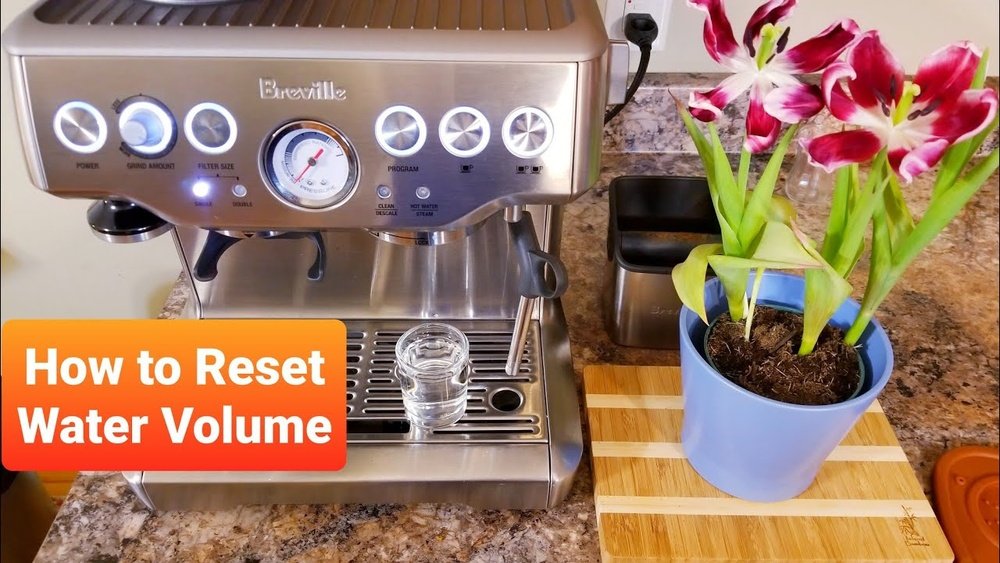
Resetting your Breville espresso machine can solve many common problems, from blinking lights to bad-tasting coffee or an unresponsive touchscreen. If you’re a coffee lover, you know how frustrating it is when your morning espresso routine doesn’t go as planned. The good news? A reset is often a quick fix, and you don’t need to be a technician to do it.
But not all Breville machines are the same. Each model has its own reset steps, from the popular Barista Express to the advanced Oracle Touch. Sometimes, a simple power cycle is enough. Other times, you’ll need to reset factory settings or clear error codes. This guide explains all methods in clear, simple language. You’ll learn exactly when and how to reset, what to expect, and how to avoid common mistakes that can make things worse.
If you’re worried about losing your settings or damaging your espresso machine, don’t be. I’ll guide you through each step, with practical tips and real examples. You’ll also find tables comparing reset methods for different models, troubleshooting advice, and answers to the most frequent questions.
Whether you own a Breville for home or a busy office, you’ll be able to reset it confidently and get back to brewing delicious coffee.
Why Resetting Your Breville Espresso Machine Matters
A reset can seem like a small thing, but it has a big impact on how your machine works. Over time, your Breville espresso machine stores data about your preferences, usage patterns, and even minor errors. These can cause:
- Unusual taste in coffee
- Unresponsive buttons or screens
- Error messages that won’t go away
- Lights that blink for no clear reason
A reset clears these problems, restoring your machine to a stable state. It’s similar to restarting a computer: temporary glitches often disappear, and everything works smoothly again.
Many users don’t realize that regular resets can also:
- Improve consistency in espresso taste and extraction.
- Prevent bigger technical issues by clearing memory errors.
- Help identify if the problem is software or hardware.
Types Of Resets On Breville Espresso Machines
Not all resets are created equal. You’ll typically find three main types:
- Soft reset (Quick restart): Turns the machine off and back on. Used for minor glitches.
- Factory reset (Full reset): Restores factory settings. Useful for major errors or before selling.
- Error code reset: Clears specific error messages, especially after descaling or cleaning.
Knowing which reset to use is important. Using the wrong method can erase your custom settings or, in rare cases, hide a bigger problem.
How To Soft Reset Your Breville Espresso Machine
A soft reset is the first thing to try if your espresso machine acts strange. It’s safe, quick, and won’t delete your saved settings.
Soft Reset Steps
- Turn off the machine using the power button.
- Unplug from the wall. Wait at least 60 seconds.
- Plug back in. Turn the power on.
- Wait for the startup cycle. Watch for normal lights or sounds.
This works for most Breville models, including the Barista Express, Barista Pro, Bambino Plus, and Oracle Touch.
When To Use A Soft Reset
- The display is frozen or unresponsive.
- Lights are blinking without reason.
- The pump won’t start.
- The machine doesn’t recognize a water tank or portafilter.
A soft reset won’t erase custom drink settings. If your problem returns after a soft reset, try a factory reset.
How To Factory Reset Breville Espresso Machines (all Models)
A factory reset returns your machine to its original settings. This is helpful if:
- You want to erase all saved preferences.
- The machine has persistent errors.
- You plan to sell or give away your Breville.
Because each model is different, the steps can change. Here’s a guide for the most popular Breville espresso machines.
Factory Reset: Breville Barista Express (bes870xl)
- Turn off the machine, but leave it plugged in.
- Press and hold the PROGRAM button.
- While holding, turn the machine back on.
- Release the PROGRAM button when the lights start to blink.
- All settings will return to default.
Factory Reset: Breville Barista Pro (bes878)
- Turn the machine on.
- Press the MENU button to enter the settings menu.
- Use the dial to scroll to “RESET DEFAULTS.”
- Press the dial to confirm.
- Wait for the display to show confirmation, then exit.
Factory Reset: Breville Oracle/oracle Touch
- Tap the MENU or Settings icon.
- Scroll to “Factory Reset” or “Reset All Settings.”
- Press to confirm. Some models ask you to confirm again.
- The machine will reset and restart.
Factory Reset: Breville Bambino Plus
- Turn off the machine.
- Press and hold the 1 CUP and STEAM buttons together.
- Turn the machine back on while holding both buttons.
- Release when lights start blinking. The reset is complete.
Factory Reset: Breville Dual Boiler
- With the machine off, press and hold the POWER and 1 CUP buttons.
- Turn the machine back on.
- Release both buttons when you see the reset lights.
Quick Reference Table: Factory Reset Steps By Model
Here’s a comparison of factory reset steps for common Breville models:
| Model | Reset Button(s) | Extra Steps |
|---|---|---|
| Barista Express | PROGRAM | Hold during power on |
| Barista Pro | MENU + Dial | Scroll to “Reset Defaults” |
| Oracle Touch | Settings/Menu | Select “Factory Reset” |
| Bambino Plus | 1 CUP + STEAM | Hold during power on |
| Dual Boiler | POWER + 1 CUP | Hold during power on |
What Gets Erased In A Factory Reset?
- Custom shot volumes
- Temperature settings
- Milk frothing levels
- Clock/timer settings
- Water hardness and filter reminders
If you want to keep these, write down your favorite settings before resetting.
How To Reset Error Codes And Descale Alerts
Sometimes, your Breville espresso machine shows a specific error code or a descale alert. Resetting these is different from a factory reset.
Common Error Codes
- “Clean Me” light: Reminds you to run a cleaning cycle.
- “Descale” light: Tells you to descale the machine.
- E1/E2/E3: Means there’s a sensor or temperature problem.
Resetting The “clean Me” Or “descale” Light
- Complete the cleaning or descaling cycle as described in your manual.
- After the cycle, turn the machine off.
- Wait 1-2 minutes, then turn it back on.
- If the light stays on, repeat the cleaning or descale cycle.
- Some models need you to press and hold the CLEAN or MENU button for 5 seconds to clear the alert.
When The Error Won’t Clear
If you’ve finished the cycle but the light or error stays on, try a factory reset. If it still doesn’t clear, there may be a hardware issue—contact Breville support.
Resetting Touchscreen Breville Machines
Touchscreen models like the Oracle Touch and Barista Touch have slightly different reset processes. The screen makes things easier, but also adds extra settings.
How To Factory Reset Oracle Touch Or Barista Touch
- Tap the Settings or gear icon on the main screen.
- Scroll to “Factory Reset.”
- Tap to confirm. The screen may ask if you want to keep or delete recipes.
- The machine resets and restarts.
Extra Tip
If the screen is frozen, use a soft reset (power off and unplug) first. If that doesn’t work, contact Breville support.
How To Reset Shot Volumes And Custom Drink Settings
You don’t always need a full factory reset. Sometimes, you just want to reset the shot volume (how much coffee is in a single or double shot).
Resetting Shot Volumes: Manual Models
- Turn the machine on.
- Hold the PROGRAM button until it blinks.
- Place a cup under the spout.
- Press the 1 CUP or 2 CUP button. The machine will start pouring.
- Press the button again when the desired amount is reached.
- The machine saves this as the new default.
Resetting Shot Volumes: Touchscreen Models
- Tap the drink you want to edit.
- Tap “Adjust” or “Customize.”
- Set the shot size and save.
This is useful if your coffee tastes off or you want to experiment with new recipes.
When Should You Reset Your Breville Machine?
Many users wonder how often they should reset. The answer depends on your usage:
- After software glitches: If the machine freezes or malfunctions.
- After major cleaning: Especially after descaling or deep cleaning.
- Before selling: To erase your settings and data.
- If taste changes: If coffee tastes bad, even after cleaning.
You don’t need to reset every week. Most users only reset every few months, or when a problem appears.
What To Do Before And After Resetting
Preparation is key. Here’s how to reset safely and avoid mistakes:
Before Resetting
- Write down your favorite settings. If you’ve customized temperature, shot volume, or milk options, make a note.
- Unplug accessories. Remove the water tank, portafilter, and milk jug.
- Clean the machine. This avoids new errors after reset.
After Resetting
- Re-enter your favorite settings. Use your notes to program shot volumes, milk foam levels, and temperature.
- Run a test shot. Brew a single coffee to check everything works.
- Check for error lights. If anything blinks, consult the manual.
Comparison: Soft Reset Vs Factory Reset Vs Error Reset
Which reset do you need? Here’s a side-by-side look:
| Reset Type | What It Does | When to Use | Risks |
|---|---|---|---|
| Soft Reset | Restarts machine, keeps settings | Minor glitches, frozen display | None |
| Factory Reset | Erases all settings | Major errors, selling machine | Lose custom settings |
| Error Reset | Clears error or descale alerts | After cleaning or descaling | None, but may hide bigger problem |

Credit: www.youtube.com
Common Mistakes When Resetting Breville Machines
Resetting is simple, but there are a few mistakes that can cause trouble:
- Forgetting to unplug: Always unplug before a full reset to avoid shock.
- Not following the right steps for your model: Each model is different. Check your manual or this guide.
- Losing favorite settings: Many users forget to write down shot volumes or temperature.
- Ignoring persistent errors: If an error returns after reset, call support. Don’t keep resetting.
- Resetting too often: Frequent resets can wear out buttons and electronics.
Non-obvious Insights For A Better Reset
Beginners often miss these tips, which can make resetting smoother:
- Descale first, reset second: If you see taste problems or error lights, descale your machine before resetting. Sometimes, mineral build-up causes the issue—not the software.
- Check power supply: Many “dead” machines are actually unplugged or have a tripped breaker. Test another outlet before resetting.
- Use filtered water: After a reset, set your machine to expect filtered or distilled water. This reduces future errors and descale alerts.
- Factory reset doesn’t fix hardware: If buttons physically don’t work, a reset won’t help—call for repair.

Credit: www.advantagegrandcanyon.com
Troubleshooting After A Reset
If your machine doesn’t work after a reset, here’s what to check:
- No power? Check the outlet and power cord.
- Blinking lights? Review the error codes in your manual.
- No water flow? Make sure the tank is full and seated.
- Strange taste? Run a cleaning cycle after the reset.
- Touchscreen not responding? Try a soft reset, or contact support.
Sometimes, a reset reveals a deeper problem. If your machine still fails after two resets, don’t keep trying—this can make things worse.
How To Avoid Needing Frequent Resets
With good maintenance, you’ll rarely need to reset your Breville espresso machine. Here’s how to prevent most issues:
- Clean weekly: Follow the cleaning routine in your manual.
- Descale every 2-3 months: Even if the light doesn’t come on.
- Use filtered water: Reduces scale and internal errors.
- Don’t overload: Brew within the machine’s limits (no extra-fine grinds or overfilled baskets).
- Update firmware: Some advanced models allow software updates—check with Breville support.
These steps keep your machine running smoothly and your coffee tasting great.
Real-world Example: Resetting A Barista Express After A Power Outage
Emma, a home barista, found her Barista Express blinking all lights after a storm. She unplugged and replugged it, but the problem stayed. Instead of panicking, she:
- Turned off the machine.
- Held the PROGRAM button while turning it back on.
- Waited for lights to blink, then released.
- Machine returned to normal, but her shot volume was reset.
- She re-programmed her favorite settings.
This is a classic example: sometimes, a power surge scrambles the memory, and a factory reset is the fix.
Advanced Tips: Resetting After Cleaning Or Descaling
Many people find errors after cleaning or descaling. Here’s how to reset without causing problems:
- Don’t interrupt the cycle: Always finish a cleaning or descaling cycle before resetting. Stopping midway can confuse the sensors.
- Double-check water tank: After descaling, refill and reseat the water tank. Some errors are just loose connections.
- Run a rinse cycle: After a reset, run plain water through the machine. This clears any leftover cleaning solution.

Credit: www.advantagegrandcanyon.com
Comparing Breville Models: Which Are Easiest To Reset?
Some Breville machines are easier to reset than others. Here’s a quick comparison:
| Model | Ease of Reset | Common Issues |
|---|---|---|
| Barista Express | Easy | Shot volume lost after reset |
| Barista Pro | Easy | Menu navigation can confuse |
| Oracle Touch | Very Easy | Recipe data may not clear fully |
| Bambino Plus | Moderate | Button combination is tricky |
| Dual Boiler | Moderate | Multiple buttons must be held |
If you want the simplest reset process, the Oracle Touch or Barista Touch are best. Manual models are still easy, but you need to remember button combinations.
Resources For More Help
If you run into problems that a reset can’t solve, check the Breville support website for your model. Manuals, videos, and live chat can help with tricky errors. For advanced details, the Breville Support Center is a reliable resource.
Frequently Asked Questions
How Often Should I Reset My Breville Espresso Machine?
You should only reset your machine when you have a problem, such as strange errors, unresponsive buttons, or after a deep cleaning. Regular resets are not necessary and can erase your settings.
Will Resetting My Breville Machine Erase My Saved Recipes?
A soft reset will not erase recipes. But a factory reset will remove all custom recipes, shot volumes, and temperature settings. Write down your preferences before a factory reset.
My Descale Light Stays On After Resetting. What Should I Do?
Make sure you’ve completed the full descale cycle. If the light stays on, unplug the machine for 60 seconds, then plug back in. If it still won’t clear, try a factory reset, or contact Breville support.
Is It Safe To Reset My Breville Espresso Machine Often?
Frequent resets are not dangerous, but they can wear out the buttons over time. Only reset when needed. If your machine needs frequent resets, there may be a bigger problem.
Can I Reset My Breville Machine If The Screen Is Frozen?
Yes. Start with a soft reset (power off and unplug). If the screen is still frozen after that, try a factory reset. If nothing works, contact Breville support for repair.
Resetting your Breville espresso machine doesn’t have to be stressful. With these clear steps, you can solve most problems quickly and enjoy your coffee with confidence. Remember, regular cleaning and good maintenance will keep your machine running smoothly—so you’ll need to reset less often.
If you’re ever in doubt, check your manual or reach out to Breville support for advice.