
Setting the digital clock on your stove might seem simple, but for many people, it can be a confusing task. If you’ve ever found yourself pressing buttons with no results or reading a manual that makes no sense, you are not alone.
A stove’s clock isn’t just for telling time—it’s often needed for programming the oven, setting timers, and keeping your cooking on track. When the clock is wrong, it can ruin your schedule or make timed recipes difficult.
This guide will walk you through everything you need to know about how to fix a digital clock on a stove. Whether you lost power and your clock is blinking, bought a used stove without instructions, or just want to keep your kitchen running smoothly, you’ll find step-by-step advice here.
Let’s look at the reasons stove clocks go wrong, how to reset and adjust them, and how to handle common problems—all in clear, easy-to-understand language.
Why The Digital Clock On Your Stove Matters
The digital clock on your stove isn’t only for checking the time while you cook. It also controls important functions:
- Auto oven start/stop: Some models use the clock to start or stop baking automatically.
- Kitchen timer: Many stoves use the clock for countdowns.
- Programming features: Delayed baking, self-cleaning cycles, and other features rely on the correct time.
If your stove’s clock is wrong, you might miss out on these features. In some cases, an incorrect clock can prevent the oven from working at all.
Common Reasons Digital Stove Clocks Need Fixing
Many people discover their stove clock is incorrect or not working after these events:
- Power outage: When power returns, the clock may blink or reset.
- Daylight saving time: Clocks need adjusting twice a year.
- Manual error: Accidentally pressing buttons can change the time.
- Stuck or unresponsive buttons: Wear and tear can cause problems.
- Electrical issues: Faulty wiring or control board issues.
Knowing the reason helps you fix the problem faster. For example, a blinking clock after a power outage usually just needs resetting, while buttons that don’t work may need cleaning or repair.

Credit: www.youtube.com
Understanding Your Stove’s Controls
Before you start, it’s important to know that not all stoves use the same controls. The main types are:
- Button controls: Most modern stoves have a panel with labeled buttons.
- Knob or dial controls: Older models may use a twistable knob for setting the time.
- Touchscreen: Some high-end models use a touch display.
You’ll need to identify which type you have. Look for labels like Clock, Set, Timer, or symbols that look like a clock. If you can’t find them, check your stove’s manual or search for your model online.
Example Of Control Panel Layouts
| Type | Common Brands | Typical Controls |
|---|---|---|
| Button Panel | GE, Whirlpool, Samsung | Clock, Bake, Timer, +/-, Start |
| Knob/Dial | Older Kenmore, Frigidaire | Timer, Clock, Push/Turn |
| Touchscreen | LG, Bosch, Viking | Digital display, Touch clock icon |
How To Fix The Digital Clock On Your Stove: Step-by-step
Let’s go through the most common methods, based on your stove type. If you know your brand and model, you can also find specific instructions online, but these steps work for most stoves in the US.
1. Button-controlled Digital Clocks
This is the most common type in homes.
Setting The Clock
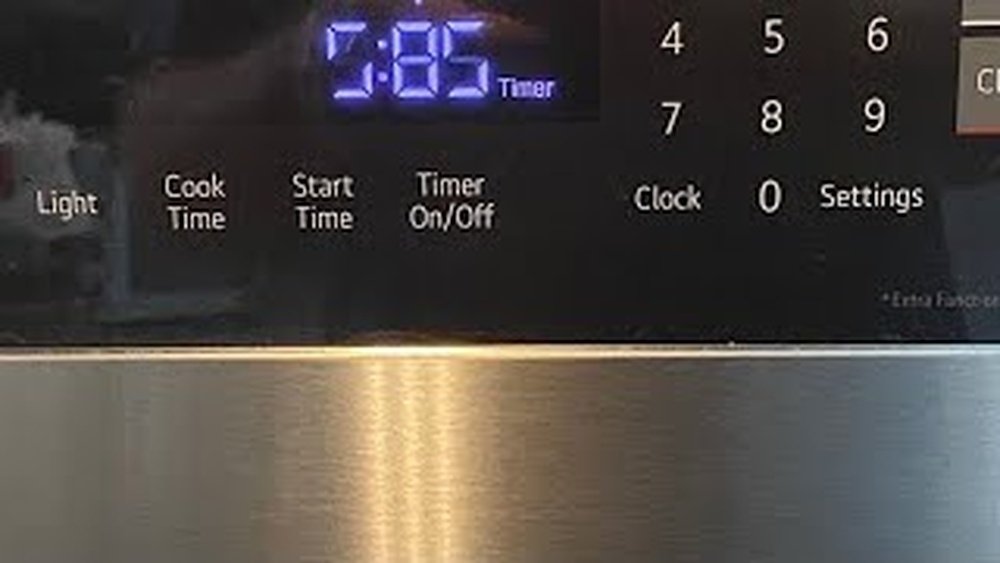
- Locate the clock button: Look for a button labeled Clock or a clock symbol.
- Press and hold: On many stoves, you must press and hold the Clock button for 3-5 seconds. The display should start blinking.
- Adjust the time: Use the + or – buttons, or arrows, to set the correct hour and minute.
- Confirm: Press Clock again, or sometimes Start or Set, to confirm the new time.
Practical Tip: If your clock doesn’t start blinking after step 2, try pressing Clock and Set together, or Clock and Start. Some brands require two buttons at once.
Example
On a Whirlpool stove:
- Press Clock.
- Use +/- to set the time.
- Press Start.
On a GE stove:
- Press and hold Clock until the display blinks.
- Set the time.
- Press Clock again.
What If The Buttons Don’t Work?
If pressing the buttons does nothing, you might have:
- Locked controls: Try pressing and holding the Control Lock button for 3-5 seconds.
- Stuck buttons: Gently clean around the buttons with a dry cloth.
- Faulty panel: Electrical problems may need a technician.
2. Knob Or Dial-controlled Clocks
Older stoves often use a knob or dial.
- Find the clock knob: Usually labeled Clock.
- Push or pull: Some knobs need you to push in or pull out before turning.
- Turn to set: Rotate the knob until the correct time shows.
- Release: Let go or push the knob back in.
Example: On an older Frigidaire, push in the clock knob, turn to set the time, then release.
3. Touchscreen Controls
High-end stoves may have a touchscreen.
- Wake the screen: Touch anywhere on the display to wake it up.
- Find the clock icon: Tap the settings or clock symbol.
- Adjust time: Use on-screen arrows or number pad.
- Save: Tap Save or OK.
Non-obvious Insight: Some models only let you set the clock when the oven is off. If you can’t change the time, make sure no cooking function is running.
4. After Power Outage Or Reset
A power outage can cause the clock to blink or reset.
- Wait for power to stabilize: Don’t set the clock until lights and appliances are running normally.
- Follow normal clock-setting steps: As above.
- Check oven functions: Make sure the oven works after setting the clock. Some stoves won’t work until the clock is set.
Extra Tip: Use a surge protector to prevent future resets.
5. Daylight Saving Time Changes
Most stoves do not change for daylight saving time automatically.
- Spring forward: Add one hour to the current time.
- Fall back: Subtract one hour.
Some smart stoves update automatically if connected to Wi-Fi, but most need manual adjustment.
Fixing Common Digital Clock Problems
Even after you reset the clock, you might face other issues. Here’s how to fix the most common ones.
Clock Is Flashing Or Blinking
A blinking clock usually means:
- Power loss: Reset the clock as described earlier.
- Error code: Check for numbers or letters on the display and look up what they mean in your manual.
Clock Won’t Set Or Change
If nothing happens when you try to set the time:
- Controls locked: Hold the Control Lock or similar button for 3-5 seconds.
- Panel needs reset: Unplug the stove for 2 minutes, then try again.
- Defective control board: If buttons still don’t work, you may need professional service.
Clock Loses Time Or Runs Fast/slow
If the clock doesn’t keep correct time:
- Electrical surges: Install a surge protector.
- Weak power supply: Check your home’s wiring.
- Internal fault: The control board may be failing.
Non-obvious Insight: Frequent small power flickers (too fast to notice) can make digital clocks lose time. If you notice this problem, ask an electrician to check your outlets.
Display Is Dim Or Blank
A dim or dark display could mean:
- Energy saver mode: Some models dim the clock to save energy.
- Loose wiring: Safely unplug the stove and check plug and outlet.
- Failed display board: May require repair.
Caution: Don’t open the stove unless you know what you’re doing. Electrical parts can be dangerous.
Buttons Are Stuck Or Unresponsive
Food spills and grease can make buttons stick.
- Clean with dry cloth: Wipe the panel gently.
- Avoid water: Never spray liquid directly on the control panel.
- Use a soft brush: For stubborn gunk, a soft toothbrush can help.
If buttons still don’t work, a part inside may need replacement.
When To Call A Professional
Not all clock problems can be fixed at home. Call a professional if:
- The display is always blank, even after resetting.
- Buttons are physically broken or missing.
- The clock loses time every day, even after power checks.
- You smell burning or see sparks near the controls.
Attempting to repair internal parts without training can be dangerous and may void your warranty.
How To Find Your Stove’s Model And Manual
If you need brand-specific help, you’ll need the stove’s model number. This is usually found:
- Behind the oven door (open and look around the frame)
- On the back of the control panel
- Inside the drawer below the oven (if your stove has one)
With your model number, search online for your manual or visit the manufacturer’s website. Manuals give step-by-step instructions and troubleshooting help.
For example, the GE Appliances website lets you download manuals by model number.
Comparison: Manual Vs Automatic Clock Setting
Some new stoves offer automatic clock setting if connected to Wi-Fi, but most require manual setting. Here’s how they compare:
| Feature | Manual Setting | Automatic Setting |
|---|---|---|
| Requires user action | Yes | No |
| Adjusts for daylight saving | No | Yes (if connected) |
| Needs internet | No | Yes |
| Compatible models | All | Smart stoves only |
Most homes have manual clocks, so knowing how to set them is still important.
Extra Tips For Keeping Your Digital Clock Accurate
Here are some practical steps to avoid future issues:
- Check after power outages: Always look at your stove clock when power returns.
- Use surge protectors: Protect your electronics from power spikes.
- Clean the control panel regularly: Avoid sticky buttons and display problems.
- Replace backup batteries: Some stoves have a small battery to keep time during outages (check your manual).
- Label the controls: If you often forget which button sets the clock, add a small label for easy reference.
Why Your Digital Clock Is Not Working (advanced Causes)
If basic steps don’t fix your clock, these advanced problems could be the cause:
- Faulty electronic control board: The main circuit that controls all functions may be bad.
- Broken display: The screen itself can fail, even if the rest of the stove works.
- Wiring issues: Loose or damaged wires inside the stove can interrupt power.
- Software glitches: Rare on most stoves, but smart models can have software bugs.
In these cases, a repair technician is often needed. Repairs can cost between $100 and $300, depending on the part.
Credit: www.reddit.com
How To Avoid Mistakes When Fixing Your Digital Clock
Many people make errors that can create bigger problems. Here’s what to avoid:
- Forcing the buttons: If a button sticks, don’t press harder—clean it gently instead.
- Unplugging frequently: Turning power off and on too often can damage electronics.
- Using sharp objects: Never use knives or metal tools to press buttons or clean the panel.
- Ignoring the manual: Each stove is different; check your manual before trying complex fixes.
- Attempting risky repairs: If you’re not sure, call an expert.
How Digital Stove Clocks Differ By Brand
Not all stoves set the clock the same way. Here are some examples:
- GE: Often uses a “Clock” button, sometimes needs “Set” or “Start” to finish.
- Whirlpool: Usually press “Clock,” adjust with “+/-,” confirm with “Start.”
- Samsung: Uses “Clock” or “Time,” may require holding the button.
- Frigidaire: Older models use a dial, newer ones use “Clock” and arrow buttons.
- LG: Touchscreen models use a digital clock icon.
If you have a less common brand, always check the manual or search online for your exact model.
Credit: www.nytimes.com
How To Set The Clock On Popular Stove Brands
Here’s how to set the clock on some of the most common brands:
Ge
- Press Clock.
- Enter the time using number keys.
- Press Start.
Whirlpool
- Press Clock.
- Adjust with +/- buttons.
- Press Start.
Samsung
- Press and hold Clock for 3 seconds.
- Set the time with arrow buttons.
- Press Clock again.
Frigidaire
- Press Clock.
- Use arrow buttons to set time.
- Press Start.
Lg
- Tap the Settings icon on touchscreen.
- Select Clock.
- Set time and tap Save.
If you get stuck, try searching “[your brand] stove set clock” for more details.
Table: Troubleshooting Clock Issues By Symptom
Here’s a quick reference for common problems and solutions:
| Symptom | Possible Cause | Fix |
|---|---|---|
| Clock blinking | Power loss | Reset clock |
| Buttons unresponsive | Locked controls, dirty panel | Unlock, clean |
| Display dim or blank | Energy saver mode, wiring issue | Check settings, plug, call tech |
| Clock losing time | Power flickers, failing board | Check power, call tech |
| Can’t set time | Oven in use, wrong steps | Stop oven, follow manual |
How To Reset Your Stove’s Control Panel
If you’ve tried everything and the clock still won’t set, a control panel reset can sometimes help.
- Turn off power: Unplug the stove or switch off the circuit breaker.
- Wait 2 minutes: This lets the control board fully reset.
- Restore power: Plug the stove in or turn the breaker back on.
- Try setting the clock: Use the normal steps.
If the problem remains, it’s probably a hardware issue.
The Importance Of A Working Digital Clock
A working stove clock does more than tell time. It helps your kitchen run on schedule, makes baking and roasting more reliable, and allows you to use features like delayed start and timers. Keeping it accurate means fewer mistakes and less stress while cooking.
If you ever need more help, the manufacturer’s customer service can often guide you by phone or chat. For more technical information, see resources like the Wikipedia Stove Page.
Frequently Asked Questions
Why Does My Stove Clock Keep Blinking?
A blinking stove clock almost always means there was a power interruption. This could be a brief outage, a tripped breaker, or even unplugging the stove. Simply reset the clock using the steps for your brand.
Can A Broken Clock Stop My Oven From Working?
Yes, on some models. If the clock is not set, the oven may not heat or timers may not work. Always set the clock after a power loss to restore full function.
How Do I Clean Sticky Clock Buttons Safely?
Use a dry, soft cloth to wipe the control panel. For stubborn mess, use a soft toothbrush. Never spray cleaner directly onto the panel—spray onto the cloth instead.
What If My Stove Clock Loses Time Every Day?
This usually means an internal fault or power supply problem. Check for loose plugs or flickering lights in your kitchen. If the problem continues, contact a repair technician.
Is It Possible To Upgrade My Stove To An Automatic Clock?
Most stoves cannot be upgraded to a smart clock unless they are designed for it. If you want features like auto time change, consider a new stove with Wi-Fi or smart home integration.
Keeping your digital clock working isn’t just about time—it keeps your whole kitchen running smoothly. With the tips in this guide, you can handle almost any clock problem quickly and confidently.