
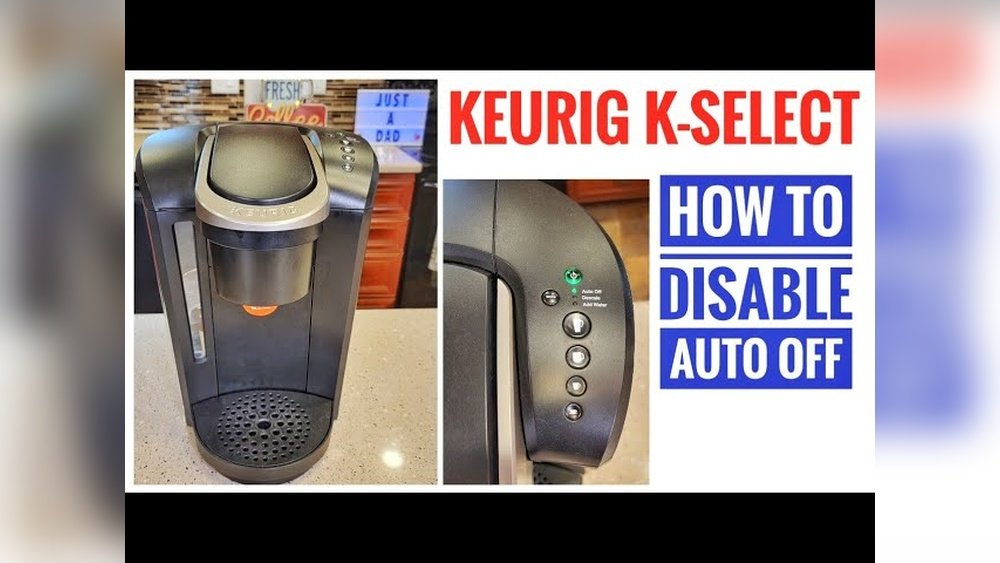
Many coffee lovers choose Keurig machines for their speed and convenience. But sometimes, the Auto Off feature can interrupt your routine. Picture this: You’re ready for a second cup, but your Keurig has already turned off, forcing you to wait for it to heat up again. This feature saves energy, but it can be frustrating if you want your machine to stay on. The good news? You can turn off Auto Off on most Keurig models.
Whether you own a classic Keurig, a K-Elite, or a K-Slim, disabling Auto Off is possible. However, the steps can be confusing because every model is a little different. This guide will help you understand why the Auto Off exists, when you might want to turn it off, and exactly how to do it—no matter which Keurig you own.
We’ll also cover what to do if your Keurig keeps shutting off and how to avoid common mistakes. By the end, you’ll have full control over your coffee experience.
What Is Keurig’s Auto Off Feature?
Many appliances today include energy-saving features, and Keurig is no exception. The Auto Off function is designed to help you save electricity and make your device safer. After a set period—often 2 hours—your Keurig will power down automatically. This is helpful if you forget to turn it off, but it can also be inconvenient if you want your machine ready all day.
Benefits And Drawbacks
Benefits:
- Saves energy when not in use
- Prevents overheating or safety risks
- Provides peace of mind if you forget to turn off the brewer
Drawbacks:
- Delays when you want another cup later
- May interrupt brewing if triggered accidentally
Some users appreciate the safety. Others find it annoying, especially in busy offices or homes where multiple people use the machine.
Why Turn Off Auto Off On Keurig?
There are real reasons to keep your Keurig always on. Let’s look at common situations:
- Multiple Users: In offices or large households, several people may use the Keurig throughout the day. Turning off Auto Off keeps it ready, so nobody has to wait for reheating.
- Busy Mornings: If your mornings are hectic, you don’t want to waste time waiting for your Keurig to heat up.
- Frequent Use: Some people drink coffee all day. Leaving the machine on saves time.
- Smart Outlets: If your Keurig is connected to a smart plug, Auto Off can interfere with custom schedules.
However, remember that disabling Auto Off may use more energy. If you don’t need your Keurig on all the time, it’s better to leave Auto Off enabled.
How Auto Off Works On Different Keurig Models
Keurig has released dozens of models, and the Auto Off feature works differently on each. Some have a physical button, others require navigating a menu. Understanding your specific model is key.
Here’s a quick comparison of how Auto Off works on popular Keurig machines:
| Keurig Model | Default Auto Off Time | How to Change |
|---|---|---|
| K-Classic (K55/K50) | 2 hours | Physical button |
| K-Elite | 2 hours | Menu settings |
| K-Slim | 5 minutes | Physical button |
| K-Select | 2 hours | Button sequence |
| K-Duo | 5 minutes (single serve), 2 hours (carafe) | Menu settings |
Not all Keurig machines allow you to disable Auto Off. Some, especially newer budget models, have this feature built in permanently.
How To Turn Off Auto Off On Keurig: Step-by-step For Every Major Model
Every Keurig is a little different. Below, you’ll find clear instructions for disabling Auto Off on the most popular models. If you can’t find your model, check the user manual or the Keurig website.
Keurig K-classic (k55, K50)
- Make sure the machine is powered on.
- Look for the Auto Off button (usually near the top right).
- The green light means Auto Off is enabled. Press the button once to turn it off—the light should go dark.
- Your Keurig will now stay on until you turn it off manually.
Tip: If the power goes out or the machine is unplugged, you may need to repeat these steps.
Keurig K-elite
- Turn on the brewer.
- Locate the Settings button (gear icon).
- Press the Settings button repeatedly until you see “Auto Off” on the display.
- Use the up/down arrows to select “Off.”
- Press the K button to confirm.
Example: If you set “Auto Off” to “Off,” your K-Elite will stay on all day.
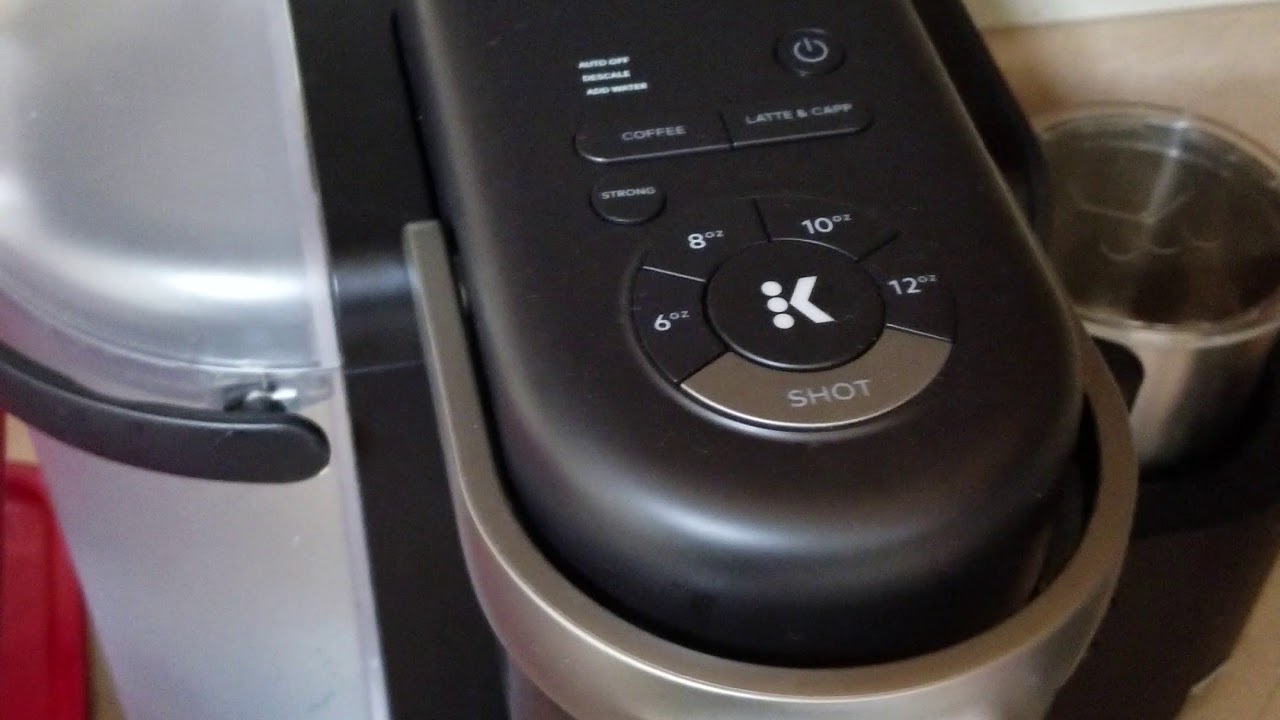
Keurig K-slim
- Plug in and power on the K-Slim.
- Find the Strong and 10oz cup size buttons.
- Press and hold both buttons at the same time for about 3 seconds.
- The Auto Off indicator should turn off, confirming the setting.
Note: If you unplug your K-Slim, you may need to repeat this step.
Keurig K-select
- Make sure the brewer is on.
- Press and hold the Strong and 10oz buttons together for 3 seconds.
- The Auto Off light will turn off.
Practical Insight: Many users don’t realize that the K-Select shares the same button sequence as K-Slim. If you have trouble, make sure you press both buttons at exactly the same time.
Keurig K-duo & K-duo Plus
- Power on the machine.
- Press the Carafe button to enter carafe mode.
- Press the Auto Off button (or, in some models, go through the menu using the digital display).
- Use the up/down arrows to set Auto Off to “Off.”
- Confirm by pressing the K button or waiting for the display to set.
Extra Tip: On some K-Duo models, there’s a dedicated Auto Off button next to the display.
Keurig K-supreme And K-supreme Plus
- Power on the brewer.
- Press the Settings button to access the menu.
- Navigate to the “Auto Off” setting.
- Use the arrow buttons to turn it “Off.”
- Confirm the setting.
Keurig K-mini And K-mini Plus
Unfortunately, Auto Off cannot be disabled on K-Mini or K-Mini Plus. These models are designed for single-cup brewing and always turn off 90 seconds after brewing.
Keurig K-cafe
- Turn on the machine.
- Press the Settings or Menu button.
- Find the “Auto Off” option.
- Use arrows to turn it off.
- Press the K button to confirm.
Insider Detail: On the K-Cafe, Auto Off controls only the main brewer. The frother does not have an Auto Off setting.
Keurig K200, K250, K300, K350, K400, K450, K475, K500, K550, K575
- Power on the brewer.
- Tap the “Settings” or “Menu” button on the touchscreen.
- Navigate to “Auto Off.”
- Select “Off.”
- Save or confirm your choice.
Common Mistake: Some users accidentally change the clock instead of the Auto Off setting. Read the display carefully.
Keurig K155 Officepro
- Turn on the machine.
- Tap “Menu” on the touchscreen.
- Scroll to “Auto Off Timer.”
- Set to “Off.”
- Exit the menu.
Other Keurig Models
If your model isn’t listed, check the manual or look for an Auto Off button, menu option, or a combination of buttons. Many Keurigs use the Strong + 10oz button method, but not all.
Troubleshooting: What If Auto Off Won’t Turn Off?
Sometimes, the Auto Off feature refuses to disable, or your Keurig still shuts off. Here’s what to do:
- Check for Power Interruptions: Unplugging your Keurig often resets all settings. If you lose power, repeat the Auto Off steps.
- Button Sequence: Make sure you’re holding the correct buttons for long enough.
- Firmware Updates: Some Keurigs receive software updates. Check the Keurig website for updates or issues.
- Factory Reset: As a last resort, try a factory reset (usually in the settings menu). This erases all custom settings, so you’ll need to reconfigure.
Uncommon Insight: Some models have a hidden “service mode” that allows more advanced changes. This is usually for technicians, but advanced users sometimes share these tricks in forums.
Is It Safe To Disable Auto Off?
Disabling Auto Off makes your Keurig more convenient, but it does carry some risks:
- Energy Use: Your machine will use electricity all day, even if not brewing.
- Overheating: Rare, but possible if left on for days.
- Burnout: Heating elements can wear out faster.
Example: If you leave your Keurig on 24/7, it may use 30-50 kWh more per year, adding $4–$7 to your electricity bill (based on US rates).
Safety Tip: Always turn off your Keurig if you go on vacation or won’t use it for days.
Credit: www.ifixit.com
How To Tell If Auto Off Is Enabled
Most Keurigs have a light or display indicating if Auto Off is active. Here’s how to check:
- Lighted Button: On classic models, a green light means Auto Off is ON.
- Digital Display: On newer models, check the settings menu.
- No Indicator: Some machines have no clear sign. If your Keurig turns off by itself, Auto Off is enabled.
The Difference Between Auto Off And Auto Brew
Don’t confuse Auto Off with Auto Brew. Auto Off powers down the machine after a set time. Auto Brew is a timer that starts brewing at a set time.
| Feature | What It Does | Which Models |
|---|---|---|
| Auto Off | Turns off after inactivity | Most Keurigs |
| Auto Brew | Starts brewing at a set time | K-Duo, K-Elite, some others |
If you want coffee ready when you wake up, look for Auto Brew—not just Auto Off controls.
Common Mistakes When Turning Off Auto Off
Many users struggle with this setting. Here are common errors to avoid:
- Wrong Model Instructions: Each Keurig is different. Always check your model number.
- Not Holding Buttons Long Enough: Many models require holding buttons for 3 seconds.
- Forgetting to Save Changes: On digital displays, you may need to press a confirm button.
- Power Loss: Settings often reset if the machine loses power.
- Expecting More Options: Some budget models don’t allow disabling Auto Off.
Pro Tip: Write down your model number and keep it near your machine. This makes troubleshooting much easier.
How To Find Your Keurig Model Number
Knowing your exact model is critical. Here’s how to find it:
- Check the Bottom: Look for a sticker or plate under the brewer.
- Check the Back: Some models have the number on the back panel.
- User Manual: The manual lists the model.
- Serial Number: Enter the serial on the Keurig website for details.
If you’re not sure, compare your machine to pictures online.
How Long Does Keurig Stay On With Auto Off?
Here are common Auto Off times for popular models:
| Model | Auto Off Time |
|---|---|
| K-Classic, K-Select, K-Elite | 2 hours |
| K-Slim, K-Duo Single Serve | 5 minutes |
| K-Mini, K-Mini Plus | 90 seconds |
| K-Duo Carafe | 2 hours |
Some older models allow you to adjust this time in the menu.
Extra Tips For Managing Your Keurig’s Power
Disabling Auto Off isn’t the only way to keep your Keurig ready. Here are a few more ideas:
- Use a Smart Plug: Schedule power times, or control with your phone.
- Manual Shut-Off: If you forget, try setting a phone reminder to turn off your Keurig.
- Regular Cleaning: Keeping your Keurig clean prevents overheating and problems.
- Positioning: Place your Keurig where you can see the power light, so you remember to turn it off manually.
What To Do If Your Keurig Keeps Turning Off
If your Keurig keeps shutting off—even with Auto Off disabled—try these fixes:
- Descale the Brewer: Mineral buildup can cause random shut-offs. Run a descaling solution through your machine every 3 months.
- Check the Power Cord: Damaged cords or loose plugs can interrupt power.
- Reset to Factory Settings: Sometimes, a reset will fix glitches.
- Contact Support: If problems continue, call Keurig customer service.
Insider Detail: On some models, a full water reservoir is required for the brewer to stay on. If your Keurig turns off after brewing, check the water level.
When You Should Leave Auto Off Enabled
For some users, Auto Off is a good thing. Keep it enabled if:
- You live alone and use the Keurig only a few times a day.
- You care about energy saving.
- You worry about forgetting to turn off appliances.
- Your Keurig is in a place where children or pets might touch it.
Remember, safety and energy costs matter.
Keurig App And Smart Controls
Some newer Keurigs connect to Wi-Fi or use a mobile app. These models may allow Auto Off control from your phone.
- Keurig K-Supreme Plus SMART: The app lets you adjust settings, including Auto Off, remotely.
- Firmware Updates: Some features are added after purchase. Check for updates in the app.
Pro Insight: Mobile app models often remember settings after power loss, unlike basic machines.
Comparing Keurig Auto Off To Other Coffee Makers
How does Keurig’s Auto Off feature stack up against other brands?
- Nespresso: Most Nespresso machines also have a 9-minute Auto Off.
- Breville: Some models allow custom shut-off times.
- Mr. Coffee: Typically 2–4 hour Auto Off.
Keurig’s feature is average for the industry, but the ability to disable it is less common on budget models.

Credit: www.youtube.com
Energy Saving Vs. Convenience: Finding Your Balance
Leaving your Keurig always on uses more energy but saves time. Here’s a simple cost comparison:
- Auto Off Enabled: About $2–$3/year in standby electricity.
- Always On: Up to $10/year, depending on usage and model.
If you value convenience, the extra cost may be worth it. For most people, Auto Off saves money and is better for the environment.
Real-world Example: Office Vs. Home Use
In offices, disabling Auto Off keeps the machine ready for everyone. At home, you might only need it on for a few hours.
Scenario: In a shared workspace, leaving the Keurig always on saves 10 minutes of wait time per person per day. Over a month, that’s hours of saved productivity.
At home: The savings are smaller. You might prefer to leave Auto Off on and enjoy lower bills.
Credit: www.fluentincoffee.com
What If Your Keurig Doesn’t Allow Disabling Auto Off?
Some models, especially compact or budget-friendly ones, don’t let you turn off Auto Off. If this matters to you, consider upgrading to a model with more features.
- Check the Keurig website for a full comparison.
- Ask before buying if always-on power is important.
- Consider a smart plug as a workaround, but know it won’t prevent internal shut-off if the firmware is locked.
Where To Find More Information
For the latest model-specific instructions, always check the official Keurig website. Manuals are available for download, and customer service can help with unusual problems. For more on energy-saving and appliance safety, the U.S. Department of Energy offers practical advice.
Frequently Asked Questions
How Do I Know If My Keurig Has Auto Off?
Most Keurigs have an indicator light or a menu setting for Auto Off. If your machine turns off by itself after a few minutes or hours of inactivity, Auto Off is enabled. Check the display or user manual for more details.
Can I Set A Custom Auto Off Timer On My Keurig?
Some advanced models let you adjust the timer in the menu. For example, K-Elite and K-Supreme allow custom times. Budget models like K-Mini do not offer this feature.
Will Disabling Auto Off Damage My Keurig?
No, disabling Auto Off will not harm your Keurig if you use it normally. However, leaving it on all the time may wear out the heating element faster and use more electricity.
What If My Keurig Keeps Shutting Off Even With Auto Off Disabled?
Frequent shut-offs can be caused by mineral buildup, a faulty power cord, or a software glitch. Try descaling your machine, checking the cord, or resetting to factory settings. If problems continue, contact Keurig support.
Is It Better To Leave Auto Off Enabled Or Disabled?
For most people, leaving Auto Off enabled saves energy and improves safety. If you use your Keurig many times a day or share it with others, disabling Auto Off may be more convenient.
Coffee is personal, and so is your Keurig. With these steps, you can take control of your brewer’s power settings and make your daily cup just a little bit easier.