
Using a dishwasher can feel confusing, especially if you’re new to modern kitchen appliances. The Hotpoint dishwasher one button feature is designed to make life easier. Instead of choosing from many cycles and options, you press just one button, and the dishwasher does the rest. But how does it really work? What does this button do? And how can you use it correctly to get the cleanest dishes every time?
This guide will answer all these questions and more. Whether you have never used a Hotpoint dishwasher before or just want to get the best results from the one-button function, you’ll find everything you need here. We’ll cover step-by-step instructions, tips for better cleaning, common mistakes, and even how the one-button system compares with other dishwasher controls.
By the end, you’ll feel confident using your Hotpoint dishwasher and understanding all its features.
What Is The Hotpoint Dishwasher One Button?
Hotpoint dishwashers are known for their simple design and reliable cleaning. Many models include a one button control—sometimes called “One Touch,” “Push & Go,” or just “Start.” This feature is all about ease. Instead of choosing a wash cycle, temperature, or drying option, you only need to load your dishes and press one button.
The one button system is pre-programmed. It automatically selects a balanced wash cycle that works for most daily loads. This means it picks the water temperature, wash time, and drying settings for you. The idea is to save you time and remove any guesswork.
For busy families, older adults, or anyone who dislikes complicated controls, it’s a real advantage.
But there are also some things you need to know. For example, the one button is best for normal loads—not for heavy pots or delicate glassware. And if you want to change the cycle, you’ll need to use the other buttons or settings. Understanding when and how to use the one button makes a big difference.
Step-by-step: How To Use Hotpoint Dishwasher One Button
Using the one button function is simple, but doing it right matters for clean, dry dishes. Let’s break down the process.
1. Prepare Your Dishes
Before loading, scrape off large food pieces. Hotpoint dishwashers can handle some mess, but chunks of food or bones can block the filter or damage the pump. You don’t need to rinse dishes—just remove the big stuff.
2. Load The Dishwasher Correctly
- Place plates and larger items on the bottom rack.
- Put cups, glasses, and small bowls on the top rack.
- Make sure nothing blocks the spray arms.
- Face dirty sides toward the center.
- Place utensils in the basket, mixing up spoons, forks, and knives to avoid sticking.
Proper loading helps water reach all dishes. Overloading can leave things dirty or even damage the machine.
3. Add Detergent
Use the right amount of dishwasher detergent. Too much can cause extra suds and poor rinsing; too little may leave grease behind. Put the detergent in the dispenser—never sprinkle it inside the machine.
For best results, use tablets or powder made for dishwashers. Liquid soap for hand washing is not suitable and can cause leaks.
4. Check Salt And Rinse Aid
If your Hotpoint model has a salt compartment (for hard water areas), check and refill it if needed. Salt helps prevent white marks on glassware. The rinse aid helps with drying and stops water spots. Most dishwashers have a small window to show if these need refilling.
5. Close The Door Firmly
The dishwasher will not start if the door isn’t fully closed. Push until you hear a click. Some models have a small light or beep to confirm the door is locked.
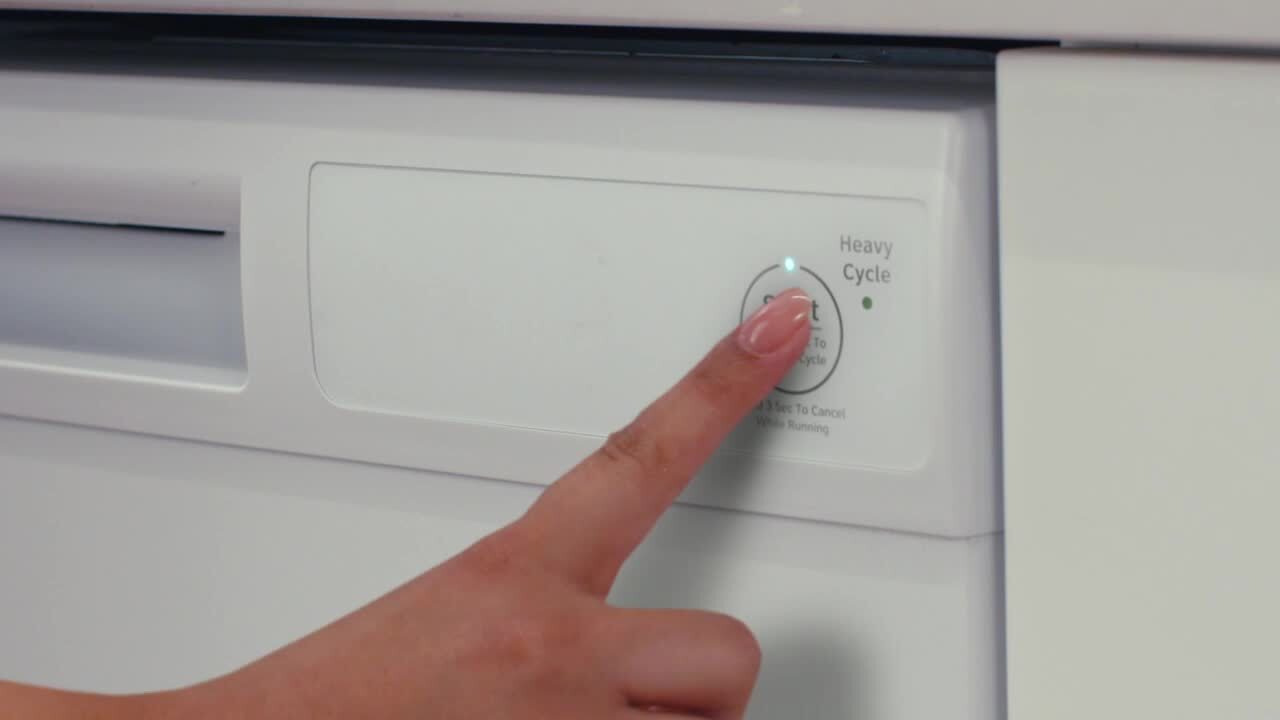
6. Press The One Button
Find the main button—usually marked with a play symbol, “Start,” or “Push & Go.” Press it once. Some models require you to hold it for two or three seconds. The machine will beep or light up to show it’s running.
After a few seconds, you’ll hear water start to fill the machine. This means the cycle has begun.
7. Wait For The Cycle To Finish
Most one-button cycles last between 60 and 120 minutes. The dishwasher will run through washing, rinsing, and drying steps automatically. You don’t need to do anything else.
8. Open Carefully And Unload
When the cycle is done, some Hotpoint models beep or show a green light. Open the door slightly to let steam escape, then wait 5-10 minutes before unloading. Start with the bottom rack first—this stops water from glasses and cups dripping onto dry plates below.
Credit: www.homedepot.com
The Science Behind The One Button Cycle
The one button program isn’t just a random setting. Hotpoint engineers design it using real washing data. The cycle uses sensors to check the water’s clarity and temperature, adjusting the wash as needed.
For example, if the water stays dirty after the first rinse, the machine might add more time or an extra rinse. If the dishes are already quite clean, the cycle may finish sooner. This sensor technology helps save water and energy while getting good cleaning results.
The standard one button cycle usually includes:
- Pre-wash: Removes loose food.
- Main wash: Uses hot water and detergent.
- Rinse: Clears away soap and residue.
- Drying: Uses heat or air to dry dishes.
Some models even use eco-friendly modes during the one button cycle, reducing electricity and water use.
Hotpoint Dishwasher One Button: Pros And Cons
Using the one button system is not perfect for every situation. Here’s a breakdown of the main advantages and limitations.
| Pros | Cons |
|---|---|
| Very easy to use | Limited cycle choices |
| Good for daily cleaning | Not ideal for heavy stains |
| Saves time | May use more water than eco cycles |
| Reduces mistakes | Less control over temperature |
| Safe for most dish types | Not suited for delicate glassware |
Most people find the one button works well for everyday dishes. But if you often wash pots, pans, or fragile items, you may need to use other settings.
Common Problems And How To Fix Them
Sometimes, the one button doesn’t give perfect results. Here are frequent issues and ways to solve them.
Dishes Not Clean
- Overloading or blocking the spray arms is a top cause. Reload and try again.
- Old or damp detergent loses power. Use fresh detergent.
- Hard water buildup can leave spots. Check and refill salt and rinse aid.
White Spots Or Cloudy Glasses
- Low rinse aid or dishwasher salt can cause this. Refill both.
- Try running an empty cycle with a cup of white vinegar.
Dishwasher Doesn’t Start
- Door not closed or locked. Push the door firmly.
- Power supply problem. Check the plug and fuse.
Bad Smells
- Food stuck in the filter. Clean the filter under the bottom rack.
- Not running the dishwasher enough. Try running a short cycle every few days.
Water Left In The Bottom
- Drain hose blocked or kinked. Straighten or clean it.
- Filter clogged. Wash the filter in hot soapy water.
If these steps don’t help, check your user manual or contact Hotpoint support.
Hotpoint One Button Vs. Other Dishwasher Controls
How does the one button compare to full control panels? Here’s a simple overview.
| Feature | One Button | Traditional Controls |
|---|---|---|
| Ease of use | Very high | Medium to low |
| Cycle choices | One main cycle | Many options |
| Customization | Low | High |
| Best for | Everyday dishes | Special loads (pots, glassware, etc.) |
| Learning curve | Easy | Can be complex |
One button systems are perfect for people who want quick, reliable cleaning without thinking about settings. Traditional controls are better for those who need to wash very dirty pots, delicate items, or want to save energy with eco cycles.
Tips For Best Results With The One Button
Getting the most from your Hotpoint dishwasher doesn’t take much extra work. These practical tips can help you avoid common problems and keep your dishes sparkling.
- Load correctly. Leave space between dishes so water can reach everywhere.
- Use good detergent. Tablets or powder from trusted brands often work better than cheap or unknown products.
- Check spray arms. Spin them by hand before starting to make sure nothing blocks them.
- Clean the filter monthly. Remove and rinse the filter to keep water flowing freely.
- Don’t overload. It’s tempting to fit more, but overcrowding stops dishes from getting clean.
- Run hot water first. Before starting, run the kitchen tap until water is hot. This gives the dishwasher a good start.
- Refill salt and rinse aid. These small steps make a big difference in cleaning and drying.
- Use the right cycle for tough jobs. If you have burned-on food, use the intensive or pots and pans cycle instead of the one button.
- Let dishes cool before unloading. This helps prevent chips and spots.
- Wipe the door seal weekly. Food and grease can build up and cause odors.
Most beginners miss the importance of regular filter cleaning and correct detergent use. Both are key to great results.
When Not To Use The One Button
While the one button is very handy, it’s not perfect for every situation. Here are times to pick a different cycle:
- Heavily soiled pots and pans: Use an intensive or heavy-duty cycle.
- Delicate glassware or china: Choose a gentle or glassware program.
- Baby bottles or items that need sanitizing: Use a high-temperature or “sanitize” setting.
- Half loads: Some models have a special half-load option to save water.
Knowing when to switch cycles helps keep your dishes and dishwasher in good shape.
Understanding Hotpoint Dishwasher Symbols
Hotpoint dishwashers use simple symbols on the control panel. Here are some common ones found near the one button:
- Play/Pause symbol: Start or stop the cycle.
- Tap symbol: Add salt or check water supply.
- Sun symbol: Add rinse aid.
- Lock symbol: Child lock engaged.
- Spray arms: Check for blockages.
If you’re not sure, check the quick guide in your user manual. Knowing these symbols can save you time and prevent mistakes.
Energy And Water Use: Real-world Data
Hotpoint’s one button cycle is designed for efficiency, but how does it compare in real use? Here are some typical numbers (these may vary by model):
- Water use per cycle: 9–12 liters (2.4–3.2 gallons)
- Electricity use per cycle: 0.7–1.2 kWh
- Average cycle time: 90–120 minutes
Compared to traditional hand washing, which uses about 40 liters (over 10 gallons) per load, the dishwasher is much more water efficient. Energy use is also lower thanks to better insulation and sensors.
For more details on dishwasher efficiency, see the ENERGY STAR Dishwasher Guide.

Credit: www.bensonsappliance.com
Maintenance Tips For Hotpoint Dishwashers
Regular care keeps your dishwasher running smoothly. Here’s what you should do:
Monthly
- Clean the filter. Remove and wash under hot water.
- Wipe spray arms. Use a toothpick to clear blocked holes.
- Check the salt and rinse aid. Refill if low.
Every 3–6 Months
- Run a cleaning cycle. Use a dishwasher cleaner or a cup of white vinegar on the top rack. Run on the hottest setting.
- Check door seals. Wipe with a damp cloth to remove food and grease.
Yearly
- Check hoses and connections. Make sure there are no leaks or cracks.
- Inspect racks and wheels. Replace if broken.
Proper maintenance prevents breakdowns and keeps your dishwasher cleaning at its best.
Is The One Button Safe For All Dishes?
The one button cycle is gentle enough for most everyday plates, cups, and silverware. However, some items should not go in the dishwasher:
- Nonstick pans: Coating can wear off.
- Sharp knives: Can dull quickly.
- Crystal or hand-painted glass: May fade or chip.
- Wooden utensils: Wood can crack or warp.
- Copper or brass: Can discolor.
Always check the manufacturer’s instructions for special items. When in doubt, wash by hand.
Credit: www.homedepot.com
Saving Money And The Environment
Using the one button can save you money and help the environment:
- Less water and energy: Modern dishwashers use far less than hand washing.
- Detergent savings: Tablets and powder are concentrated.
- Longer life for dishes: Gentle cycles reduce chips and cracks.
To save even more, only run the dishwasher when full. Avoid pre-rinsing dishes under running water—just scrape off food. And always use the eco cycle for lightly soiled loads when you have time.
Troubleshooting Advanced Issues
If the basic fixes don’t solve a problem, try these steps:
- Reset the dishwasher: Unplug for 1 minute and plug back in.
- Check error codes: Many Hotpoint models display a code on the panel. Check your user manual for meanings.
- Inspect water supply: Make sure valves are open and hoses are not blocked.
- Call for service: If you hear loud noises, see leaks, or the machine won’t turn on, contact a Hotpoint repair technician.
Never try to repair electrical parts yourself unless you are trained.
Real User Experiences
Many people choose Hotpoint dishwashers for their ease of use. Here are a few examples from owners:
- Maria, a busy mom: “The one button saves me every night. I load everything, press start, and get clean dishes in the morning.”
- John, a retiree: “I like not having to remember which setting to use. The one button always works for my plates and glasses.”
- Ahmed, a college student: “I used to forget to add salt. Now I check it every month, and my glasses look much better.”
A common insight is that filter cleaning and using the right detergent make a big difference—small steps that most beginners overlook.
Advanced Features Found In Some Hotpoint Models
Some Hotpoint dishwashers have extra features linked to the one button system:
- Auto cleaning sensors: Adjust time and water based on dirt level.
- Half-load mode: Uses less water for small loads.
- Delay start: Set the cycle to begin later.
- Child lock: Prevents accidental starts.
Check your model’s manual to see which features are included.
Frequently Asked Questions
How Do I Know If My Hotpoint Dishwasher Has A One Button Function?
Most modern Hotpoint dishwashers have a clearly marked button labeled “Push & Go,” “One Touch,” or a play symbol. If your control panel is very simple, with one large main button and a few indicator lights, you likely have the one button system. Always check the user manual for confirmation.
Can I Open The Dishwasher During The One Button Cycle?
Yes, you can pause the cycle by carefully opening the door. The machine will usually stop automatically. To continue, close the door firmly and press the start button again. However, hot steam may escape, so open slowly and avoid putting your face close to the door.
What Detergent Should I Use With The One Button?
For best results, use a dishwasher tablet or powder. Avoid using regular dish soap for hand washing, as it creates too many suds and may cause leaks. Some tablets contain rinse aid, but you should still refill the rinse aid compartment regularly.
My Dishes Are Still Wet After The Cycle. What Should I Do?
This can happen if the rinse aid is low, or if you open the door too soon. Try refilling the rinse aid and waiting 10 minutes after the cycle ends before unloading. Some plastics also don’t dry fully because they don’t retain heat.
Is The One Button Cycle Energy Efficient?
Yes, the one button cycle is designed to balance cleaning power and energy use. It often uses less water and electricity than older dishwashers or hand washing. For even more savings, use eco cycles for lightly soiled loads and only run the machine when full.
Hotpoint’s one button system is all about making dishwashing fast, easy, and reliable. With a little knowledge and some simple habits, you’ll get sparkling dishes every time—without stress or confusion.