
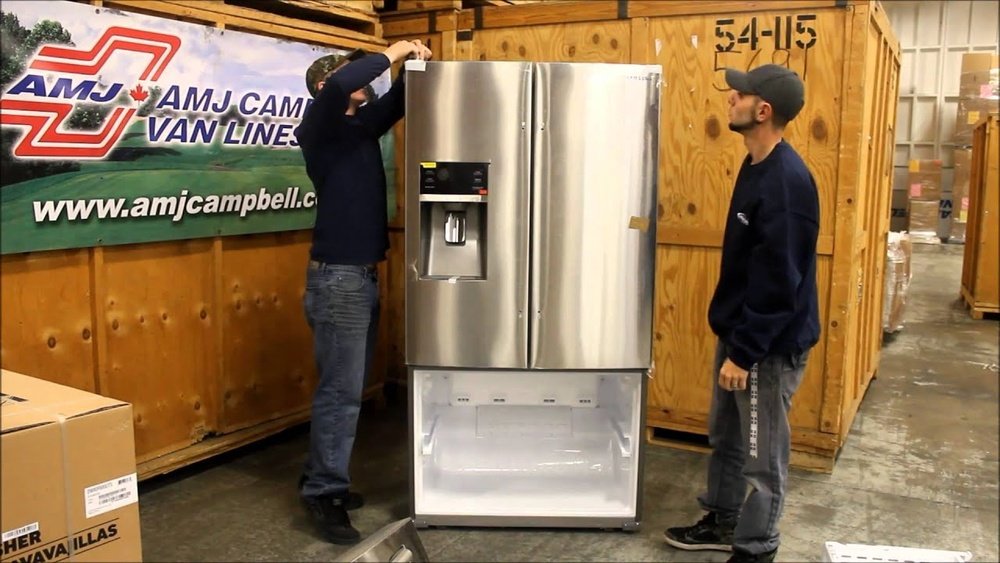
Removing the doors from your Samsung fridge can seem complicated, especially if you have never done it before. But sometimes, it’s necessary—maybe you’re moving, need to fit the fridge through a narrow doorway, or want to clean the appliance thoroughly.
The process is not the same for every refrigerator, and Samsung fridges can have unique features, like water and ice dispensers, hidden wiring, or different door types. Understanding the right steps will save you time, prevent damage, and keep you safe.
This guide will take you through everything you need to know about how to take Samsung fridge doors off, explaining every detail so even beginners can succeed.
Why Remove Samsung Fridge Doors?
There are several reasons you might need to remove your refrigerator doors. The most common is moving the appliance—modern fridges are large, and doorways or hallways are often too narrow. Removing the doors makes the fridge easier to maneuver and reduces the risk of damaging your home or the appliance. In some cases, you may need to remove the doors for deep cleaning or to access internal components during repairs. If your fridge has a reversible door feature, you might need to remove the doors to switch the way they open. Finally, if you’re recycling or disposing of an old fridge, removing the doors is a safety requirement to prevent children or pets from getting trapped inside.
Preparation: Tools And Safety
Before you start, proper preparation is critical. This prevents accidents and makes the job smoother.
Tools You Will Need
Most Samsung refrigerator doors can be removed using simple tools. Here’s a checklist:
- Phillips screwdriver – For screws securing hinges and covers.
- Flat-head screwdriver – Useful for prying covers or disconnecting wiring clips.
- 10mm socket wrench or spanner – Many Samsung models use 10mm bolts for the hinge.
- Pliers – For water line connectors or stubborn clips.
- Towel or blanket – To protect the floor and the doors.
- Small container – To hold screws and small parts.
Safety Precautions
- Unplug the fridge before starting. This prevents electric shock and avoids damaging the appliance.
- If your fridge has a water dispenser or ice maker, turn off the water supply and disconnect the water line.
- Remove all items from the fridge and freezer doors. Empty shelves make the doors lighter and stop items from falling out.
- Ask for help if you’re not strong enough to support the doors alone. Samsung fridge doors can be heavy and awkward.
Understanding Your Samsung Fridge Model
Not all Samsung fridges are built the same. Some have French doors, others have a single door, or a side-by-side design. Newer models may have Family Hub screens or extra wiring. Before removing the doors, check your fridge’s user manual or look up your model number on the Samsung website. If you don’t have the manual, many are available as PDFs online. This helps you avoid surprises—like hidden wires or clips—and ensures you’re following instructions that fit your exact model.
Common Samsung Fridge Door Types
| Fridge Type | Number of Doors | Typical Features |
|---|---|---|
| French Door | 2 (top) + 1-2 (bottom freezer) | Water/ice dispenser, wide shelves |
| Side-by-Side | 2 | Narrow doors, tall freezer section |
| Single Door | 1 | Simpler design, no water line |
| Four Door/Flex | 4 | Convertible compartments, advanced panels |
Knowing the type helps you plan which steps to follow and which cables or pipes to disconnect.
Step-by-step: How To Take Samsung Fridge Doors Off
This section gives you a detailed, logical sequence for removing Samsung fridge doors. The instructions focus on typical modern models but also include notes for older or unusual designs.
1. Unplug And Empty The Fridge
Always unplug the fridge first. If you skip this step, you could get an electric shock or damage the electrical parts. After unplugging, take out all food, drinks, and removable shelves or bins from the doors. This makes the doors lighter and prevents spills.
2. Move The Fridge For Access
If your fridge is close to the wall or cabinets, gently pull it forward. You need enough space to stand at the side and open the doors wide. Place a towel or blanket on the floor to protect both the floor and the doors during the process.
3. Turn Off Water Supply And Disconnect Water Line
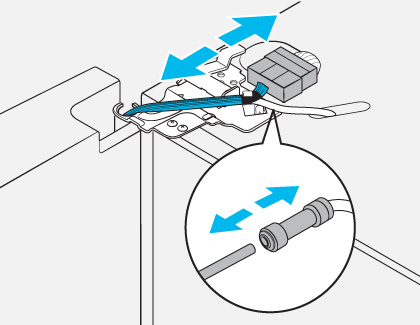
If your fridge has a water dispenser or ice maker, there will be a water line running to it. Find the shut-off valve, usually under the sink or behind the fridge, and turn it off. Carefully disconnect the water line from the fridge. Some Samsung models have a quick-release connector—push in the collar and gently pull the tube out. Have a towel ready; a little water may drip out.
4. Remove The Hinge Cover
On most Samsung fridges, the top of the door is covered by a hinge cover. This piece hides wiring and screws. Use a Phillips screwdriver to remove the screws holding the cover. Gently lift the cover off. If there are wires inside, note their colors and positions, or take a photo with your phone.
Example: Hinge Cover Removal
On a French door Samsung fridge, you’ll usually find two or three screws holding the cover. After removing them, the cover lifts off, revealing the hinge mechanism and any wiring for the display panel or dispenser.
5. Disconnect Wiring Harnesses And Water Tubes
Modern Samsung refrigerators with displays, ice/water dispensers, or Family Hub screens have wiring running through the hinge. Carefully disconnect these wiring harnesses. Most can be unplugged with your fingers, but a flat-head screwdriver can help if they’re tight. For water tubes, pull them free from their connectors.
Label each wire or tube if you’re worried about forgetting their positions.
6. Unscrew The Top Hinge
With the cover off and wiring disconnected, you can remove the top hinge. Use your 10mm socket wrench or spanner to unscrew the bolts. Keep these bolts safe in your container. Once the hinge is loose, lift it off and set it aside.
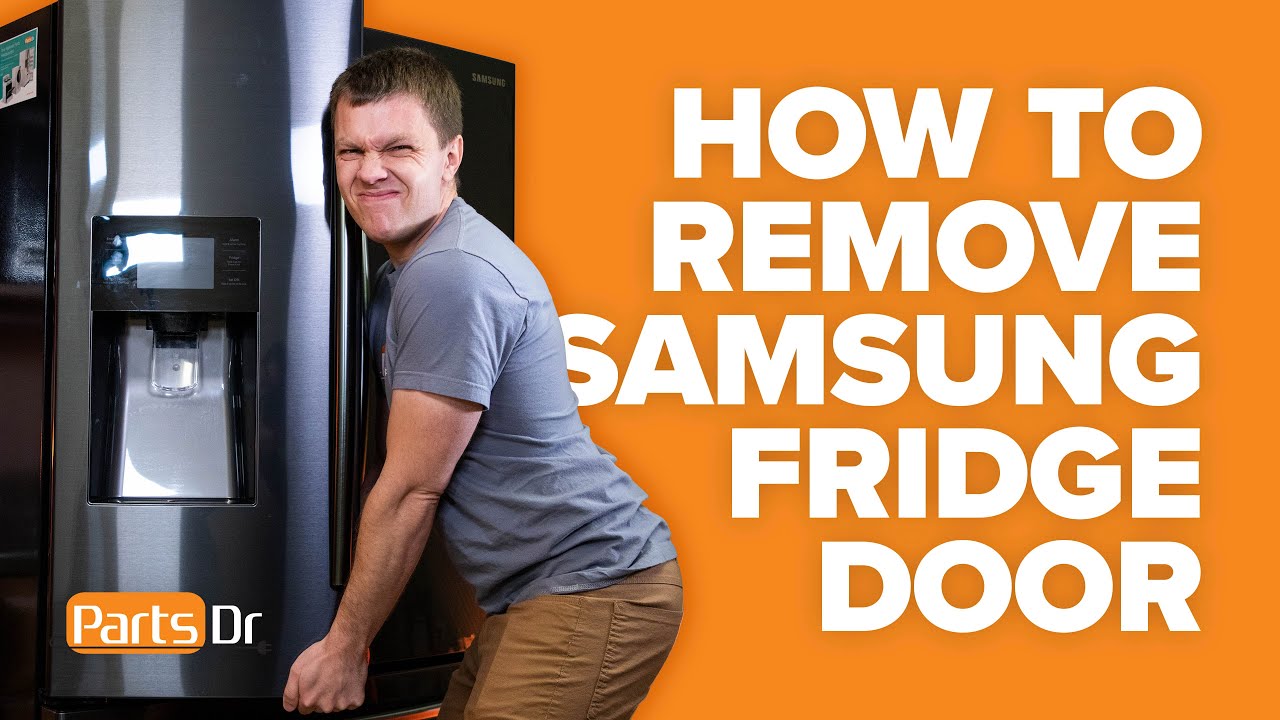
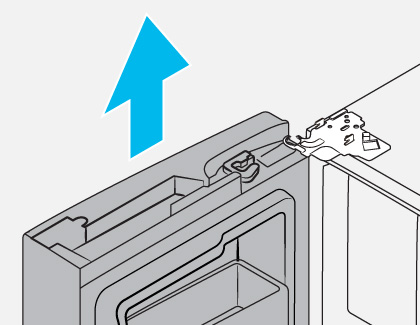
7. Lift The Door Off The Fridge
Hold the door with both hands (ask for help if needed). Carefully lift the door straight up and off the bottom hinge pin. Move the door away from the fridge and lay it flat on your towel or blanket to avoid scratches.
Important Insight
Many beginners try to “pull” the door forward without lifting it straight up. Samsung doors are designed to sit on a hinge pin, not slide off sideways. Forcing the door can bend the hinges or damage the door base.
8. Repeat For Other Doors
If you have a French door or side-by-side model, repeat the process for the other door. Each door may have its own wiring and water lines, so pay attention to each step.
9. For Bottom Freezer Drawers (if Present)
If your Samsung fridge has a bottom freezer drawer, the removal process is a little different.
- Open the drawer fully.
- Take out the freezer bins to lighten the drawer.
- Remove the screws securing the drawer to the sliding rails (often at the sides or back).
- Lift the drawer up and off the rails. Set it aside.
10. Store Parts Safely
Keep all screws, bolts, covers, and small parts in your container. Tape them to the doors or put them in labeled bags. This prevents losing parts, which is a common beginner mistake.
Reinstalling The Doors: How To Put Everything Back
Once your fridge is moved or serviced, you’ll need to put the doors back on. Reinstallation is basically the reverse of removal, but a few key points will help you avoid common problems.
Step-by-step Reinstallation
- Position the door over the bottom hinge pin. Lower it gently so it sits securely.
- Reattach the top hinge and tighten the bolts. Don’t overtighten—just snug enough so the hinge is firm.
- Reconnect wiring harnesses and water tubes. Double-check colors and connections. Crossed wires can cause display errors or stop the dispenser from working.
- Replace the hinge cover and secure it with screws.
- Reconnect the water line and turn on the water supply. Check for leaks.
- Plug in the fridge and test all functions (lights, dispenser, ice maker, display).
- Reinstall the freezer drawer if you removed it.
Door Alignment Tips
If the doors seem uneven or don’t seal properly after reinstallation, adjust the hinges. Most Samsung hinges allow for a small amount of adjustment. Loosen the bolts slightly, align the door, and retighten. Check the gasket (rubber seal) to make sure it makes full contact with the fridge frame.
Common Problems And How To Avoid Them
Removing and reinstalling fridge doors is not difficult, but small mistakes can cause big headaches.
1. Losing Screws Or Small Parts
Losing parts is the most common beginner mistake. Use a small bowl or bag to hold everything, and tape it to the door or fridge so it doesn’t get lost during moving.
2. Forgetting Wire Positions
Take photos before disconnecting any wiring. Even if connectors are color-coded, a quick photo on your phone makes reassembly much easier.
3. Damaging Water Lines
Be gentle with water tubes. Pulling too hard can split or crack them, causing leaks. If your line is old or brittle, consider replacing it with a new piece from a hardware store.
4. Not Labeling Parts
If your fridge has multiple wires or hoses, label them with masking tape and a pen. This avoids confusion later.
5. Forcing Door Off The Hinge
Never force the door forward or sideways. Always lift it straight up. Forcing can bend the hinge or break the door’s base.
6. Skipping The Water Shut-off
If you forget to turn off the water supply, you risk flooding your kitchen. Always shut off the water before disconnecting any lines.
Credit: www.youtube.com
Special Cases: Family Hub, Flexzone, And Unique Features
Some Samsung models have advanced features that require extra care.
Family Hub Models
Family Hub fridges have touchscreens and advanced electronics in the door. These require more wiring to be disconnected. Always check your manual for wiring diagrams, and take extra photos. If you’re not comfortable, consider calling a Samsung technician.
Flexzone And Four Door Models
These fridges may have extra doors or drawers. Each section often has separate wiring and sometimes its own water line. Remove one door at a time, and label all connections.
Older Samsung Fridges
Older models may have simpler hinges without wiring or water lines. The process is faster but still requires care when lifting the doors.
Expert Tips For Success
- Work with a friend. Samsung doors can be heavy and awkward. A second person can steady the door and prevent accidents.
- Use a magnetic tray for screws and bolts. This keeps metal parts from rolling away.
- Lay doors flat on a soft surface. This prevents dents, scratches, and damage to the gasket.
- Check for hidden screws. Some hinge covers have screws underneath plastic caps. Pry off gently with a flat-head screwdriver.
- Test before final placement. After reinstalling, check all functions before pushing the fridge back into its final spot.
Real-world Example
Imagine you’re moving into a new apartment and your Samsung French door fridge won’t fit through the kitchen doorway. You follow these steps, taking off both doors and the bottom freezer drawer. With the doors off, the fridge slides easily through the narrow space.
After moving, you reinstall the doors, double-check the wiring, and test the water dispenser. Everything works perfectly, and you’ve saved yourself time, money, and stress.
Comparing Samsung Door Removal To Other Brands
How does taking off Samsung fridge doors compare to other brands? Here’s a simple comparison:
| Brand | Typical Hinge Design | Wiring/Water Complexity | User-Friendliness |
|---|---|---|---|
| Samsung | Modular, hidden wiring | Medium to high | Good, but needs attention to detail |
| LG | Similar modular | Medium | Similar to Samsung |
| Whirlpool | Simpler hinges | Low to medium | Easy for most users |
| GE | Traditional hinges | Low | Very easy |
Samsung and LG tend to have more wiring and advanced features in the door. This means more steps but also better features. Whirlpool and GE are usually simpler, with fewer wires or tubes.
Credit: www.samsung.com
Environmental And Safety Notes
When disposing of an old fridge, most cities and recycling centers require the doors to be removed. This prevents children or animals from getting trapped inside. Removing the doors also allows the fridge to be processed more easily for recycling. Always follow local rules and recycle the appliance responsibly.
If you plan to store a fridge without doors, keep it upright and in a dry place. Leaving it on its side or back can damage the compressor or cause oil to leak into the cooling lines.
How Long Does It Take?
For most people, removing both doors from a Samsung fridge takes about 30–45 minutes if you follow the steps carefully. If you have never done it before, allow at least one hour so you can take photos and label wires as you go. Reinstallation usually takes another 30 minutes. If your fridge has more features (like a Family Hub screen), add extra time for disconnecting and reconnecting wiring.
Credit: www.samsung.com
Troubleshooting After Reassembly
Sometimes, after you put the doors back, something doesn’t work as before. Here are some common troubleshooting tips:
- Water dispenser not working: Check if the water line is fully inserted and the shut-off valve is open.
- Lights or display not working: Double-check wiring harness connections.
- Door not closing/sealing: Adjust the hinge alignment and check that no wires or tubes are blocking the door.
- Strange noises: Make sure doors are seated correctly and not rubbing against the frame.
If you’ve checked everything and still have problems, refer to your user manual or contact Samsung support.
When To Call A Professional
While most people can remove Samsung fridge doors with basic tools and careful attention, some situations need a professional:
- If your fridge has advanced electronics (like a Family Hub screen) and you’re not comfortable with wiring.
- If you notice damaged or corroded parts.
- If you are physically unable to lift or support the doors safely.
- If you can’t find your fridge’s model-specific instructions.
A professional can finish the job quickly, avoid damage, and ensure all features work as they should.
Additional Resources
If you want more technical details, Samsung’s official support site has model-specific guides and videos. You can also find community forums where users share photos and experiences. For more about refrigerator technology, see this Wikipedia article.
Frequently Asked Questions
How Do I Know If My Samsung Fridge Doors Can Be Removed?
Most Samsung fridges allow door removal for moving or servicing. Check your user manual or look for screw covers and hinges on top of the fridge. If you see a hinge cover with screws, the doors are removable.
What Should I Do If I Can’t Disconnect The Water Line?
If the water line is stuck, don’t force it. Check for a locking clip or collar you need to press in. If it’s still stuck, gently twist while pulling. If it won’t budge, consider calling a technician to avoid breaking the line.
Can I Remove The Doors Alone, Or Do I Need Help?
You can remove smaller single doors alone, but for French door, four-door, or side-by-side models, it’s safest to have help. The doors are heavy and awkward, especially with wiring or water tubes attached.
Will Removing The Doors Affect The Fridge’s Performance?
No, as long as you reinstall everything correctly and avoid bending the hinges or damaging the seals. Test all functions after reassembly to make sure everything works.
How Do I Realign The Doors If They’re Uneven After Reinstallation?
Loosen the top hinge bolts slightly, adjust the door so it’s level, and retighten. Check the door seal and adjust until the door closes smoothly and seals completely.
Taking off the doors of your Samsung fridge is a practical skill that can save you money, time, and trouble. By following these clear steps, using the right tools, and paying attention to details like wiring and water lines, you can do the job safely and confidently.
With a bit of planning, you’ll have your fridge moved, cleaned, or serviced in no time—without the stress of missing parts or broken features.