
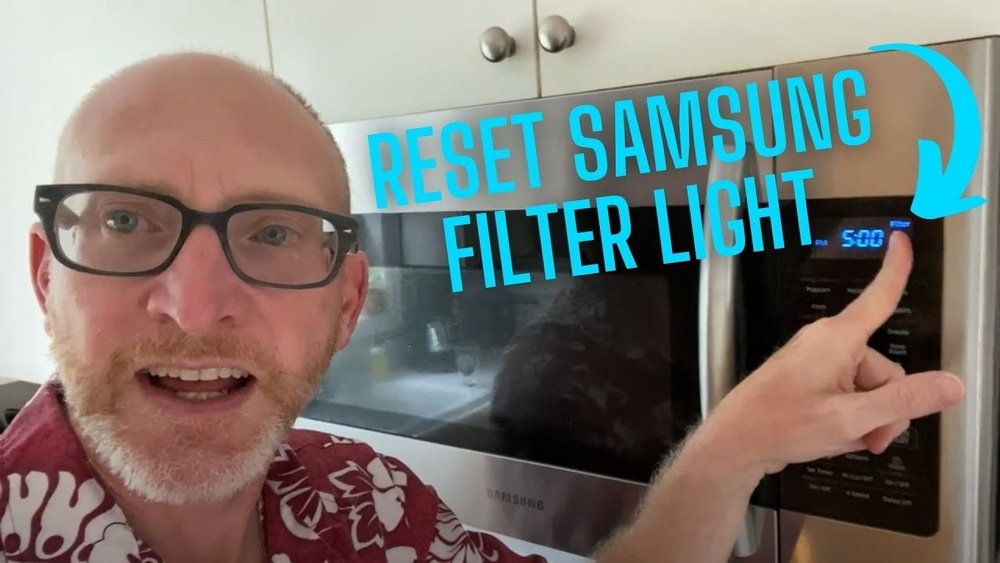
Many people rely on Samsung microwaves for fast and efficient cooking. These modern appliances come with advanced features that make kitchen life easier. One useful feature is the filter reminder. This alert tells you when it’s time to clean or replace the microwave’s filter. But what happens after you clean the filter? The filter reminder stays on until you reset it. If you’re not sure how to reset the filter on your Samsung microwave, you’re not alone. Many owners find this step confusing, especially with the variety of models on the market.
This article will guide you through everything you need to know about resetting the filter on a Samsung microwave. You’ll learn why the filter needs resetting, step-by-step instructions for different models, and practical troubleshooting tips. Whether you’re a new owner or have used your microwave for years, this guide will help you keep your appliance running smoothly.
Along the way, you’ll also discover common mistakes, useful maintenance advice, and answers to questions that confuse most beginners.
Why Samsung Microwaves Have A Filter Reminder
Samsung microwaves often have a grease filter and sometimes a charcoal filter, especially in over-the-range models. These filters catch grease, smoke, and odors during cooking. Over time, filters become dirty and less effective. When this happens, air circulation drops and cooking odors can linger. That’s why Samsung microwaves include a filter reminder feature. The reminder is a small indicator light, usually labeled “Filter” or “Clean Filter,” that turns on after a set number of cooking hours.
Ignoring the filter reminder can lead to several issues:
- Poor air quality in your kitchen
- Grease buildup inside the microwave
- Reduced appliance lifespan
Resetting the filter indicator after cleaning or replacing the filter is essential for accurate reminders in the future.
Understanding The Filter Reset Process
Resetting the filter reminder is not automatic. After you clean or change the filter, you must manually reset the light. The exact steps depend on the microwave model. Most Samsung microwaves use a similar process, but the button names and locations might be slightly different.
Here’s what you need to know:
- The filter reset does not clean the filter itself.
- You must clean or replace the filter before resetting the light.
- Skipping the reset can cause the reminder to stay on, even with a clean filter.
Some microwaves have a dedicated “Filter Reset” button, while others use a combination of buttons on the control panel. If you don’t reset the filter light, your microwave will not know the filter is clean.

Credit: www.samsung.com
Step-by-step Guide: Resetting The Filter On Samsung Microwave
Let’s break down the process by model type. This section covers the most common Samsung microwave types: over-the-range, countertop, and built-in models.
Resetting Filter On Over-the-range Samsung Microwaves
Over-the-range microwaves are popular because they combine cooking and ventilation. These models almost always have a filter reminder.
1. Locate The Control Panel
Find the main panel on the microwave’s front. The “Filter” indicator light is usually near the digital display.
2. Wait For The Reminder
The “Filter” or “Clean Filter” light will turn on when it’s time to clean the filter, usually after 30-60 hours of use.
3. Clean Or Replace The Filter
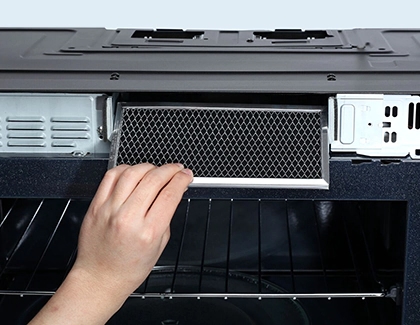
Remove the grease filter from the bottom of the microwave. Wash it with warm water and mild soap. If your model has a charcoal filter, replace it as needed.
- Reset the Filter Indicator
- Press and hold the “Filter” or “Reset Filter” button for 3 seconds.
- If your model doesn’t have a dedicated filter button, press and hold the “Vent/2 Speed” or “Options” button for 3 seconds.
- The indicator light should turn off.
Resetting Filter On Countertop Samsung Microwaves
Most countertop microwaves do not have a filter reminder. If yours does:
1. Follow The Over-the-range Steps
The reset process is usually the same. Look for a “Filter” or “Options” button.
2. Check The User Manual
If you’re unsure, consult your microwave’s manual or the Samsung website for model-specific steps.
Resetting Filter On Built-in Samsung Microwaves
Built-in models are less common but sometimes include a filter reminder.
1. Identify The Filter Type
Built-in models may have a grease filter, charcoal filter, or both.
2. Reset The Indicator
Press and hold the “Filter” button for 3 seconds, or use the sequence described in your manual.
Resetting The Filter On Smart Samsung Microwaves
Some new Samsung microwaves connect to Wi-Fi or use smart controls.
1. Use The Touchscreen Or App
On smart models, you might reset the filter through the microwave’s touchscreen menu or the Samsung SmartThings app.
2. Follow On-screen Prompts
The app or display will guide you through the reset process.
Example Step-by-step For Popular Models
Here are common reset steps for some popular Samsung microwave series:
- Samsung ME21M706BAS: Press and hold the “Filter” button for 3 seconds.
- Samsung ME18H704SFS: Press the “Options” button, then select “Filter Reset,” and press “Start.”
- Samsung MC17J8000CS: Use the Smart Control menu, select “Reset Filter,” and confirm.
How To Find Your Samsung Microwave Model Number
Knowing your model number is important for finding the right reset steps. You can usually find this information in one of these places:
- On a label inside the microwave door
- On the back or side of the microwave
- In the user manual
Write down the model number before searching for instructions or contacting support.
Common Filter Types In Samsung Microwaves
Samsung microwaves use two main filter types:
1. Grease Filter:
Usually made of metal mesh. Traps grease from cooking vapors. Washable and reusable.
2. Charcoal Filter:
Made of activated carbon. Absorbs odors and smoke. Not washable—replace every 6-12 months.
Comparison Of Grease And Charcoal Filters
Here’s a simple comparison of the two filter types:
| Filter Type | Main Purpose | Cleaning | Replacement Frequency |
|---|---|---|---|
| Grease Filter | Trap grease and particles | Washable | Every 1-3 months |
| Charcoal Filter | Remove odors and smoke | Not washable | Every 6-12 months |
Using the right filter type for your model is essential for proper operation.
What To Do If The Filter Light Won’t Reset
Sometimes, the filter indicator stays on even after you follow the reset steps. This can be frustrating. Here are the most effective troubleshooting tips:
1. Double-check Button Sequence
Make sure you’re holding the correct button for the required time. Some microwaves need exactly 3 seconds—too short or too long won’t work.
2. Unplug The Microwave
If the light won’t turn off, unplug the microwave from the power outlet for 1-2 minutes, then plug it back in. This can reset the control board.
3. Check For Stuck Buttons
Dirt or grease can make buttons stick. Wipe the control panel with a soft, damp cloth.
4. Update Firmware (smart Models)
If you have a smart Samsung microwave, check for firmware updates in the SmartThings app.
5. Contact Samsung Support
If all else fails, contact Samsung customer service. Have your model number ready.
Credit: www.samsung.com
How Often Should You Clean Or Replace The Microwave Filter?
Keeping the filters clean is critical for performance and safety. Here’s a schedule most experts recommend:
- Grease Filters: Every 1-3 months, or when the filter is visibly dirty
- Charcoal Filters: Every 6-12 months, or if cooking odors linger
Heavy cooking or frying may require more frequent cleaning. Setting a calendar reminder or marking your filter cleaning on a chart helps maintain a regular schedule.
Filter Maintenance Frequency Comparison
| Cooking Frequency | Grease Filter Cleaning | Charcoal Filter Replacement |
|---|---|---|
| Light (1-2 times/week) | Every 3 months | Every 12 months |
| Average (3-5 times/week) | Every 2 months | Every 9 months |
| Heavy (Daily or more) | Every month | Every 6 months |
Practical Tips For Filter Maintenance
Good filter maintenance is more than just cleaning when the light comes on. Here are some tips you might not know:
1. Let The Filter Dry Completely
After washing a grease filter, let it air dry before reinstalling. A wet filter can cause steam and odors.
2. Check For Damage
Inspect filters for dents, tears, or holes. A damaged filter cannot trap grease or odors properly.
3. Vacuum The Vent Area
Every few months, use a vacuum cleaner to remove dust from around the vent and filter area.
4. Record The Last Cleaning Date
Keep a note on your phone or a sticker inside the cabinet. This helps track when the next cleaning is due.
5. Use The Correct Replacement
Always buy filters specified for your Samsung microwave model. Off-brand filters may not fit or perform well.
How Filter Reset Affects Microwave Performance
Some users wonder if the filter reset is just for the light or if it affects microwave operation. The answer depends on the model:
- Most Samsung microwaves will continue to work with the filter light on. However, ignoring the light can lead to dirty filters and, eventually, reduced performance.
- Some advanced models may reduce fan speed or block vent functions until the filter is cleaned and reset.
Resetting the filter light ensures your microwave’s reminders stay accurate. This helps you maintain good air quality and keeps your appliance in top condition.
What If You Lost The User Manual?
Many people misplace their appliance manuals. If you can’t find your Samsung microwave manual:
- Visit the official Samsung website and search for your model number
- Download a PDF manual for free
- Call Samsung support and request instructions
Having the manual handy makes filter maintenance and resets easier, but all the main steps are covered in this article.
Safety Precautions When Resetting The Filter
Safety should always come first when working with electrical appliances. Here are some precautions to follow:
1. Unplug The Microwave
Before removing or cleaning filters, unplug the microwave to avoid electric shock.
2. Let The Appliance Cool
Wait until the microwave and filter are cool to the touch before cleaning.
3. Use Mild Detergent
Avoid harsh chemicals that can damage the filter mesh.
4. Handle Filters Gently
Bending or dropping a filter can make it unusable.
Following these steps keeps you and your microwave safe.
Real-world Example: Resetting Filter On A Samsung Over-the-range Microwave
Let’s walk through a practical example:
Sarah owns a Samsung ME21M706BAS over-the-range microwave. The “Clean Filter” light has turned on. Here’s what she does:
- Turns off the microwave and unplugs it.
- Removes the grease filter from the bottom vent.
- Washes the filter in warm, soapy water. Rinses and lets it dry.
- Reinstalls the dry filter.
- Plugs in the microwave and turns it on.
- Presses and holds the “Filter” button for 3 seconds.
- The “Clean Filter” light turns off—reset successful.
This example shows how simple maintenance can prevent future problems.
Mistakes To Avoid When Resetting The Filter
Many microwave owners make the same mistakes. Here’s what to watch out for:
1. Resetting The Light Before Cleaning The Filter
This defeats the purpose of the reminder.
2. Forgetting To Dry The Filter
Moisture inside the microwave can cause smells or electrical problems.
3. Using The Wrong Filter
Not all filters fit every model. Double-check before buying replacements.
4. Ignoring Persistent Indicator Lights
If the light stays on after a reset, don’t ignore it—troubleshoot or call for help.
The Role Of Filter Reminders In Appliance Longevity
Regular filter maintenance and resetting the reminder help extend your microwave’s life. Clean filters improve airflow, reduce grease buildup, and lessen the chance of electrical failure. Microwaves with clean filters also run more quietly and efficiently.
Skipping filter maintenance can cause:
- Poor venting
- Overheating
- Higher energy use
- Early breakdowns
A few minutes spent on filter care can add years to your microwave’s useful life.

Credit: www.youtube.com
How Samsung Microwaves Compare To Other Brands
Samsung microwaves are known for their user-friendly features. But how does the filter reset process compare to other brands? Here’s a quick look:
| Brand | Filter Reminder | Reset Process | Filter Types |
|---|---|---|---|
| Samsung | Yes | Button hold or menu | Grease, Charcoal |
| LG | Yes | Button hold | Grease, Charcoal |
| GE | Yes (most models) | Button hold/menu | Grease, Charcoal |
| Panasonic | No (most models) | N/A | Grease |
Samsung’s filter reset is as easy as, or easier than, most competitors.
How To Know If The Filter Needs Extra Attention
Sometimes the filter reminder isn’t enough. Watch for these signs that your microwave needs extra care:
- Lingering odors after cooking
- Steam escaping from odd places
- Visible grease buildup inside or around the vent
If you notice these signs, clean or replace the filter, even if the reminder hasn’t turned on.
When To Call A Professional
Most filter resets are simple. But if you experience any of these, seek professional help:
- The filter light won’t reset after all troubleshooting steps
- The microwave stops working after filter maintenance
- The vent fan doesn’t operate or is much louder than normal
Samsung-authorized repair technicians can diagnose and fix more serious problems.
Environmental Impact Of Microwave Filters
Replacing filters on time is good for your health and your appliance, but what about the environment?
- Grease filters can be washed and reused, reducing waste.
- Charcoal filters must be replaced, but many brands use recyclable materials.
Check your local recycling rules to dispose of old filters responsibly. This reduces landfill waste and helps the environment.
Where To Buy Replacement Filters
Always use the correct filter for your model. You can buy genuine Samsung filters at:
- Samsung’s official website
- Major appliance stores
- Online retailers like Amazon
Avoid very cheap or generic filters. They may not fit or work as well as OEM parts.
For more information on appliance maintenance and filter care, see the official Samsung support page.
Frequently Asked Questions
How Do I Know If My Samsung Microwave Needs A Filter Reset?
If the Filter or Clean Filter light turns on, it’s time to clean or change the filter and reset the indicator. Some models also beep or display a message on the screen.
What Happens If I Don’t Reset The Filter Light?
The microwave will keep showing the filter reminder. For most models, this does not stop cooking, but it can lead to forgetting future maintenance and reduce vent performance over time.
Can I Use My Microwave With The Filter Light On?
Yes, but it’s not a good idea. The filter may be dirty, which can cause poor air quality, bad smells, and even damage to the microwave over time.
Where Can I Find The Filter Reset Button?
It’s usually on the control panel as “Filter,” “Filter Reset,” or “Options. ” Some models use the vent or menu button. Check your user manual or the steps in this article.
Are Samsung Microwave Filters Universal?
No. Filters come in different sizes and shapes. Always use the filter specified for your microwave model to ensure proper fit and function.
Keeping your Samsung microwave in good shape is simple with regular filter maintenance and correct use of the reset feature. With these tips, you’ll enjoy clean air, efficient cooking, and a longer-lasting appliance.