
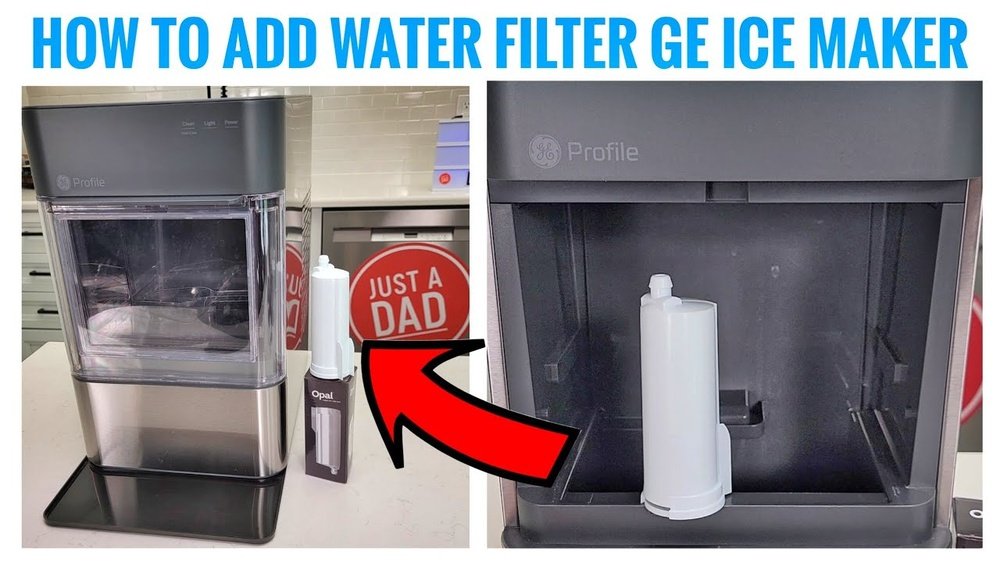
If you own an Opal Ice Maker, you know how wonderful it is to have soft, chewable nugget ice at home. But to keep your ice fresh and your machine running smoothly, you must take care of the filter. Many users forget about the filter or don’t realize how much it affects ice quality and machine health. Changing the filter is not just a maintenance task—it’s essential if you want clean, good-tasting ice and a long-lasting machine.
This guide will walk you through everything you need to know about changing the filter on your Opal Ice Maker. Whether you’re a first-time owner or have been enjoying nugget ice for years, you’ll find practical steps, troubleshooting tips, and insights that most beginners miss.
We’ll also address common mistakes, compare filter types, and answer top questions so you can confidently handle this task and avoid problems later.
Why The Filter Matters In Your Opal Ice Maker
The filter is a small part, but it makes a big impact. Its main job is to remove impurities from tap water, like chlorine, odors, and small particles. These can give ice a strange taste or smell. Worse, they can build up in the machine, causing clogs or even damage.
Many people don’t realize that using a dirty or old filter can:
- Make ice taste bad or cloudy
- Slow down ice production
- Cause “slippery” ice that melts too fast
- Lead to scale and mineral buildup inside the machine
Changing the filter regularly means your ice stays clean, your drinks taste better, and your Opal runs with fewer problems. If you’ve ever noticed your ice tasting “off” or your machine getting louder, the filter may be the reason.
How Often Should You Change The Opal Ice Maker Filter?
For most homes, the filter should be replaced every 3 to 6 months, depending on usage and local water quality. If you make ice daily or have hard water, change it every 3 months. If you use it less, 6 months may be enough. If you see a drop in ice quality or production, don’t wait—change it sooner.
Some Opal models have a light or app notification to remind you. But the best approach is to mark your calendar and check the filter at least once a season.
Types Of Opal Ice Maker Filters
Opal offers a few types of filters, and it’s important to pick the right one for your model. Most Opal machines use a cylindrical water filter that fits inside the reservoir. There are also third-party options, but not all fit or work as well.
Here are the main filter options:
| Filter Type | Compatible Models | Lifespan | Notes |
|---|---|---|---|
| Opal Genuine Water Filter | Opal 1.0, 2.0, Side Tank | 3-6 months | Best performance, warranty-safe |
| Third-Party Compatible Filter | Check fit for your Opal model | 2-4 months | Cheaper, variable quality |
| Reusable Filter Cartridge | Limited models | Clean every month | Eco-friendly, may void warranty |
Insight: Many owners don’t realize that using non-genuine filters can sometimes void the warranty or cause leaks. Always check your user manual before buying a filter.
Tools And Materials You’ll Need
Before you start, make sure you have:
- Replacement filter (Opal brand or compatible)
- Clean towel or cloth (for spills)
- Mild soap and water (for cleaning)
- Pitcher of clean water (for rinsing and testing)
- User manual (optional, but helpful)
You don’t need any special tools—just your hands and a little patience.
Pro Tip: It’s smart to keep a spare filter on hand, especially if you use your ice maker often. That way, you’re never stuck with old or dirty ice.
Step-by-step Guide: How To Change The Filter On Opal Ice Maker
Changing the filter is simple, but following the right steps helps avoid leaks or issues. Here’s how to do it safely and quickly.
1. Turn Off And Unplug The Ice Maker
Safety comes first. Always turn off the power and unplug the machine before opening the reservoir. This prevents electrical shocks and keeps the ice maker from running while you work.
2. Remove The Water Reservoir
Open the lid or slide out the water reservoir, depending on your Opal model. Some Opal machines have a removable side tank, while others have a built-in reservoir. If you’re unsure, check your user manual.
3. Take Out The Old Filter
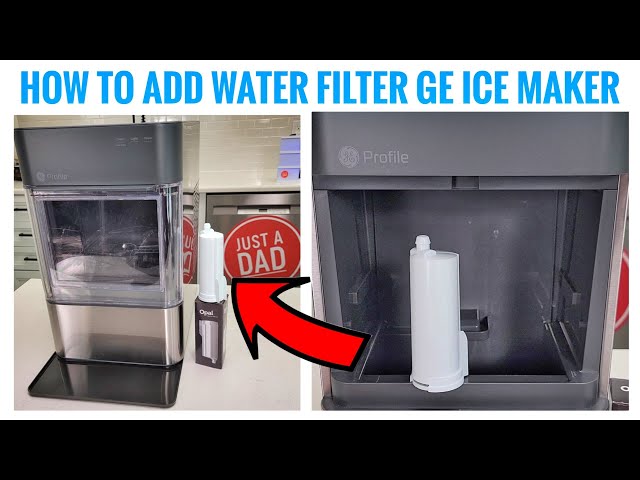
The filter is usually found at the bottom of the reservoir or attached to the water intake. Grasp the filter firmly and twist it counterclockwise. It should unlock and pull out easily. If it feels stuck, wiggle gently—never force it.
Beginner Insight: Many users forget to release any pressure in the tank. If water splashes, don’t worry—just use your towel to clean up.
4. Clean The Reservoir Area
Before installing the new filter, wipe the area with a clean towel. Rinse out the reservoir with mild soap and water, especially if you notice slime, scale, or odors. Let it air dry or dry with a towel.
Expert tip: Even tiny bits of debris can affect the seal on the new filter, so a quick clean makes a big difference.
5. Prepare The New Filter
Unpack the new filter and check for any damage. Some filters need to be rinsed with cold water before use. Run water through the filter for about 30 seconds if recommended. This removes loose carbon dust and ensures the best taste.
6. Install The New Filter
Align the filter with the intake port in the reservoir. Push it in and twist clockwise until it locks in place. It should feel snug but not overly tight. If it doesn’t fit, double-check that you have the correct filter for your Opal model.
7. Reattach The Reservoir
Slide the water reservoir back into place or close the lid securely. Make sure everything lines up and there are no gaps.
8. Fill With Fresh Water
Pour clean, cold water into the reservoir up to the fill line. Avoid distilled water—it lacks minerals and can confuse the sensors in some Opal models.
9. Plug In And Run A Rinse Cycle
Plug the ice maker back in and turn it on. Run a rinse cycle (if your model has one) or let it make one batch of ice, then discard that ice. This flushes out any leftover carbon dust from the new filter.
Hidden detail: Many users skip this step, but running a rinse cycle prevents cloudy or strange-tasting ice for the first batch.
10. Check For Leaks And Test
After the rinse, check around the filter and reservoir for drips. If you see water, remove and reseat the filter. If everything’s dry, you’re done—enjoy your fresh, clean ice!
Troubleshooting: Problems After Changing The Filter
Sometimes, even after following all the steps, you might run into issues. Here’s how to handle the most common ones:
Filter Won’t Fit
- Double-check the filter type and model compatibility.
- Some third-party filters look similar but aren’t the right size.
- If you force the filter, it can damage the reservoir threads.
Leaks Or Dripping
- Remove the filter and inspect the O-ring (small rubber seal). If it’s missing or twisted, the filter won’t seal.
- Clean any debris from the connection point.
- Tighten the filter, but don’t overtighten.
No Ice Production
- Make sure the reservoir is filled with water.
- Check that the filter is seated all the way.
- Reset the ice maker by unplugging for 5 minutes, then plugging back in.
Bad Tasting Or Cloudy Ice
- Run two to three rinse cycles.
- Use fresh, cold tap water (not distilled or softened water).
- If the taste doesn’t improve, try a different brand of filter.
Advanced tip: If you have hard water, consider using a water softener pitcher before filling your Opal. This can reduce scale and improve ice clarity.
Comparing Opal Filters With Other Brands
Not all filters are created equal. Some third-party brands claim to fit Opal ice makers but may have lower-quality filtration or poor seals. Here’s a quick comparison:
| Feature | Opal Genuine Filter | Third-Party Filter |
|---|---|---|
| Fit & Compatibility | Guaranteed | Varies |
| Water Taste | Consistently clean | May vary |
| Warranty | Protected | May void warranty |
| Price | Higher | Lower |
Non-obvious insight: Even if a third-party filter costs less, a poor fit or leak can cause water damage that costs much more to repair.
Tips For Extending The Life Of Your Opal Ice Maker
Proper filter changes are important, but a few extra steps can protect your investment:
- Clean the reservoir regularly. Don’t wait for the filter change—wipe out the tank every few weeks.
- Use high-quality tap water. If your tap water tastes bad, your ice will too, even with a filter.
- Descale the machine every 2-3 months, especially if you live in a hard water area. Follow the manufacturer’s instructions.
- Don’t use distilled or softened water. These can confuse sensors and may produce poor-quality ice.
- Store spare filters properly. Keep them sealed in a cool, dry place to prevent contamination.
How To Tell If Your Opal Filter Needs Changing
Most people wait for bad-tasting ice or slow ice production. But there are earlier signs:
- Ice tastes slightly “flat” or musty
- Ice cubes are smaller or softer than before
- Machine makes more noise during ice making
- Visible particles or cloudiness in the ice
If you notice these, change the filter even if it’s before the recommended date. Preventing problems is easier than fixing them later.
What To Avoid When Changing The Filter
Many owners make small mistakes that cause big headaches. Here’s what to avoid:
- Skipping the rinse cycle. This leaves carbon dust in your ice.
- Forcing the filter. If it doesn’t fit, stop and check the model—forcing can break the intake.
- Using hot water to rinse. This can damage the filter media. Always use cold water.
- Reusing old filters. Some try to extend filter life by rinsing and reusing—this doesn’t work and risks contamination.
- Ignoring leaks. Even a small drip can become a big problem if left unchecked.

Credit: www.amazon.com
Understanding The Filter Change Indicator
Some newer Opal models have a filter change indicator (a small light or app alert) that lets you know when it’s time. Don’t ignore this—change the filter soon after you see the alert.
- If the light stays on after a filter change, reset the indicator by holding down the “Clean” or “Reset” button for 5 seconds (check your manual for your model).
- If your model doesn’t have an indicator, use a sticky note or phone reminder.
The Impact Of Water Quality On Filter Life
Where you live makes a big difference in how often you need to change your filter. Hard water (water with lots of minerals) can clog filters faster. If your city regularly issues water quality warnings, you may need to change the filter more often.
Example: In cities with “very hard” water, some users change their filter every 2 months instead of 3-6 months. If you’re not sure about your water, you can check your local water report at the EPA’s Consumer Confidence Reports page.
When To Call For Professional Help
In most cases, changing the filter is a do-it-yourself job. But if you notice:
- Water leaks from the bottom of the machine (not just the reservoir)
- Error messages that don’t clear after a reset
- Strange noises or smells that persist after changing the filter
It’s time to contact Opal customer service or a qualified appliance repair technician. Sometimes the problem is deeper, like a broken pump or clogged line, and needs expert attention.
How To Dispose Of Old Opal Filters
Old water filters can’t be reused, but many are recyclable. Check with your local recycling center—some accept used water filters, while others do not. If not, throw the old filter in the trash.
Eco-tip: Opal’s genuine filters are made to minimize plastic waste compared to some other brands.
Credit: www.youtube.com
Table: Filter Change Frequency By Usage Level
To help you plan, here’s a handy table for how often to change your filter based on how much you use your Opal Ice Maker.
| Usage Level | Recommended Change Interval | Notes |
|---|---|---|
| Daily (multiple batches) | Every 3 months | High minerals = change more often |
| Weekly (1-2 batches) | Every 6 months | May last longer with soft water |
| Seasonal (occasional use) | Change before each season | Don’t leave old water in tank |
Smart Storage: Keeping Spare Filters Ready
A small but important tip: store spare filters in their sealed packaging in a cool, dry place. Humidity or sunlight can damage the filter media before you even use it. Don’t keep them under the sink where leaks or chemicals could contaminate them.
What To Do If You Lose The Manual
If you can’t find your Opal Ice Maker manual, don’t worry. You can download a digital copy from the manufacturer’s website. Having the manual helps you check filter compatibility, troubleshooting codes, and cleaning instructions specific to your model.
Real-life Example: A Filter Change Gone Wrong
Sarah, an Opal owner from Texas, noticed her ice tasted strange, and her machine was making odd noises. She changed the filter but skipped the rinse cycle. The first batch of ice was gray and tasted like charcoal. After running three more rinse cycles, the ice returned to normal.
Lesson: Don’t skip the rinse, and always use fresh, clean water after changing the filter.
Frequently Asked Questions
How Do I Know If My Opal Ice Maker Filter Needs To Be Changed?
Most people notice changes in taste, smell, or ice clarity. If the ice tastes “off,” is cloudy, or smaller than usual, it’s time to change the filter. Some Opal models also have a filter change light or app alert.
What Happens If I Don’t Change The Filter?
If you delay changing the filter, impurities build up. This can cause bad-tasting ice, machine clogs, slow production, or even damage to internal parts. Long-term neglect may void your warranty.
Can I Use My Opal Ice Maker Without A Filter?
Yes, but it’s not recommended. Running without a filter leaves your ice exposed to tap water contaminants. Your ice may taste worse and the machine could develop scale or buildup problems faster.
How Do I Reset The Filter Indicator On My Opal Ice Maker?
After changing the filter, hold the “Reset” or “Clean” button (depending on your model) for 5 seconds. This turns off the filter alert light. Check your user manual for the exact button and steps.
Are Third-party Filters Safe To Use With Opal Ice Makers?
Some are, but many are not. Only use brands that clearly state compatibility with your Opal model. Genuine Opal filters are safest and protect your warranty, but if you choose third-party, check for a good fit, proper certification, and strong reviews.
Changing the filter on your Opal Ice Maker is a small job with a big reward: cleaner, tastier ice and a longer-lasting machine. With the steps and insights here, you’ll avoid common mistakes and enjoy great ice every time. If you ever have doubts, check your manual or visit the official Opal support site. Regular filter changes are the secret to the best nugget ice at home.

Credit: www.amazon.com