
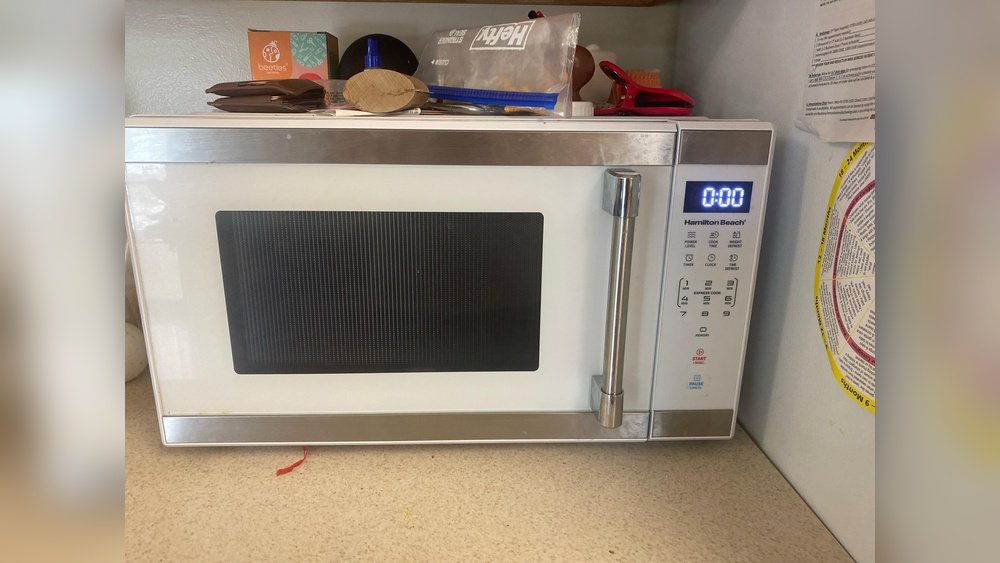
If you own a Hamilton Beach microwave, you know how helpful it is for quick meals and snacks. But sometimes, the loud beeping or chimes can be annoying, especially late at night or in shared spaces. Many people wonder how to make a Hamilton Beach microwave silent, but clear answers are hard to find.
This guide will show you step by step how to quiet your microwave, explain why these sounds happen, and give you tips to use your microwave in a quieter way. By the end, you’ll have practical solutions, a better understanding, and even answers to common questions.
Why Do Hamilton Beach Microwaves Beep?
Before you try to silence your microwave, it helps to know why it beeps. Microwave beeping is more than just an alarm—it’s a safety feature and a reminder. Most microwaves beep to:
- Signal when cooking is finished
- Remind you to remove your food (with repeated beeps)
- Warn about errors or problems
- Confirm button presses or settings
Hamilton Beach, like other brands, builds these sounds into their products to help users. But not everyone wants or needs these alerts all the time.
For example, when you’re heating milk late at night, the end-of-cycle beep can seem much louder than during the day. In a busy kitchen, you might ignore beeps, but in a quiet home, they can be disruptive. Understanding the purpose behind each type of beep helps you decide which ones you want to keep and which you’d prefer to mute.
Are All Beeps The Same?
Not every beep serves the same purpose. Some are single, short sounds, while others are loud or repeating. Knowing the difference helps you decide which sounds are most annoying and how to reduce them.
- End-of-cycle beeps: Alert you when the timer runs out
- Reminder beeps: Repeat every minute until you open the door
- Button beeps: Confirm you pressed a key
- Error beeps: Warn about problems (like leaving the door open)
For instance, if your microwave keeps beeping every minute after cooking, it’s a reminder beep. If you hear a beep every time you push a button, that’s a button confirmation beep. Recognizing the pattern helps you troubleshoot or explain the issue if you contact support.
Some users may not mind button beeps but find reminder beeps especially frustrating. Others may prefer all sounds off, especially if they use the microwave during quiet hours. Knowing which beep bothers you most helps you choose the right solution.
Can You Make A Hamilton Beach Microwave Silent?
The simple answer: sometimes yes, sometimes no. It depends on the model you have. Some Hamilton Beach microwaves have a “mute” or “sound off” setting, while others do not. Even when there’s no official mute button, there are still ways to reduce noise. We’ll cover all options, from built-in features to creative workarounds.
It’s worth noting that Hamilton Beach has released more models with mute or sound-off features in recent years, but many older or basic models still lack this option. If your microwave is more than a few years old or a budget model, you might not find a mute button.
However, don’t give up—there are often hidden tricks or alternative solutions.
Credit: www.reddit.com
Step-by-step: How To Mute A Hamilton Beach Microwave
1. Check The Manual For A Mute Option
The first place to look is your user manual. Some Hamilton Beach models have a sound off or mute feature hidden in the settings. If you don’t have the paper manual, you can usually find a digital copy on the Hamilton Beach website.
- Look for sections called “Sound,” “Beep,” or “Settings.”
- The mute function, if available, is often activated by pressing and holding a key (such as “0” or “Stop/Cancel”) for about 3 seconds.
Some manuals may not clearly mention the mute option, so check the troubleshooting or FAQ section. If you’re still unsure, try searching your model number plus “mute” online. Other users may have posted solutions for your specific microwave.
If you find the mute option, follow the steps to silence the microwave. If not, keep reading for other solutions.
2. Try Common Mute Button Combinations
Some models use secret button combinations that are not in the manual. Try these:
- Press and hold the “0” button for 3-5 seconds. If it works, you’ll usually see “Snd Off” or a similar message.
- Try pressing and holding the “Stop/Cancel” or “Start” button.
- On some newer models, holding the “2” or “8” key can also trigger mute.
If you hear a beep or see a message, the sound is now off. Test by pressing a few keys.
Sometimes, these combinations are not advertised because they’re meant for service technicians, but many owners have discovered them by experimenting. If your first tries don’t work, try different buttons but don’t press random combinations too quickly—this can sometimes reset settings or trigger other functions.
3. Explore The Control Panel
Older Hamilton Beach microwaves may have a Sound or Beep button. If you see one, press it to toggle sound on or off.
Some models require entering a programming mode. For example:
- Open the microwave door.
- Press and hold the “Kitchen Timer” and “Power Level” buttons together for 5 seconds.
This is rare, but worth a try if your model looks more advanced.
If you see a speaker icon, a musical note, or the word “Sound” on the control panel, those are good places to start. If your microwave has a digital display, look for any options or settings menus you can scroll through.
4. Use The “night Mode” Or “silent Mode” If Available
A few Hamilton Beach microwaves offer a “night” or “silent” mode. This setting reduces both sound and display brightness, ideal for late-night use. Check your manual or look for a moon or speaker icon on the control panel.
Night mode is especially useful in kitchens that are close to bedrooms or in open-plan apartments. By dimming the display and lowering the sound, it prevents the microwave from lighting up or waking others. Some models also offer auto-scheduling, so the microwave enters silent mode during set hours.
5. Physical Sound Dampening (if No Mute Function Exists)
If your microwave does not have a mute feature, you still have options:
- Muffle the speaker: The beeper is a small electronic part inside the case. If you are comfortable with DIY projects and safety rules, you can open the back panel (unplug first!) And cover the beeper with a small piece of electrical tape or foam. This will make the beep much quieter, though not totally silent.
- Block the sound externally: Place a thick towel or mat under the microwave. This reduces vibration and echo, making beeps softer.
- Move the microwave to a location further from bedrooms or shared spaces.
Warning: Opening the microwave case can be dangerous. There is a risk of electric shock, even after unplugging. Only attempt this if you understand the risks and know what you are doing.
You can also try placing a sound-absorbing pad or curtain on the wall behind the microwave. This can cut down on how far the sound travels. These methods don’t mute the beeps, but they make them less noticeable, especially in rooms with hard surfaces that reflect sound.
6. Use “quick Start” Or “express” Settings
Some Hamilton Beach microwaves beep less when you use simple, fast-cook options like “Express Cook. ” If you use these, you may avoid repeated reminder beeps.
For example, pressing “Express Cook 1” will cook for one minute and usually only beep at the end, not during. Using these features can make your microwave experience feel quieter, especially if you’re heating something for a short period and can stop it before reminder beeps start.
7. Power Cycle And Reset
Sometimes, resetting the microwave can clear beeping glitches:
- Unplug the microwave for 1-2 minutes.
- Plug it back in and test if beeping has changed.
This won’t remove built-in sounds, but it can stop stuck reminder beeps.
If your microwave starts to beep randomly or gets stuck in a beeping loop, a reset often solves the problem. If it returns, there may be a fault with the control panel or sensors that may require a repair.
8. Contact Hamilton Beach Support
If your model is not listed in the manual and the above steps do not work, call or email Hamilton Beach Customer Support. Give them your model number and ask if a mute feature exists. Sometimes, newer firmware or hidden settings are available.
Support can also confirm if your model simply does not have a mute function, saving you time. They might even suggest solutions for models with known sound issues or glitches, or offer advice about purchasing a quieter model.
Comparison: Hamilton Beach Vs Other Brands For Silent Features
It’s helpful to know how Hamilton Beach compares to other popular microwave brands when it comes to silent operation.
| Brand | Mute Function Available? | Ease of Use | Additional Quiet Features |
|---|---|---|---|
| Hamilton Beach | Sometimes | Varies by model | Night mode on some models |
| Panasonic | Yes (most models) | Simple button press | Silent mode, softer beeps |
| Samsung | Yes (most models) | Easy—dedicated button | Display dimming |
| GE | Yes (many models) | Menu setting | Volume adjustment |
| Whirlpool | No (most models) | Not available | N/A |
As you can see, Hamilton Beach is in the middle—some models are easy to silence, others are not.
A key point is that brands like Panasonic and Samsung have made mute functions standard, while Hamilton Beach is still updating its lineup. If silence is a top priority for you, comparing these features before buying can save headaches later.
Why Do Some Microwaves Lack A Mute Feature?
Many users are surprised that mute options are missing on some microwaves. Here’s why:
- Safety regulations: Some rules require audible signals for end-of-cycle or errors.
- Cost-saving: Simpler control panels are cheaper to produce.
- Design tradition: Brands may not update older models with newer features.
- Market demand: Not all buyers ask for silent operation, so companies focus on other features.
Sometimes, companies test new features on higher-end models before adding them to all products. If a mute feature is popular, you may see it in more affordable models in the future. Also, some microwaves are designed for commercial use, where sound signals are more critical for safety and workflow.
Silent Use Tips For Hamilton Beach Microwaves
Even if your microwave can’t be fully muted, you can use it more quietly. Here are some expert tips:
- Open the door quickly after cooking. This stops reminder beeps.
- Use shorter cook times and add more time as needed, so you’re present when it finishes.
- Unplug the microwave after use if you don’t need the clock or timer.
- Cover your food to prevent splattering, which can trigger additional warning beeps.
- Plan microwave use for times when noise is less likely to bother others.
You can also try placing your microwave away from walls that connect to bedrooms or quiet spaces. Soft furnishings and curtains in the room can absorb sound, making beeps less sharp. If you only need the microwave occasionally, consider unplugging it when not in use—this not only cuts down on unexpected beeps but can also reduce energy use.
Two Non-obvious Insights
- Some newer Hamilton Beach models allow you to control beep volume rather than muting entirely. Look for “Volume” in the settings, not just “Mute.” This setting is not always obvious and may be hidden in a submenu, so check the manual carefully.
- Multiple beeps may signal a problem (like the door not being fully closed). If your microwave seems louder than usual, check the door and seals. Sometimes, the microwave will keep beeping until you fix the issue, and muting won’t help.
A third insight: If your microwave stops beeping suddenly without you changing settings, the speaker may be failing. In that case, you may not hear important error warnings, so check other functions often.
Safety Precautions When Modifying Your Microwave
Trying to quiet your microwave by opening the case or covering the beeper can be risky. Microwaves store high voltage even after unplugging, which can cause shock. If you decide to try, follow these safety rules:
- Unplug the microwave and wait at least 10 minutes before opening.
- Do not touch any circuit boards or wiring unless you are trained.
- Use insulated tools and wear gloves.
- Don’t remove safety covers—just add a small piece of tape over the speaker vent if possible.
If you are unsure, it’s best to avoid any internal changes.
Remember, making changes inside the microwave may void the warranty or damage other components. If you want to try, always read repair forums or guides for your specific model. Many people find that external solutions, like moving the microwave or using sound-absorbing materials, are safer and nearly as effective.
User Experiences: Real Stories From Hamilton Beach Owners
Many people have tried to mute their microwaves—some with success, others without. Here are a few real-life stories:
- Anna, college student: “My Hamilton Beach microwave was so loud in the dorm. I tried every button, but nothing worked. I finally called customer service and they told me my model can’t be muted. Now I just open the door as soon as it beeps to stop the sound.”
- Tim, father of two: “We have a newer Hamilton Beach microwave. Holding the ‘0’ button for 3 seconds turned the sound off. It was a lifesaver for late-night snacks!”
- Ravi, apartment renter: “I put a thick towel under the microwave and it made a big difference. The beeps are still there, but much softer.”
- Jenna, night nurse: “I use my microwave at odd hours. When I couldn’t mute it, I set it on a silicone mat, which cut down the noise and kept my roommates happy.”
- Marcus, tech hobbyist: “I carefully opened my old microwave and placed foam over the beeper. It’s not totally silent, but now it’s a dull thud instead of a sharp beep.”
These examples show that results vary, but there are always ways to reduce noise.
Troubleshooting: If Your Microwave Still Beeps
If you’ve tried everything and your microwave still beeps, here are some possible reasons:
- No mute feature is available on your model
- Glitches in the control panel (try resetting)
- Faulty door sensor causing repeated warning beeps
- Timer or clock beeps that cannot be turned off
Some microwaves will beep if the turntable isn’t seated correctly or if a key is stuck. If the beeping is new or different from before, try cleaning the control panel and checking for stuck buttons. If you notice other problems like the microwave not heating, contact support.
When all else fails, consider contacting Hamilton Beach support or using an external sound barrier.
Alternatives: Quieter Microwave Options
If silence is very important, you may want to consider switching to a model that guarantees a mute function. Here’s a quick comparison of popular microwaves with silent features:
| Model | Brand | Mute/Silent Option | Approximate Price |
|---|---|---|---|
| Countertop Microwave Oven (Model 90045) | Hamilton Beach | Yes | $90 |
| NN-SN686S | Panasonic | Yes | $150 |
| ME19R7041FS | Samsung | Yes | $200 |
| JES1072SHSS | GE | Yes | $100 |
| WMH31017HZ | Whirlpool | No | $180 |
This table can help you compare if you decide it’s time for a quieter upgrade.
Before buying, always read recent reviews or ask sellers to confirm the mute feature. Some sellers list “silent” but mean “quieter than average,” not totally silent. Look for user experiences that mention how effective the mute option is in daily use.

Credit: www.youtube.com
When Silence Matters: Use Cases For Quiet Microwaves
Some situations require a silent microwave more than others. Here are a few examples:
- Shared apartments: Early risers or night owls can avoid waking roommates.
- Offices: Quiet microwaves prevent disturbing colleagues during meetings.
- Dorm rooms: Students can snack late without alerting neighbors.
- Nurseries: Parents can heat bottles at night without waking the baby.
- Open-plan homes: Sound travels easily, so less noise is better.
There are also less obvious cases: for example, people with sensory sensitivities may find microwave beeping stressful. In libraries or clinics with staff break rooms, a quieter microwave helps keep the peace. Even in small businesses, such as yoga studios or wellness centers, a silent microwave can keep the environment calm for guests.
In these situations, investing time in silencing your microwave is especially valuable.
Long-term Solutions And Future Trends
Microwave design is changing. As more people ask for silent features, manufacturers are responding. Expect to see:
- More models with mute buttons
- Smart microwaves with app-controlled sound settings
- Customizable beep volume in future firmware updates
Some brands are now adding features like “do not disturb” scheduling, where you can set quiet times for the microwave. Others are experimenting with visual alerts or softer, less jarring beeps. If you want these features, let brands like Hamilton Beach know—customer feedback shapes the next generation of appliances.
You can help by giving feedback to brands like Hamilton Beach, letting them know you want quieter appliances.
Pros And Cons Of Silencing Your Microwave
It’s important to weigh the benefits and downsides:
Pros:
- Peace and quiet at night or in shared spaces
- No more waking up family or roommates
- More control over your kitchen environment
- Better for people sensitive to noise
Cons:
- May miss important safety or error alerts
- Some modifications could void warranty
- Not all models allow full silence
- Risk of forgetting food if you don’t hear the beep
Tip: If you silence your microwave, check it regularly for problems, since you won’t hear error beeps.
A good practice is to visually check your microwave before and after use, especially if you have muted all sounds. If you rely on beeps as reminders, you might need to set a phone timer or use other cues.
Frequently Asked Questions
How Do I Know If My Hamilton Beach Microwave Has A Mute Option?
Check your microwave’s user manual or look for a mute or sound-off button on the control panel. If you can’t find it, try pressing and holding the “0” or “Stop/Cancel” buttons for a few seconds. If none of these work, your model likely does not have a built-in mute feature.
Some models may display a quick message like “Snd Off” or “Beep Off” if the function is available. Otherwise, contact Hamilton Beach support with your model number for the most accurate answer.
Will Muting My Microwave Affect Its Performance?
No, muting the beep or sound does not affect the cooking power or safety features of your microwave. It only changes the way it alerts you. You can use your microwave normally after muting.
However, if you mute all sounds, be careful not to leave food inside or miss error messages. Some people set a timer on their phone as a backup.
Is It Safe To Open My Microwave And Cover The Speaker?
Opening a microwave can be dangerous because of stored high voltage. Only try this if you are trained and understand the risks. It’s best to use external sound dampening methods or check for a built-in mute option first.
If you’re not sure, ask a professional repair technician. Never try to repair or modify the microwave if it’s still under warranty, as you may lose free service.
Can I Buy A Silent Microwave?
Yes, many brands now offer microwaves with mute or silent settings. When shopping, look for models that specifically mention “mute,” “sound off,” or “silent mode” in their features. Compare brands using the tables above or check reviews before buying.
Some online retailers let you search for “silent microwave” or “mute function,” making it easier to find the right model.

Credit: www.wikihow.com
Where Can I Get More Information About Microwave Safety And Features?
For up-to-date safety advice and features, visit the official Hamilton Beach Support page or check trusted sources like the U.S. Consumer Product Safety Commission.
A noisy microwave can be frustrating, but with the right steps, you can enjoy quieter meals and a more peaceful kitchen. Whether you find a hidden mute feature, use clever tricks, or upgrade to a newer model, you now have the knowledge to make your Hamilton Beach microwave as silent as you need.