
Every oven owner knows that the self-cleaning feature can make life much easier. No more hours of scrubbing and harsh chemicals—just push a button and let the oven take care of itself. But, before you start, there’s a step that confuses many: locking the oven door for self clean. This is not just a safety precaution; it’s a must for the cleaning cycle to work correctly. If the door isn’t locked, the oven won’t start, or worse, it could be dangerous. Many people, especially those new to modern ovens, find this step tricky. Why does it matter? How do you do it? What if your oven door won’t lock? You’ll find all the answers here—clear, practical, and based on real experience.
Let’s break down exactly how to lock your oven door for self-clean, no matter what model you have. We’ll cover manual and automatic locks, troubleshooting, what to expect during cleaning, and how to avoid common mistakes. By the end, you’ll feel confident using your oven’s self-clean safely and effectively.
Why The Oven Door Must Be Locked For Self Clean
The self-cleaning cycle heats your oven to temperatures as high as 900°F (480°C). This extreme heat burns off food residue, turning it to ash you can easily wipe away. But these high temperatures are not safe if the oven door can open. The lock keeps dangerous heat and fumes inside, protecting you and your kitchen.
Manufacturers design the locking system to:
- Prevent burns from accidental opening
- Stop children or pets from opening the oven
- Ensure the cleaning cycle completes without interruption
Many ovens simply will not start self-cleaning unless the door is fully locked. Some models use a mechanical latch, while newer ones have an automatic lock that engages when you start the cycle.
Understanding Your Oven’s Locking System
Not all ovens are the same. To lock your oven door for self-clean, you first need to know what type of lock your oven uses. There are two main types:
Manual Locking Mechanism
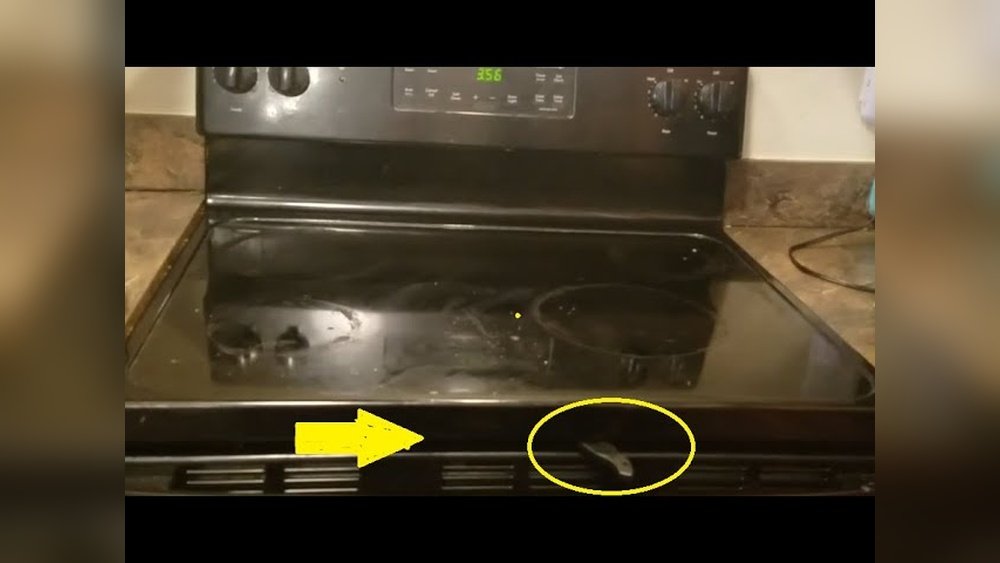
Older ovens and some basic models use a manual latch. This is usually a metal lever on the front, just above or below the oven door. You must move this lever to the “lock” position before starting self-clean.
Automatic Locking Mechanism
Most modern ovens have an automatic lock. When you select the self-clean cycle, the oven door locks by itself after a short delay. You’ll hear a click, and usually a light or display shows the door is locked.
How To Identify Your Lock Type
Check your oven’s control panel and door area:
- Look for a metal lever (manual lock)
- See if there’s a “Door Locked” light or message (automatic lock)
- Consult your oven’s manual if unsure
If you don’t have the manual, you can often find a PDF on the manufacturer’s website by searching for your oven’s model number.
Step-by-step: How To Lock Oven Door For Self Clean
Now, let’s get practical. Here’s how to lock the oven door for self-clean, depending on your oven type.
For Ovens With A Manual Lock
- Open the oven door and make sure the oven is empty.
- Push in the metal latch (usually found at the top or side of the oven) to the “lock” position. You may need to wiggle the latch gently.
- Close the oven door firmly.
- Check the lock: Try to open the door gently. It should not open.
- Select the self-clean cycle on your oven’s control panel.
- Start the cycle. The oven should begin heating.
If the door isn’t locked properly, the oven may beep or show an error message. Unlock and relock the latch, making sure it is fully engaged.
For Ovens With An Automatic Lock
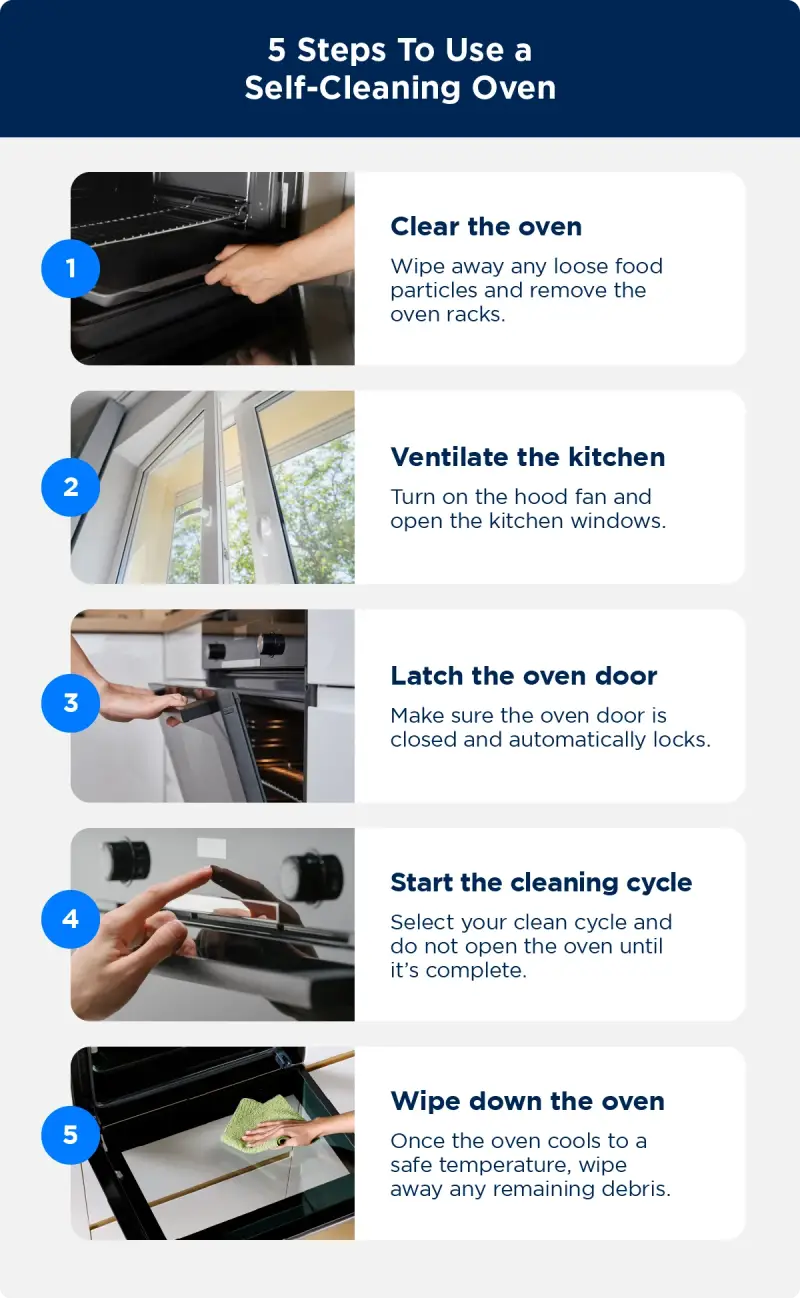
- Clear the oven of racks and food. Wipe out loose debris.
- Close the oven door completely.
- Press the “Self Clean” button on the control panel.
- Select the desired cleaning time (usually 2–4 hours).
- Press “Start”. After a short delay, you’ll hear the lock engage with a click.
- Check the display: A light or message should say “Door Locked”.
Do not try to force the door open during the cycle. The lock will release automatically when the oven cools down at the end.
What If The Lock Doesn’t Work?
If the door won’t lock, don’t force it. Forcing can damage the locking mechanism or the door seal. Try these steps:
- Make sure the oven is completely cool
- Double-check you’ve selected self-clean correctly
- Unplug the oven for 60 seconds, then plug it back in to reset the electronics
- Check for debris around the latch
If the problem continues, you may need a repair technician.
Preparing Your Oven For Self Clean
Before you lock the oven, a little preparation goes a long way. Many beginners skip this, but it makes cleaning easier and avoids problems.
- Remove all racks: Most oven racks should not be left in during self-clean. The heat can warp or discolor them. Check your manual—some special racks are self-clean safe.
- Take out any pans, foil, or oven liners: These can melt, catch fire, or damage the oven.
- Wipe out large debris: Use a damp cloth to remove chunks of food or puddles. This keeps smoke and odor down during cleaning.
- Check the gasket: The rubber seal around the door keeps heat in. Make sure it’s clean and not damaged.
- Ventilate your kitchen: Self-cleaning can produce smoke or odors. Open windows or turn on a fan.
How Long Does The Self-clean Cycle Take?
Self-cleaning cycles usually last between 2 to 4 hours. The exact time depends on how dirty the oven is and the model you have. The oven door stays locked during the entire cycle and cooling period after.
Here’s a comparison of typical cleaning times for different oven brands:
| Brand | Self-Clean Duration | Lock Type |
|---|---|---|
| GE | 3–4 hours | Automatic |
| Whirlpool | 2.5–4 hours | Automatic |
| Frigidaire | 2–3 hours | Manual/Automatic |
| Samsung | 2–3.5 hours | Automatic |
| Kenmore | 2–4 hours | Manual/Automatic |
After the cleaning ends, the door may stay locked for up to an hour while the oven cools down. This is normal—never try to force the door open.
What Happens During Self Clean
Once the oven door is locked and the cycle starts, the oven heats to a high temperature. This burns off grease, spills, and baked-on food. Here’s what to expect:
- The oven will become very hot—never touch the door or sides.
- You may notice a burning smell or smoke, especially if the oven was very dirty.
- The control panel will show a “Self Clean” or “Locked” light.
- The door remains locked until the oven is safe to open.
At the end, the oven cools down, and the lock releases automatically. You’ll find a small amount of white ash inside. Wipe this out with a damp cloth.
Safety Tips For Locking Oven Door And Using Self Clean
The self-clean feature is safe when used correctly, but mistakes can cause problems. Here are expert tips for using the lock and self-clean cycle safely:
- Never leave children or pets unattended near a self-cleaning oven
- Do not use commercial oven cleaners during self-cleaning—they can damage the oven and create toxic fumes
- Check for plastic items (like spatulas or oven thermometers) before starting—these can melt and cause damage
- If you notice smoke or strange odors, open windows and ventilate the area. If you see flames inside, turn off the oven but keep the door closed
Common Problems And How To Fix Them
Many oven owners run into issues with the door lock during self-clean. Here are common problems and solutions:
Oven Door Won’t Lock
- Manual latch won’t move: Make sure the oven is cool. If stuck, clean around the latch with a soft brush.
- Automatic lock doesn’t engage: Power cycle the oven. Check the control panel for error codes.
- Electrical problems: Try resetting the circuit breaker.
Oven Door Won’t Unlock After Cleaning
- Oven is too hot: Wait until the oven cools below 200°F (93°C).
- Lock mechanism stuck: Sometimes gently pushing on the door while pressing “Cancel” helps.
- Power outage during self-clean: Restore power and give the oven time to reset.
Error Codes Or Beeping
- Check your manual for code meanings.
- Most codes can be cleared by unplugging the oven for 1–2 minutes.
If these steps don’t work, contact a qualified technician.

Credit: www.bobvila.com
Manual Vs. Automatic Locks: Which Is Better?
You might wonder if one type of lock is better than the other. Here’s a comparison for clarity:
| Lock Type | Pros | Cons |
|---|---|---|
| Manual | Simple design, less likely to break, easy to see status | Can be forgotten, requires physical effort, not as child-safe |
| Automatic | Convenient, always engages when needed, better child safety | Relies on electronics, can fail if there’s a power problem, harder to fix |
For most users, automatic locks are easier and safer. However, if you like simple, repairable designs, manual locks have their charm.
Advanced Tips For Perfect Self Clean Results
Many people think self-cleaning ovens are “set and forget,” but a few advanced tips can make your results even better:
- Clean up big spills right away: Don’t wait for self-clean. Large spills can smoke and bake on harder.
- Use self-clean more often: Don’t let grime build up for months. More frequent cleaning means less smoke and better results.
- Check your oven’s vents: These let out steam and smoke. Make sure nothing is blocking them.
- Use a flashlight after cleaning: Check for missed spots, especially in corners.
- Keep the gasket clean: The door seal can get sticky. Wipe it gently with a damp cloth—never scrub or use harsh chemicals.

Credit: www.youtube.com
Troubleshooting: When To Call A Technician
Sometimes, locking or unlocking the oven door is more than a DIY fix. Call a technician if:
- The door remains locked for hours after cooling
- The lock mechanism feels loose or broken
- There are repeated error codes
- The oven won’t heat after self-clean
Technicians have special tools to release stuck locks and replace faulty parts. Don’t try to disassemble the lock yourself—it can void your warranty or cause injury.
Preventing Problems With Your Oven Door Lock
A few simple habits can help your oven door lock last longer:
- Don’t slam the oven door: This can misalign the lock.
- Keep the latch area clean: Food or grease can block the lock.
- Use self-clean only as often as needed: Excessive use can wear out the mechanism.
- Check the lock movement every few months, even if you don’t use self-clean often.
If your oven is older, parts can wear out. Regular maintenance can prevent a lockout when you need the oven most.
Self-cleaning Ovens: Myths And Facts
There are many myths about self-cleaning ovens and the locking system. Let’s clear some up:
- Myth: You can open the door during self-clean if you’re careful.
- Fact: Never try this. The heat and fumes are dangerous.
- Myth: Leaving racks in the oven is fine.
- Fact: Most racks will warp or discolor. Only leave them in if your manual says they’re self-clean safe.
- Myth: Self-clean uses harsh chemicals.
- Fact: The process uses only heat—no chemicals at all.
- Myth: The lock is just for show.
- Fact: The lock is a real safety device. The oven won’t start (or will shut off) if not locked.
How To Maintain Your Oven Lock For Years Of Use
Oven door locks are built for safety, but a little care keeps them working well. Here’s how:
- Check for smooth movement: Manual latches should slide easily. If sticky, clean with a damp cloth and a little dish soap.
- Listen for the “click”: Automatic locks should engage smoothly. If the sound changes, there may be a problem.
- Avoid using force: Never push or pull hard on the lock.
- Check for error codes: If your oven shows “Lock Error,” don’t ignore it—look up the code and fix the issue.
- Have the lock checked during service: When a technician visits for other issues, ask them to check the lock.
Regular maintenance means your self-clean feature is always ready when you need it.
When Not To Use Self Clean
Self-clean is convenient, but sometimes it’s better to skip it:
- If your oven has a broken gasket or damaged door
- If you have pets, birds, or sensitive people in the home (fumes can be irritating)
- If your oven is very old and the lock doesn’t work well
In these cases, use manual cleaning with gentle cleaners and a soft sponge.
Comparing Self-clean To Other Oven Cleaning Methods
How does self-clean stack up against other methods? Here’s a quick comparison:
| Cleaning Method | Effort | Effectiveness | Safety |
|---|---|---|---|
| Self Clean | Very low | High | High (if used correctly) |
| Manual Scrubbing | High | Varies | High (with mild cleaners) |
| Oven Cleaning Sprays | Medium | Good | Varies (some sprays are harsh) |
| Baking Soda/Vinegar | Medium | Medium | Very high |
Self-clean is the easiest way to remove tough, baked-on messes—just remember, the door must be properly locked.
Real-world Example: Locking The Oven Door On A Whirlpool Range
Let’s look at a common scenario with a Whirlpool electric range:
- Remove all items from the oven. Take out racks and loose debris.
- Close the oven door. Make sure it’s shut tight.
- Press “Self Clean”. The display shows “Clean” and a blinking “Lock” light.
- Wait for the lock. After 30–60 seconds, you’ll hear a click, and the “Lock” light stays on.
- Cleaning starts. The oven heats up and counts down the time.
- When done, the oven cools and the “Lock” light goes off. The door unlocks automatically.
If the door doesn’t lock or unlock, check the power and try unplugging the oven for 1 minute.
Extra Insights Beginners Often Miss
- The lock may not engage if the oven is too hot or too cold. Some ovens require a specific temperature range to activate the lock. Let the oven reach room temperature before starting self-clean.
- The door seal is as important as the lock. A damaged seal can leak heat and fumes, even with the lock engaged. Check the seal regularly for cracks or tears.
- The oven may beep or display “DOOR” if the lock isn’t fully engaged. Don’t ignore these warnings; always check and relock the door.
- Some ovens have a child lock feature separate from the self-clean lock. Learn the difference in your manual.
Credit: www.mrappliance.com
Frequently Asked Questions
Why Won’t My Oven Door Lock When I Start Self-clean?
Your oven door may not lock if the oven is still too hot from previous use, if the lock mechanism is dirty or jammed, or if there’s a problem with the electronics. Let the oven cool, check for debris, and try again.
If it still won’t lock, unplug the oven for a minute to reset it.
Is It Safe To Force The Oven Door Lock If It’s Stuck?
No, never force the oven door lock. Forcing can break the mechanism or the door itself. Instead, clean around the latch and try again gently. If the problem continues, call a technician.
How Long Does The Oven Stay Locked After Self-clean?
The oven stays locked until the internal temperature drops below about 200°F (93°C). This can take 30–90 minutes after the cleaning cycle finishes. The lock is a safety feature to prevent burns.
Can I Leave Racks In The Oven During Self-clean?
Most standard racks should be removed before self-cleaning, as the heat can warp or discolor them. Only leave racks in if your oven manual says they are self-clean safe. Check for special “self-clean” racks in the manual or product description.
Where Can I Find My Oven’s Manual Or Support Information?
Most manufacturers have manuals online. Search for your oven’s model number plus “manual” on their official website. For example, visit the Whirlpool Manuals & Literature page for Whirlpool ovens.
Locking the oven door for self-clean is a simple step, but it’s crucial for safety and results. With the steps, tips, and insights above, you’ll be ready to use this feature with confidence—no matter what type of oven you own.
Keep your oven in top shape, and enjoy a cleaner, safer kitchen every time you cook.